EasyManua.ls Logo

Nikon N80 - Troubleshooting

Nikon N80
116 pages
Print Icon
To Next Page IconTo Next Page
To Previous Page IconTo Previous Page
Loading...
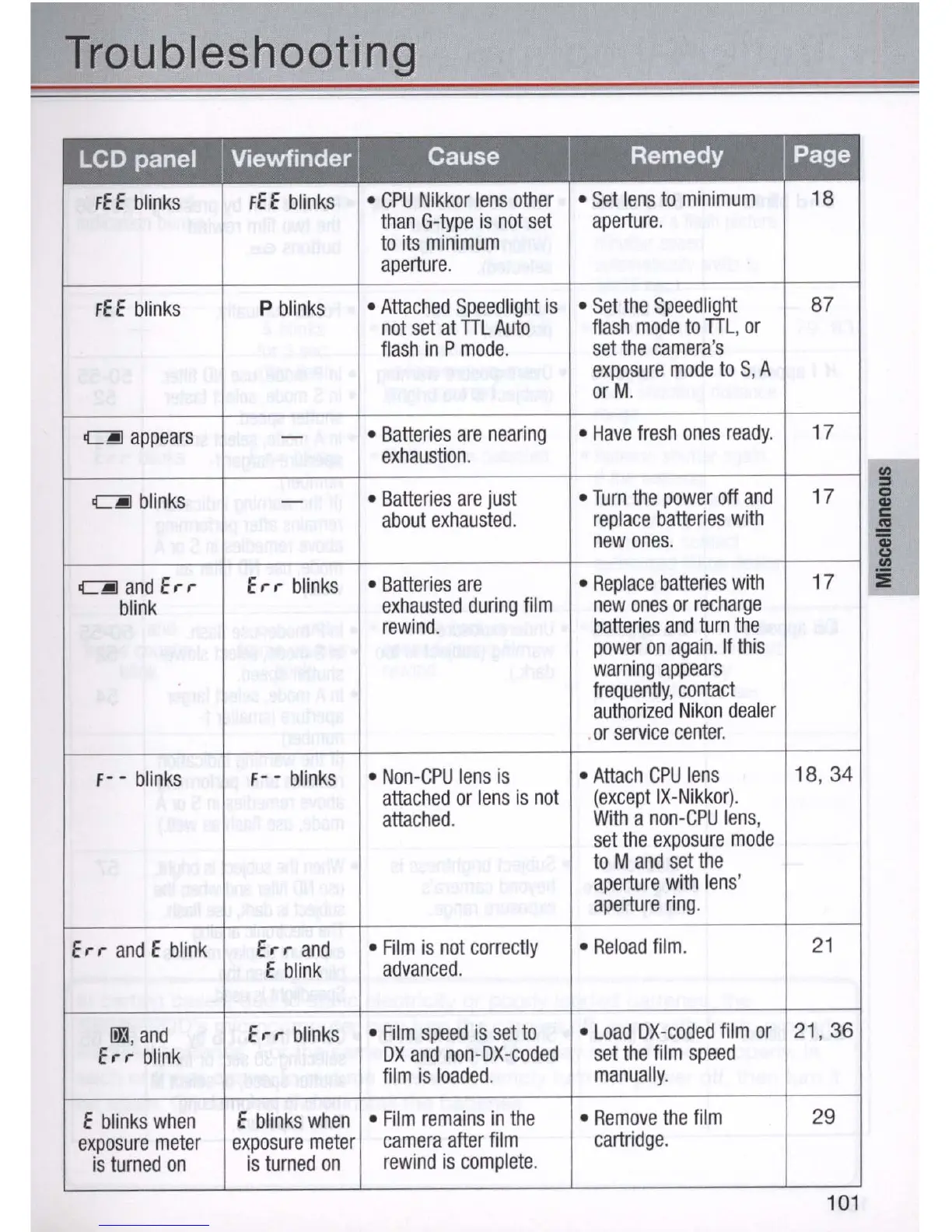
Troubleshooting
LCD panel
I Viewfinder I
Cause
I
Remedy
I Page
fEE
blinks
fEE
blinks
CPU
Nikkor
lens
other
Set
lens
to
minimum
18
than
G-type
is
not
set
aperture
.
to
its
minimum
aperture
.
fE
E
blinks
P
blinks
Attached
Speedlight
is
Set
the
Speedlight
87
not
set
at
TIL
Auto
flash
mode
to
TIL,
or
flash
in
P
mode
.
set
the
camera
's
exposure
mode
to
S, A
orM.
~
appears
-
Batteries
are
nearing
Have
fresh
ones
ready
.
17
exhaustion
.
~
blinks
-
Batteries
are
just
Turn
the
power
off
and
17
about
exhausted
.
replace
batteries
with
new
ones
.
~
and
Err
Er
r
blinks
Batteries
are
Replace
batteries
with
17
blink
exhausted
during
film
new
ones
or
recharge
rewind
.
batteries
and
turn
the
power
on
again.
If
this
warning
appears
frequently
,
contact
authorized
Nikon
dealer
or
service
center
.
f-
-
blinks
f-
-
blinks
Non
-
CPU
lens
is
Attach
CPU
lens
18
, 34
attached
or
lens
is
not
(except
IX-Nikkor)
.
attached
.
With
a
non-CPU
lens
,
set
the
exposure
mode
to
M
and
set
the
aperture
with
lens
'
aperture
ring
.
Err
and
E
blink
Err
and
Film
is
not
corre
c
tly
Reload
film
.
21
E
blink
advanced
.
l)}J
,
and
Err
blinks
Film
speed
is
set
to
Load
OX-coded
film
or
21
, 36
Err
blink
OX
and
non-OX-coded
set
the
film
speed
film
is
loaded.
manually
.
E
blinks
when
E
blinks
when
Film
remains
in
the
Remove
the
film
29
exposure
meter
exposure
meter
camera
after
film
cartridge
.
is
turned
on
is
turned
on
rewind
is
complete
.
101

Table of Contents

Related product manuals