92
Adjusting
Date
and
Time
and
Imprinting
Data-continued
5
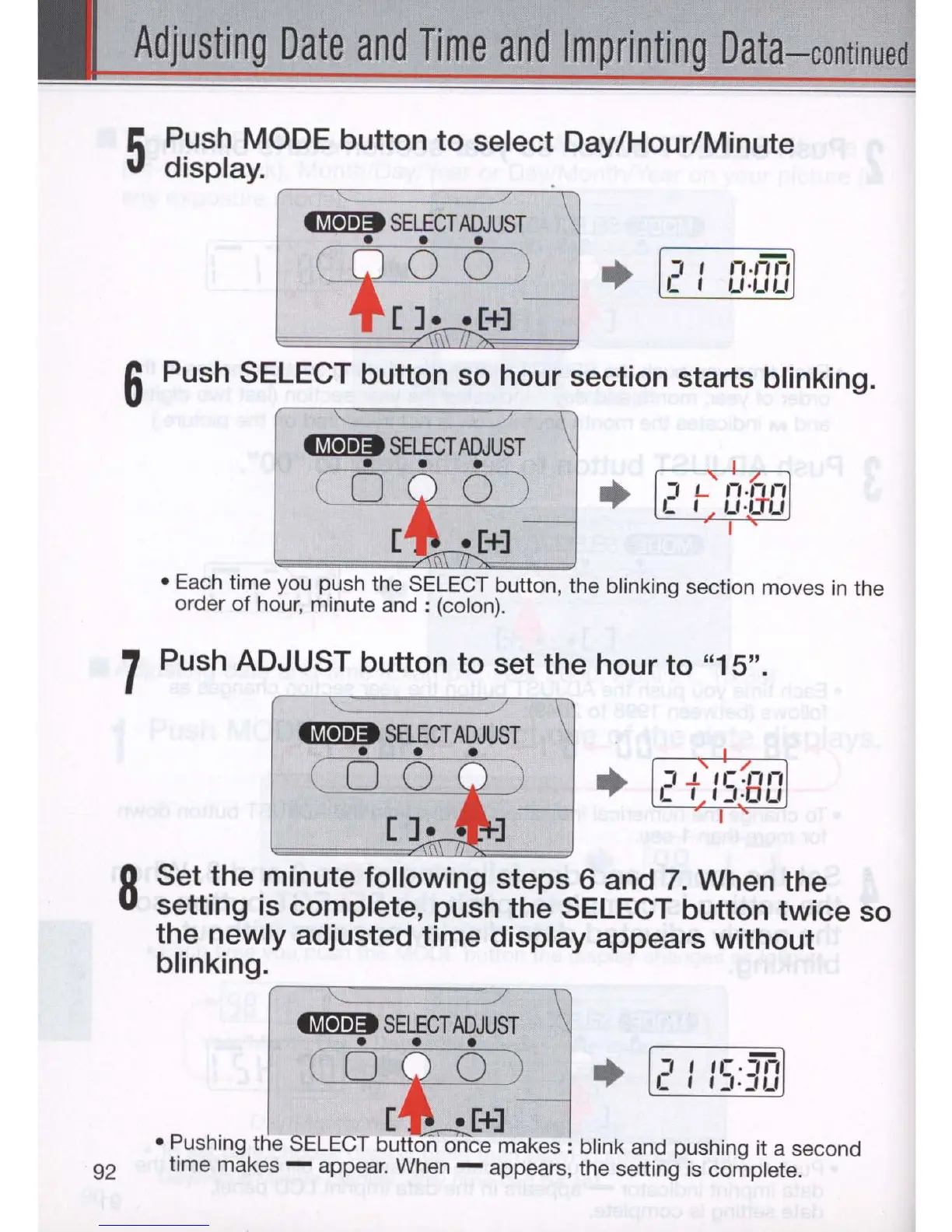
Push MODE button to select Day/Hour/Minute
display. .
~
SELECT
ADJUST
LQ
6 6
-=0)
•
~
[]
••
[+]
6 Push SELECT button
so
hour section starts blinking.
tM-
SELECT
ADJUST
\
• • •
C
D
i
O
~
+
[
~[+]
-
• Each time you push the SELECT button, the blinking section moves
in
the
order
of
hour, minute
and:
(colon).
7 Push ADJUST button to set the hour to "15" .
•
8
Set the minute following steps 6 and
7.
When the
setting
is
complete, push the SELECT button twice
so
the newly adjusted time display appears without
blinking.
r--':::::::======::r-\)
~
SELECT
ADJUST
• • •
•
(
O
~
)
[ -
.[+]
• Pushing the SELECT button once
makes:
blink and pushing it a second
time makes - appear. When - appears, the setting is complete.



 To Next Page