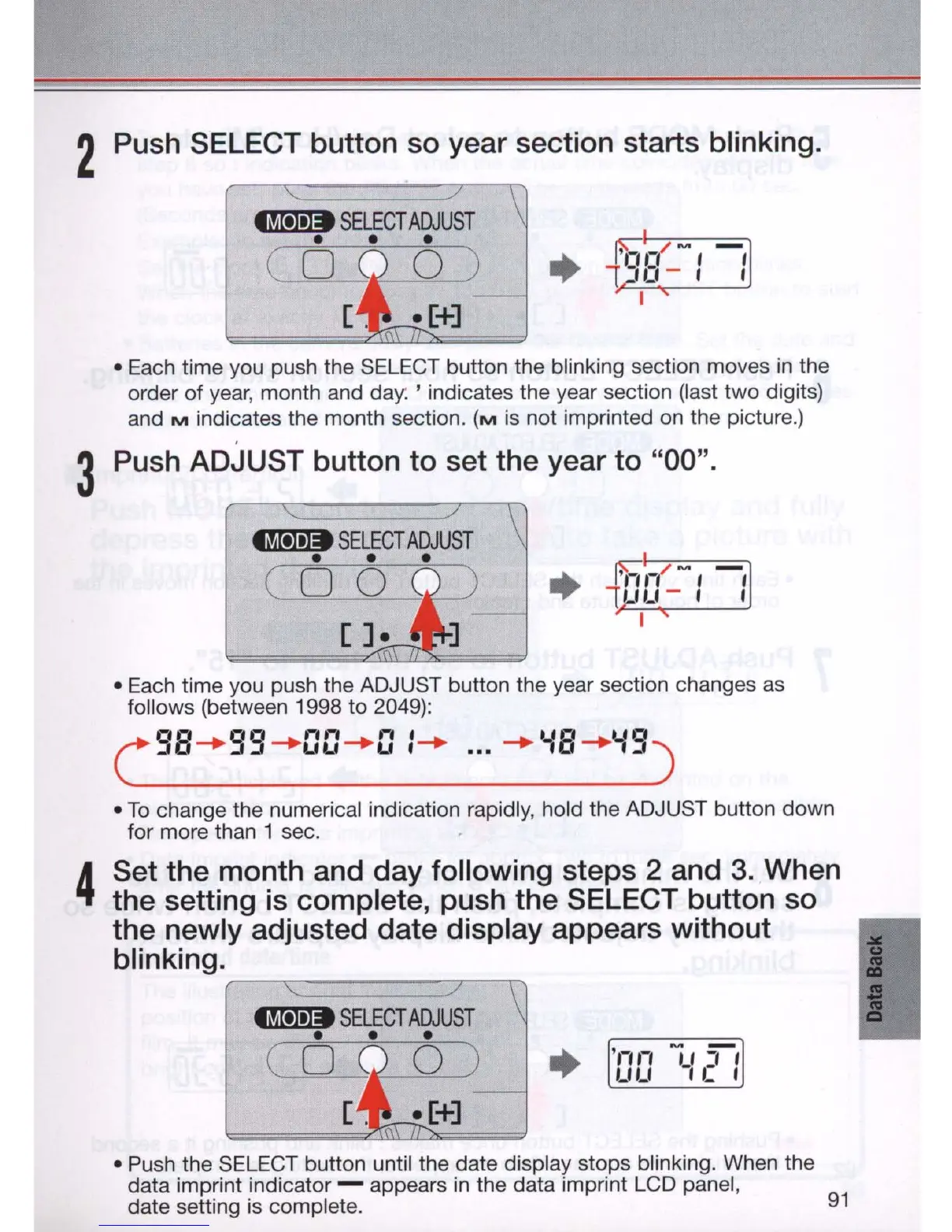
2 Push SELECT button so year section starts blinking.
• Each time you push the SELECT button the blinking section moves
in
the
order of year, month and da
y.
, indicates the year section (last
two
digits)
and
M indicates the month section. (M is not imprinted on the picture.)
3 Pu
sh
ADJUST button to set the year to "00".
i1h
,-
(
~
,
-,
1
jJ
Lf
- I I
I
• Each time you push the ADJUST button the year section changes
as
follows (between 1998 to 2049):
C
9B
-+
99
-+
DD
-+
D 1-+
...
-+
'-IB
-+
'-I9
)
•
To
change the numerical indication rapidly, hold the ADJUST button down
for more than 1 sec.
4
Set the month and day following steps 2 and 3. When
the setting
is
complete, push the SELECT button so
the newly adjusted date display appears without
blinking.
r--'::::::==:===:::r-\i
• Push the SELECT button until the date display stops blinking. When the
data imprint indicator - appears
in
the data imprint LCD panel,
date setting is complete.
91



 To Next Page