Menu/Features of Custom Setting
• Creating Custom Setting
1
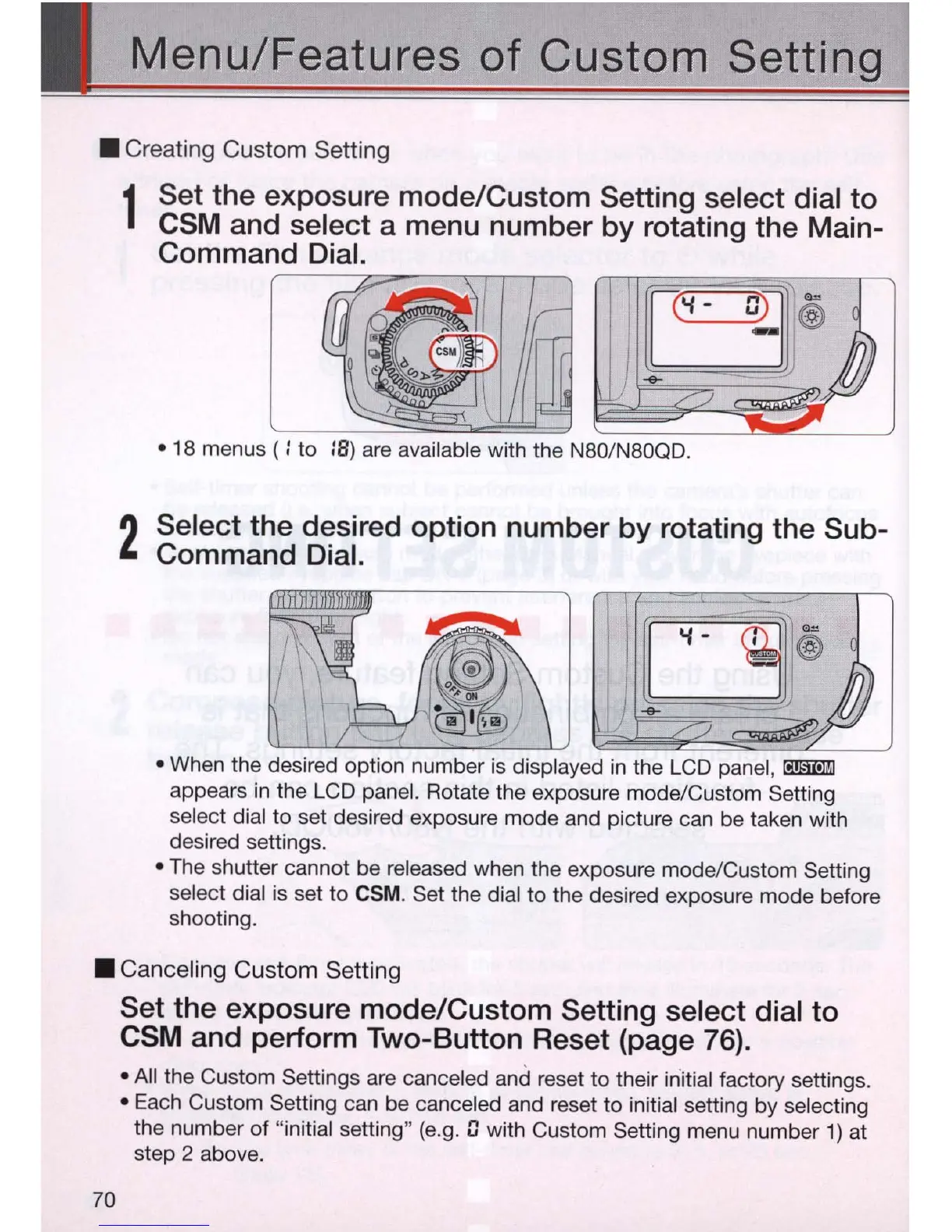
Set the exposure mode/Custom Setting select dial to
CSM and select a menu number by rotating the Main-
Command Dial.
[[9I®
-<>-
• 18 menus ( : to :8) are available with the N80/N80QO.
2
Select the desired option number by rotating the Sub-
Command Dial.
• When the desired option number
is
displayed
in
the LCD panel, mI!l1iI
appears
in
the LCD panel. Rotate the exposure mode/Custom Setting
select dial to set desired exposure mode and picture can be taken with
desired settings.
• The shutter cannot be released when the exposure mode/Custom Setting
select dial
is
set to
CSM
. Set the dial to the desired exposure mode before
shooting .
• Canceling Custom Setting
70
Set the exposure mode/Custom Setting select dial to
CSM and perform Two-Button Reset (page 76) .
• All the Custom Settings are canceled and reset to their initial factory settings.
• Each Custom Setting can be canceled and reset to initial setting by selecting
the number of "initial setting"
(e
.g.
[)
with Custom Setting menu number
1)
at
step 2 above.



 To Next Page