EasyManua.ls Logo

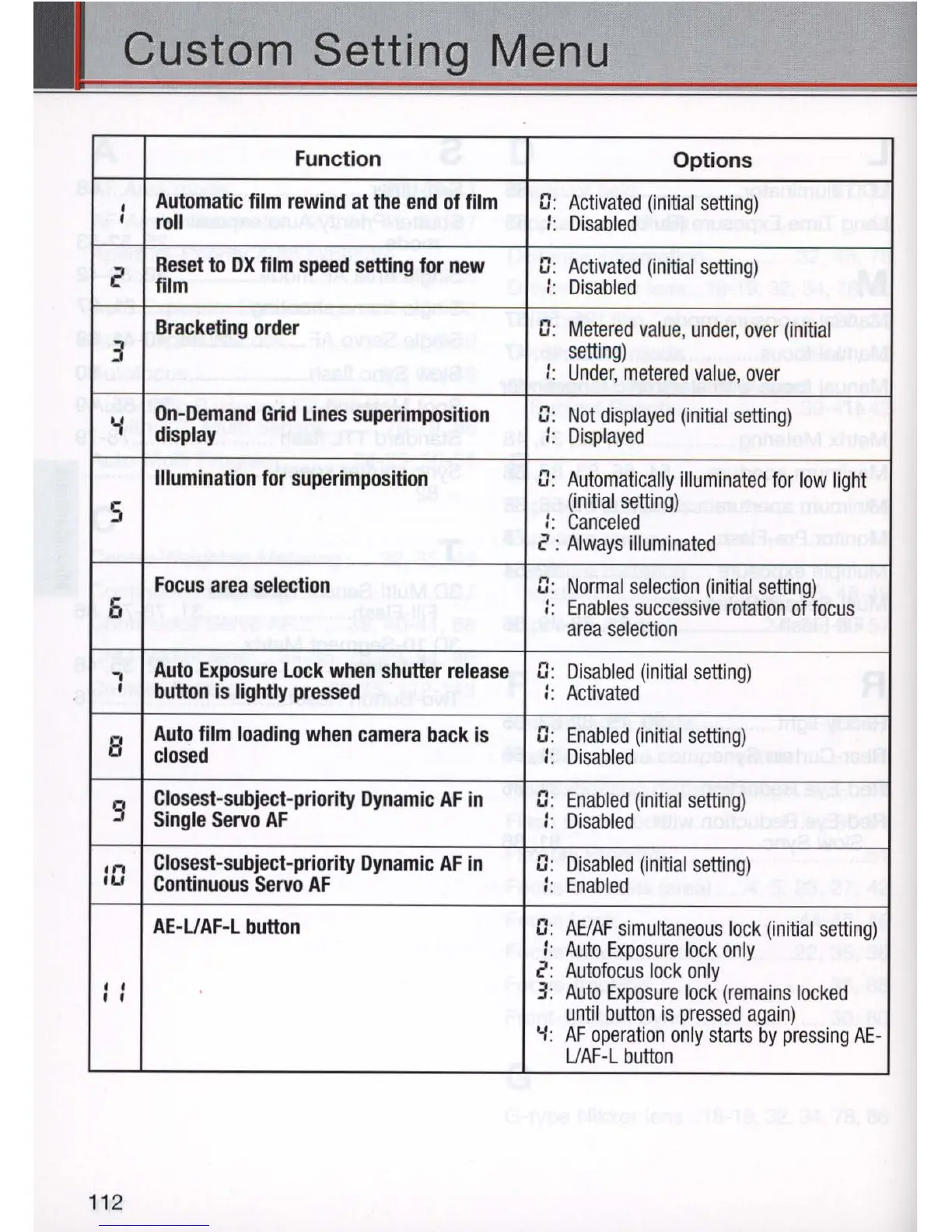
Nikon N80 - Custom Setting Menu; Automatic film rewind at the end of film roll; Reset to DX film speed setting for new film; Bracketing order

Nikon N80
116 pages
Print Icon
To Next Page IconTo Next Page
To Previous Page IconTo Previous Page
Loading...
Custom Setting Menu
Function
Options
Automatic
film
rewind
at
the
end
of
film
G:
Activated
(initia
l
setting)
I
roll
::
Di
sabled
Reset
to
OX
film
speed
setting
for
new
n .
Activated
(initial
setting)
~
u.
film
..
Di
sabled
..
Bracketing
order
n .
u.
Metered
value
,
under
,
over
(ini
ti
al
3
setti
ng
)
' .
Under,
metered
value,
over
..
On-Demand
Grid
Lines
superimposition
n .
Not
displayed
(initial
setting)
y
u .
display
..
Displayed
..
Illumination
for
superimposition
n .
u.
Autom
atica
lly
illumin
ated
for
low
light
5
(init
ial
setti
ng
)
::
Canceled
2 :
Always
i
llu
minated
Focus
area
selection
n.
Normal
se
le
ction
(initial
setti
n
g)
u .
6
'.
'.
Enables
success
iv
e
rotation
of
focus
area
selection
-.
Auto
Exposure
Lock
when
shutter
release
n .
u.
Disabled
(initia
l
setting)
I
button
is
lightly
pressed
'.
Activated
..
Auto
film
loading
when
camera
back
is
n .
Enabled
(initial
setting)
B
u.
closed
..
Di
sabled
..
Closest-subject-priority
Dynamic
AF
in
n .
Enabled
(ini
tia
l
setting)
9
u .
Single
Servo
AF
'.
Di
sabled
..
. n
Closest-subject
-
priority
Dynamic
AF
in
n .
u .
Disabled
(initia
l
setting)
IU
Continuous
Servo
AF
'.
Enabled
..
AE-U
AF
-L
button
n.
u .
AEIAF
simultaneous
lock
(initial
setting)
..
Auto
E
xposure
lock
only
..
2:
Autofo
cus
lo
ck
only
••
3:
Auto
Ex
po
s
ure
lock
(remains
lo
cke
d
I I
until
button
is
pr
essed
agai
n)
'-I
:
AF
operat
ion
o
nly
st
arts
by
pressing
AE
-
UAF-L
button
11
2

Table of Contents

Related product manuals