Date
and
Time
and
I r
N80QD
on
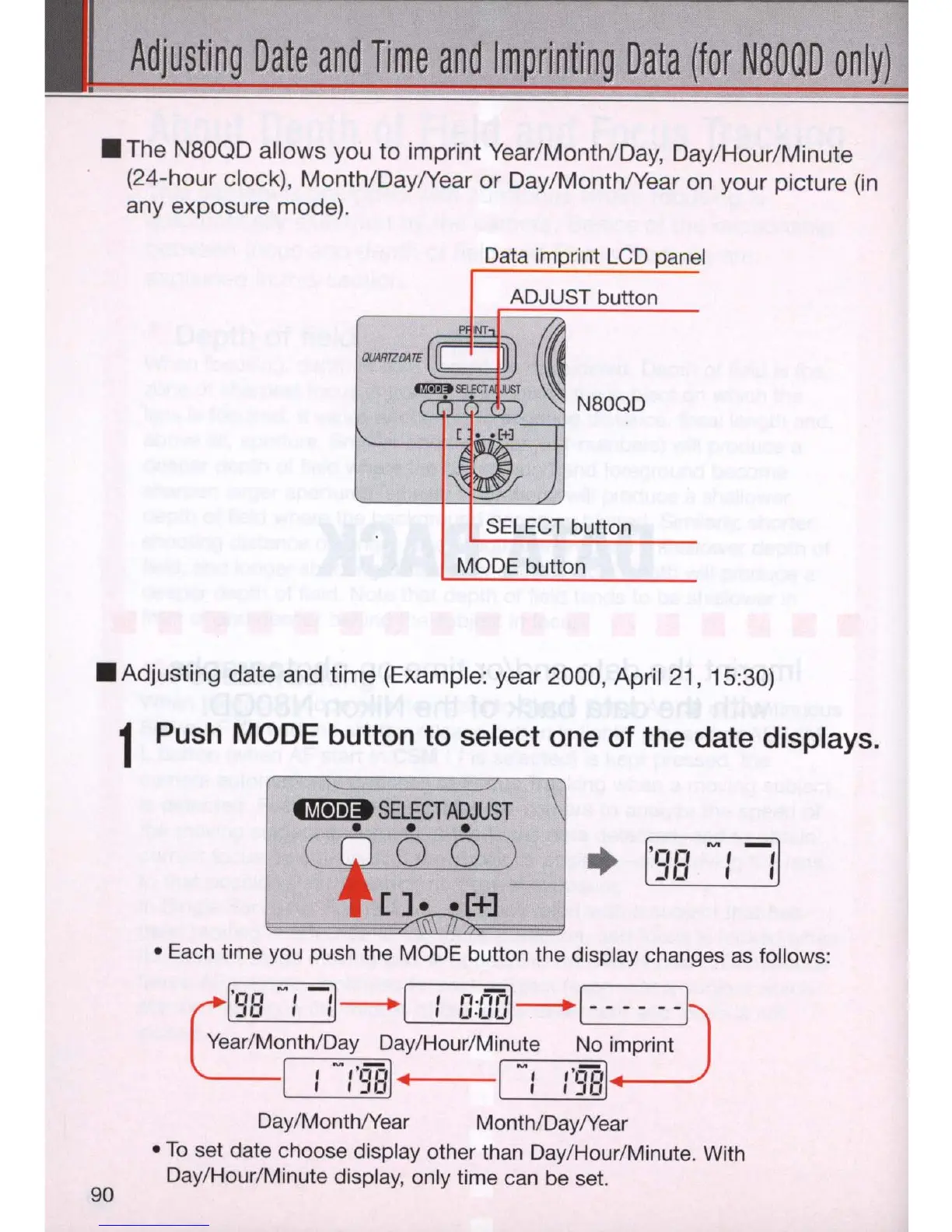
• The N80QD allows you to imprint Year/MonthlDay, Day/Hour/Minute
(24-hour ciock
),
Month/Day/Year or Day/Month/Year on your picture
(in
any exposure mode).
Data imprint
LCD
panel
ADJUST button
'->j
.
'-'t
'-...>L..
/
_
~
N80QD
SELECT button
MODE button
• Adjusting date and time (Exampl
e:
year 2000, April
21
, 15:30)
90
1 Push MODE button to select one of the date displays.
~
SELEC
T
ADJUST
• • •
(
~
O
0 )
[]
••
[+]
•
• Each time you push the MODE button the display changes
as
follows:
~
'9B
-:
:1
- 1 :
ODo
l- ------
Year
/Month/Day Day/Hour/Minute No imprint
1 :
-1'98
1
4
I
-:
1'981
----
Day
/Month/Year Month/Day/Year
•
To
set date choose display other than Day/Hour/Minute. With
Day/Hour/Minute display, only time can be set.



 To Next Page