33
IV
OPERATION
0˚
0˚
30˚
[ 1 ]
30˚
30˚
[ 2 ]
65˚
30˚
[ 3 ]
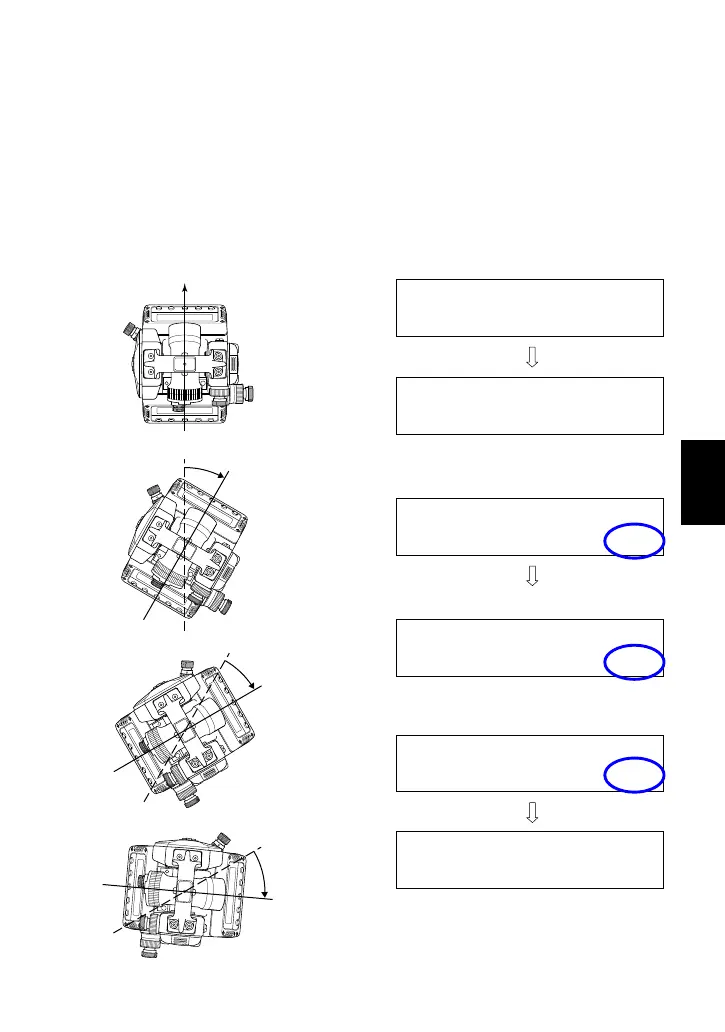
<3> HOLD
The HOLD function is used to freeze the displayed horizontal angle
readout, which remains unchanged regardless of sighting direction
changes.
• Rotate the upper plate to display the desired horizontal angle, then
depress the [HOLD] key to freeze the reading.
• To release the hold function, depress the [HOLD] key again.
Depress the [HOLD] key to hold the displayed
horizontal angle (30°).
Horizontal angle 30° freezes.
To cancel the hold function, depress the
[HOLD] key.
Rotation angle by [ 3 ] (ex. 35° in this case) is
added to the held readout angle (30°), and the
sum angle 65° is displayed.
VA: 90°35´20" ■■■
HA: 0°00´00"
VA: 90°35´20" ■■■
HA: 30°00´00"
VA: 90°35´20" ■■■
HA: 65°00´00"
VA: 90°35´20" ■■■
HA: 30°00´00" HOLD
VA: 90°35´20" ■■■
HA: 30°00´00" HOLD
VA: 90°35´20" ■■■
HA: 30°00´00"
[ 1 ] Rotate the upper plate
[ 2 ] Rotate the upper plate
[ 3 ] Rotate the upper plate



 To Next Page