1
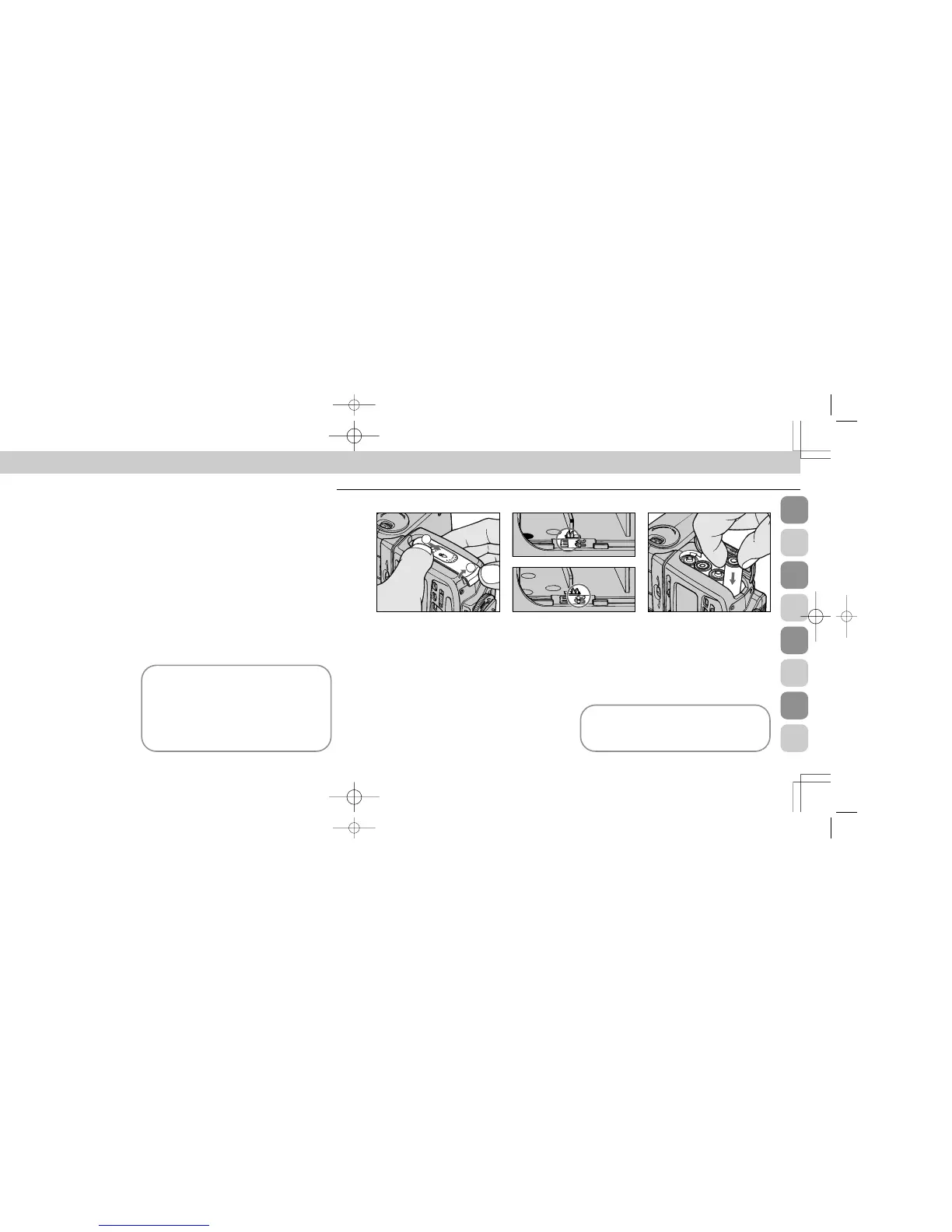
Slide the battery chamber cover in
the › direction and lift to open. 2
Slide the meter/feet lever (small
switch in the mouth of the cham-
ber) to select desired indication (m or
ft.); this will appear in the LCD panel
while the speedlight is in use.
The lever is preset to meters (m) when
shipped from the factory.
Installing Batteries
3
Load four 1.5V AA-type penlight
alkaline-manganese or 1.2V NiCd
batteries into the battery chamber. Be
sure to follow the [ indication
inside the chamber to ensure the bat-
teries are properly loaded.
Using an external power source
For an external power source, use optional Nikon DC
Unit SD-7 or SD-8 or Power Blacket Unit SK-6. For
battery information, see page 142.
Chapter
2
Getting Started — SB-26 Set-Up
This section introduces preparations for using the SB-26,
such as installing batteries, attaching flash unit to your cam-
era, and finally, turning the unit on. Follow these steps in
order, especially when using for the first time. This section
should serve as a practical guide for later reference.
WARNING — TO AVOID INJURY
• DO NOT FIRE FLASH NEAR THE EYES: Firing the flash
light very close to any person’s eyes can injure the retina,
thereby weakening eyesight or causing blindness.
• DO NOT TOUCH THE FLASH HEAD WHEN FIRING THE
SB-26: The flash head generates significant heat during
normal operation, which may cause burns. Also, when
using the flash, keep delicate materials away from the
flash head.
CAUTION — TO PREVENT
DAMAGE TO THE SB-26
SPEEDLIGHT
• DO NOT MIX OR USE THE SB-26 WITH OTHER MANU-
FACTURER’S CAMERAS, FLASH UNITS, OR ACCES-
SORIES (INCLUDING EXTERNAL POWER SOURCES):
Nikon is not responsible for malfunctions or other prob-
lems resulting from use of this product with any equip-
ment other than Nikon brand products.
PROPER CARE AND STORAGE OF THE SB-26 SPEED-
LIGHT
• SEE PAGES 140 AND 141, “Tips on Speedlight Care.”
BATTERIES: CARE AND CAUTION
• SEE PAGE 142, “About Batteries.”
ABNORMAL LC (LIQUID CRYSTAL) DISPLAY AND
MALFUNCTIONING
In certain cases, due to normal characteristics of the
built-in microcomputer, the speedlight may not oper-
ate or an abnormal display may appear, even with
fresh, properly installed batteries.
If this occurs, turn off flash and remove the batter-
ies, then reinstall batteries and turn the power on. This
should properly reset the computer.
SB-26 (E) 03.1.14 7:16 PM Page 20





 To Next Page