9998
Set Up and Practice
1
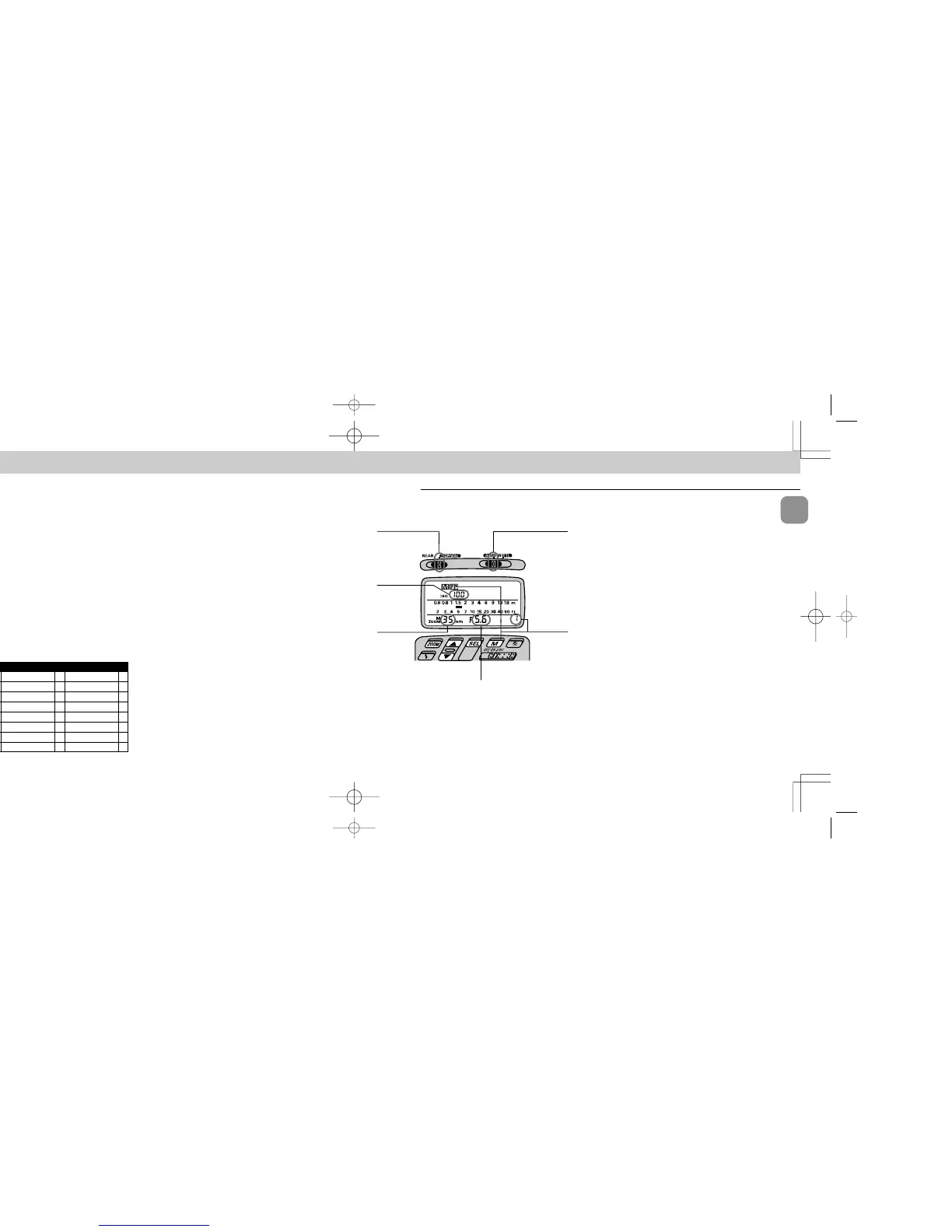
Choose i position (flash mode selector). Confirm D
appears in the LCD panel.
2
Choose W position (flash sync mode selector)*.
* FP High-Speed Sync Flash operation can be performed regardless of the flash
sync mode selector setting; for simplicity, always leave the switch at this posi-
tion.
3
Confirm ISO film speed has been set and appears in
the SB-26’s LCD panel.
ISO speed of film in use is automatically set; if not shown in
the LCD panel, lightly press the camera’s shutter release
button.
4
Confirm the zoom-head position has been set and
appears in the SB-26’s LCD panel.
The zoom-head position is automatically set and indicated
in the SB-26’s LCD panel when the camera is used with an
AF Nikkor lens (including the latest D-Type) or a Nikkor lens
having a built-in CPU.
Or, set manually according to the shooting situation (see
page 29).
DO NOT USE THE WIDE FLASH PANEL (zoom head at the
20mm or 18mm position). When used, m20 or m18, D and
F blink in the LCD panel as an alert.
1 Flash mode selector
at Manual Flash
2 Flash sync mode
selector at NORMAL
3 ISO
speed of
film in use
5 For select-
ing F and
either 1 or
2
4 Zoom-head
position
10 Aperture value
FP High-Speed Sync Flash — Flash Photography At Higher Shutter Speeds
Unlike other Nikon SLR models the F5, F90X/N90s or F90-
Series/N90 camera and the SB-26 allow you to use faster
shutter speeds up to 1/4000 sec. for flash synchronization.
Ordinarily the flash fires only when the curtains are fully
opened in regular flash syncs. With FP High-Speed Sync
Flash, the flash consecutively emits light at an extremely
rapid cycle, while the shutter curtains travel to expose the
entire film surface — but the curtains are never fully opened
(i.e. exposure with a “slit”).
By using a high-speed shutter and flash simultaneously,
you can create light flow from a rapidly moving subject.
In outdoor photography, it also enables you to use both a
wider aperture and a faster shutter speed to achieve a shal-
lower depth of field and purposely blur the subject’s back-
ground.
Chapter
4
Note that a guide number for FP High-Speed Sync Flash
varies with the selected shutter speed and it is smaller than
for regular flash synchronization (i.e. smaller light output).
Furthermore, we recommend you use shutter speeds
between 1/250 and 1/4000 sec. to avoid uneven exposure.
Before proceeding:
E ATTACH SPEEDLIGHT TO CAMERA.
E TURN ON BOTH SPEEDLIGHT AND CAMERA.
E USE MANUAL EXPOSURE MODE.
E USE SINGLE-SERVO AUTOFOCUS (S or A) OR MAN-
UAL FOCUS (M).
E USE SINGLE-FRAME SHOOTING (S) FILM ADVANCE
MODE.
F5
E F-601M/N6000 FE2
F90X/N90s
E
F50-Series/N50
FG
F90-Series/N90
E F-401x/N5005 Nikonos V
F70-Series/N70
F-501/N2020 F3-Series
F4-Series F-301/N2000 F2-Series
F-801/N8008 F-401/N4004 FM2
F-801s/N8008s F-401s/N4004s FG-20
F-601/N6006 FA
APPLICABLE NIKON SLR MODELS
SB-26 (E) 03.1.14 7:16 PM Page 98














 To Next Page