6362
9
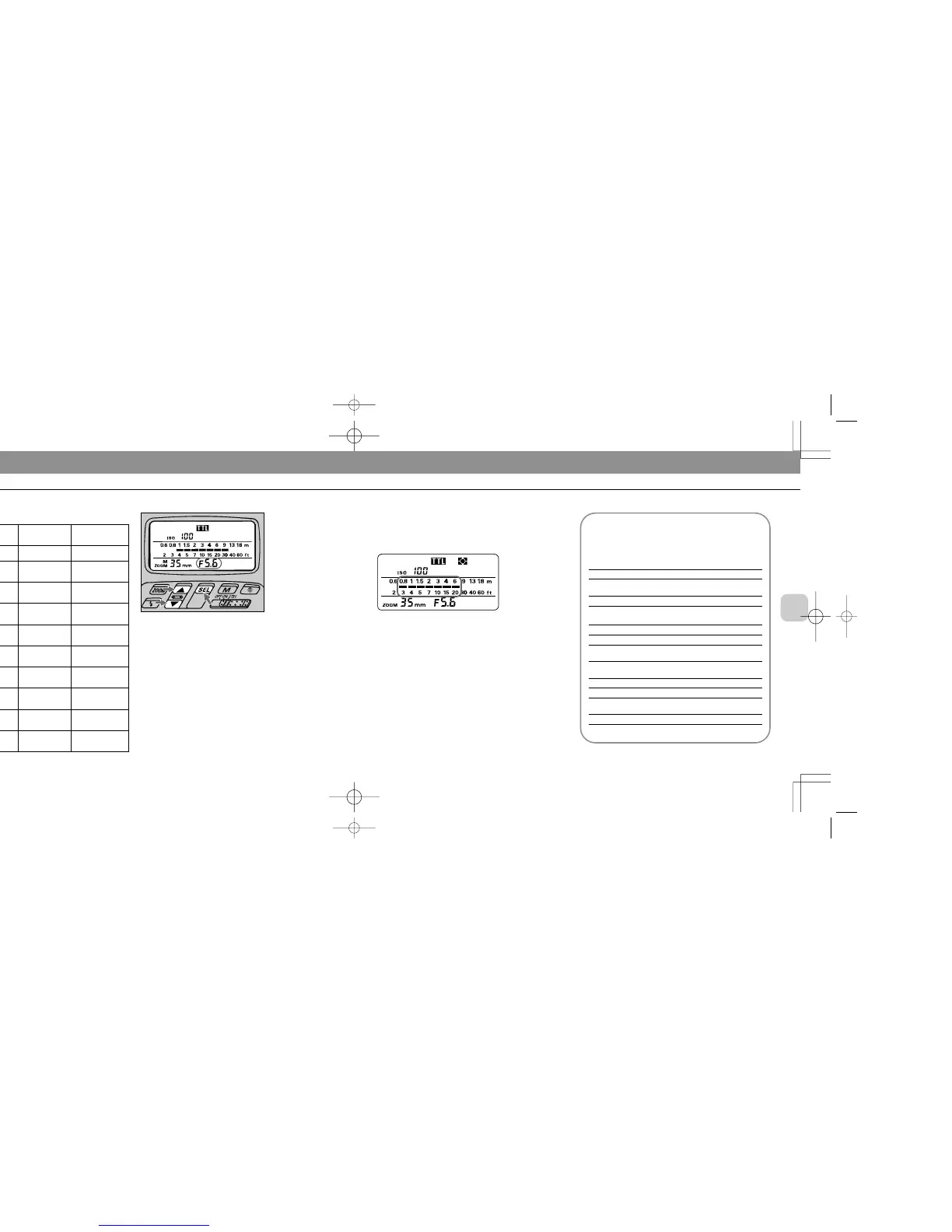
Confirm shooting distance.
Check whether subject falls within the range of the shooting
distance indicator bars / in the SB-26’s LCD panel. If
not, move closer to subject or select a wider aperture (when
aperture-priority auto or manual exposure mode), then
repeat steps 8 and 9.
Chapter
3
TTL Auto Flash H Mode: For F50-Series/N50 and F-401x/N5005 Users
Guide to determining aperture
Use these suggestions as a guide. To choose a suit-
able aperture, select aperture-priority auto or manual
exposure mode.
For F-50-Series/N50 (at ISO 100)
For outdoor subjects on a sunny day f/8
For outdoor subjects on a cloudy day,
f/5.6
in shadows
For indoor subjects f/4
In programmed auto
For subjects backlit by the sun f/16
For outdoor subjects on a sunny day f/8
For outdoor subjects on a cloudy day,
f/5.6
in shadows, or for indoor subjects
In shutter-priority auto
For subjects backlit by the sun f/16 at 1/125 sec.
For outdoor subjects on a sunny day f/8 at 1/125 sec.
For outdoor subjects on a cloudy day
f/5.6 at 1/125 sec.
in shadows
For indoor subjects f/5.6 at 1/30 sec
Selected
exposure
mode
Programmed
auto
Shutter-
priority auto
Aperture-
priority auto
Manual
Viewfinder
LED*
No
indication
+ or + @
@
– @ or –
+ or + @
@
Status/cause
—
Background is
overexposed.
OK: Background
is correctly
exposed
Background is
underexposed
Background is
overexposed
OK: Background
is correctly
exposed
Troubleshooting
—
Select faster shut-
ter speed until only
@ appears.
—
Select slower
shutter speed until
only @ appears.
Select smaller
aperture until only
@ appears.
—
– @ or –
+ or + @
@
– @ or –
Background is
underexposed
Background is
overexposed
OK: Background
is correctly
exposed
Background is
underexposed
Select larger aper-
ture until only @
appears.
Select faster shut-
ter speed or small-
er aperture.
—
Select slower
shutter speed or
larger aperture.
Warning indications
*+@, @ or –@ appears only with F-401x/N5005.
8
Set aperture in the SB-26’s LCD panel*, then read the
shooting distance range.
For instruction, see “Setting Aperture Value (Manual
Adjustment),” pages 28 to 29.
In aperture-priority auto or manual exposure mode, set the
aperture value that you have set on the camera (from step 6).
In programmed auto or shutter-priority auto exposure mode,
aperture is automatically controlled by the camera. Choose
and set a value, using the “Guide to determining aperture”
in the following page.
Once aperture is set, indicator bars / show the shooting
distance range.
* This operation is important for reading the appropriate shooting distance from
the indicator bars (step 9); setting a wrong aperture value on the SB-26 does
not affect all TTL Auto Flash operations — a shot will be taken with the aper-
ture set on the camera.
SB-26 (E) 03.1.14 7:16 PM Page 62














 To Next Page