9392
Chapter
3
Repeating Flash G Mode
5
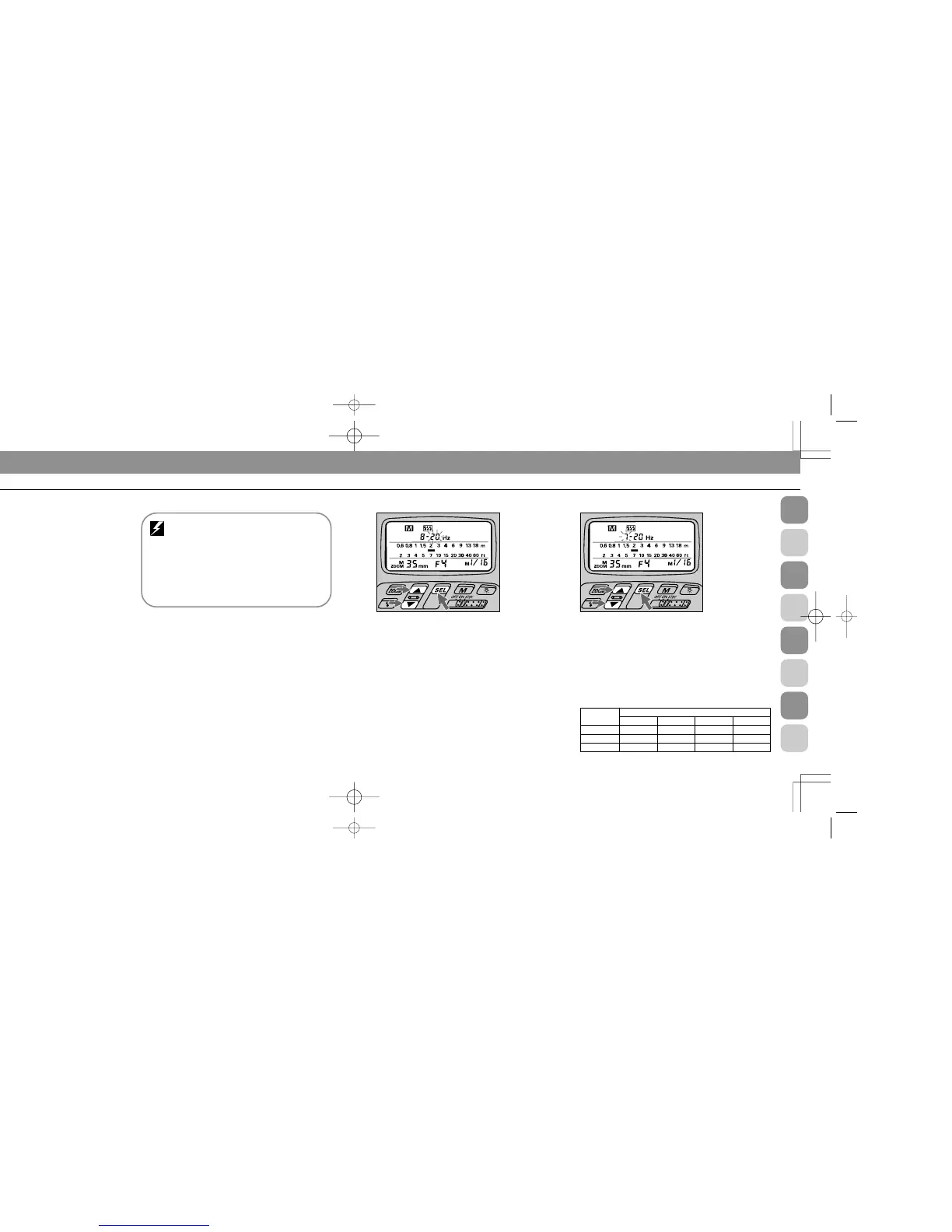
Press ◊ until a number (flash speed per second)
starts blinking beside d.
Use ˛ or Ç to set a desired flash speed.
See “Determining shutter speed with number/speed of
flashes” on page 93.
6
Press ◊ again until a number (flashes per frame)
starts blinking beside center hyphen -.
Use ˛ or Ç to set the desired number.
The maximum number of flashes per frame depends on
light-output amount and flash speed. If two hyphens --
blink, the available number of flashes is fixed (no other
choice). For details, see the chart below.
Number of repeating flashes per frame (shown with blinking
hyphens - -) : Figures indicate use with External Power Source
SD-7 or SD-8
Flash speed
per second
1 — 7 Hz 20 40 80 160
10 20 40 80
8 162040
8 — 10 Hz
20 — 50 Hz
Light output amount
j kl;
1
Choose G position (flash mode selector). Confirm D
and G appear in the LCD panel.
2
Choose W position (flash sync mode selector*).
* q position is only used for Rear-Curtain Sync Flash in TTL Auto H, Non-
TTL Auto A and Manual D Flash, and only with the F5, F90X/N90s, F90-
Series/ N90, F70-Series/N70, F4-Series, F-801/N8008, and F-801s/N8008s.
For details, see page 105.
3
Set the built-in zoom head position.
For instructions, see “Setting Zoom-Head Position (Manual
Adjustment),” pages 29 to 30.
4
Press ı button to choose desired light output.
You can choose an amount ranging from one eighth of full
power (1/8) to one sixty-fourth (1/64). LCD indications
change as: - j - k - l -; -.
Automatic zoom-head position adjustment:
F5, F90X/N90s, F90-Series/N90, F70-Series/
N70, F4-Series, F-801/N8008, or F-801s/N8008s
used with an AF Nikkor lens (including the latest
D-Type) or Nikkor lens having a built-in CPU
The zoom-head position in use is automatically set
and indicated in the SB-26’s LCD panel.
For other lenses, set manually according to the
shooting situation. See “Setting Zoom-Head Position
(Manual Adjustment),” pages 29 and 30.
SB-26 (E) 03.1.14 7:16 PM Page 92














 To Next Page