6
copyright © 2012 BMI J6 transmitter
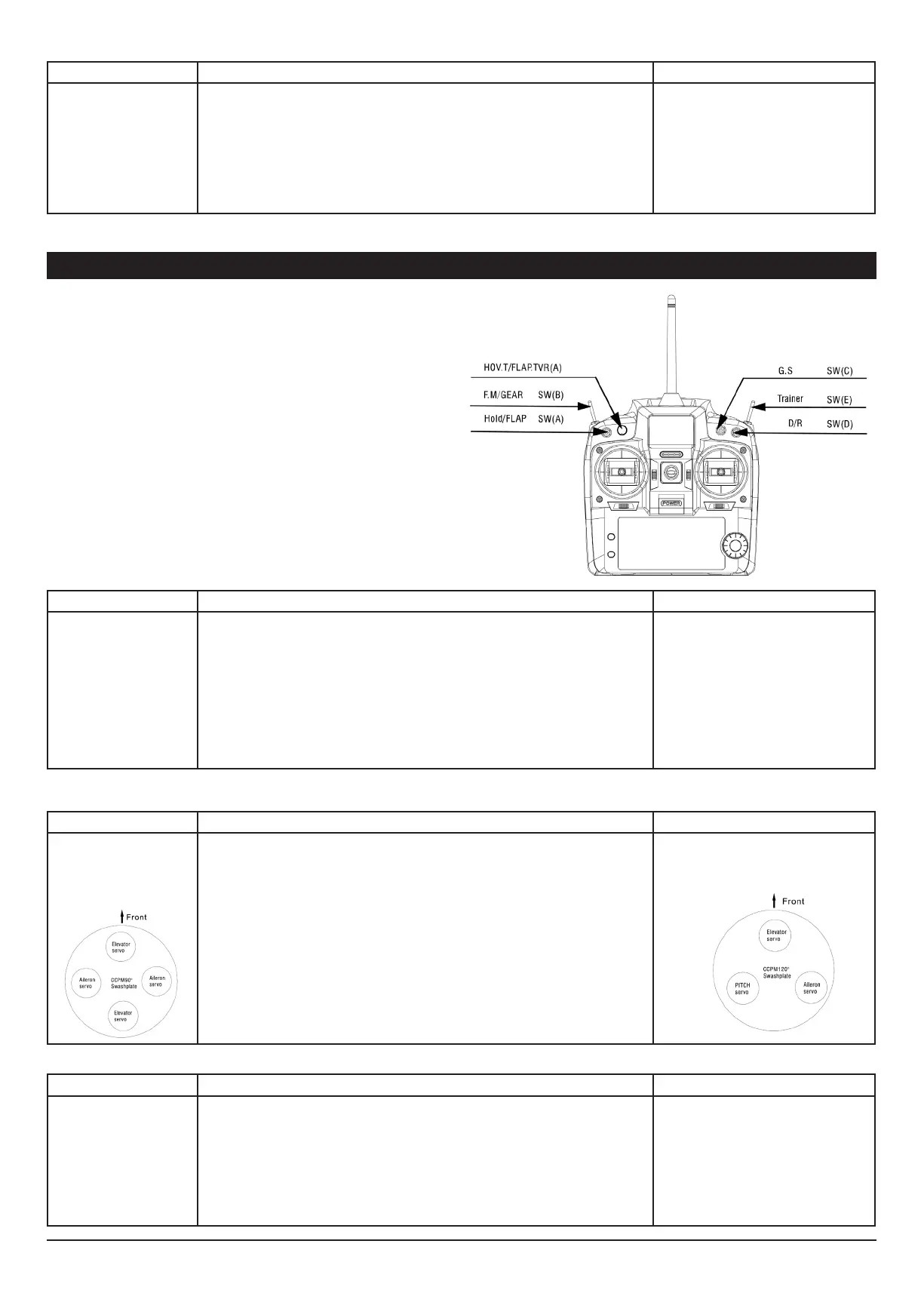
There are several possibilities to use this transmitter in combina-
tion with model helicopters , …
Modeltype, channel reverse, dual rate, swash plate mixers,
curves, trims,….. can all be setup. Below you’ll nd an overview
of all switches.
Trim memory setup
Description Steps to follow Instructions
With this function, the trim of
the elevator channel, rudder
channel en aileron channel can
be set. The transmitter will save
the trim positions.
1. Turn on the transmitter
2. Press the A-button for 1 second and the “NOR REV” symbol and “123456” symbol will start ashing.
3. turn the D-knob until the trim indicators of aileron, rudder and elevator start ashing.
4. Press the A-button or the C-button. Only one indicator keeps on ashing.
5. Use the D-knob in order to select the desired trim channel.
6. press the A-button or the C-button in order to conrm.
7. Use the D-knob to set the trim
8. Press the C-button to save
9. press the B-button to go back in the menu.
The values of this sub trim functions may vary
from -100% to +100%
Model Type setup
Description Steps to follow Instructions
“This function offers two pos-
sibilities:
Airplanes or Helicopters
Attention !
A lot of the parameters
described below are specically
for helicopters and will only
function if the model type setup
has been set to Helicopter. “
1. Turn on the transmitter
2. Simultaneously press the A-button and B-button for one second. On the LCD screen the “MODE”
-icon and the “Modeltype” Icon” (helicopter or airplane) will start ashing.
“3.Turn the D-Knob until the “”Mode””-icon and the
“”model type””-icon (helicopter or airplane) ash together on the LCD screen”
4. Next press the C-button or the A-button. The Modeltype icon keeps ashing.
5. Select the desired model type (helicopter or aeroplane), by turning the D-Knob.
6. Press the C-button to conrm your choice and its corresponding parameters
7. Press the B-button to go back in the menu.
“The model type option includes two options:
Airplane or helicopter.
An alteration of the model type will modify all
parameters of the current model to the default
factory settings. So be careful when using this
function. If you are not sure, do NOT press the
C-button, in order to avoid replacing the settings
by default values. After changing the model
type, it is recommended to restart the transmit-
ter, in order to make sure that your changes
have been saved.
Swash plate type
Description Steps to follow Instructions
“This transmitter offers two
swash plate types : CCPM90°
and CCPM120°
Select the swash plate type that
matches your helicopter”
1. Turn on the transmitter
2. Simultaneously press the A-button and B-button for one second. On the LCD screen the “MODE”
-icon and the “Modeltype” Icon” (helicopter or airplane) will start ashing.
“3.Turn the D-Knob until the “”Mode””-icon and the
swash plate icon (circle) ash together on the LCD screen”
4. Next press the C-button or the A-button. The “MODE” icon is steady, while the Swash plate icon
keeps ashing.
5. Select the desired swash plate type with the D-Knob.
6. Press the C-button to save the change
7. Press the B-button to leave the menu.
“There are two kinds of swash plates available in
the program:
CCPM 120°
CCPM 90°”
Servo reverse function
Description Steps to follow Instructions
Make sure the channel is setup
in the right position, according
to the installation position of
the servo
1. Turn on the transmitter
2. Press the A-button for 1 second and the “NOR REV” symbol and “123456” symbol will start ashing.
3.Press the A-button or the C-button to conrm.
4. Select the channel you wish to reverse, using the D-knob
5. Conrm your selection, by pressing the C-button.
6. Turn knob D in order to choose “NOR” or “REV”
7. Press the C-button to save the changes and enter into the next channel.
8. Press the B-button to return in the menu.
The LCD screen displays the current ‘NOR/REV’
settings of every channel. It is necessary to
conrm every modication with the C-but-
ton. Please pay attention that every time you
change REV/NOR settings, these changes have
immediate effect on the model. Especially when
reversing the throttle channel. We recommend
you to remove rotor blades when reversing the
throttle channel.
B:Control of model helicopters


 To Next Page