14
1
2
4
5
7
9
3
6
8
10
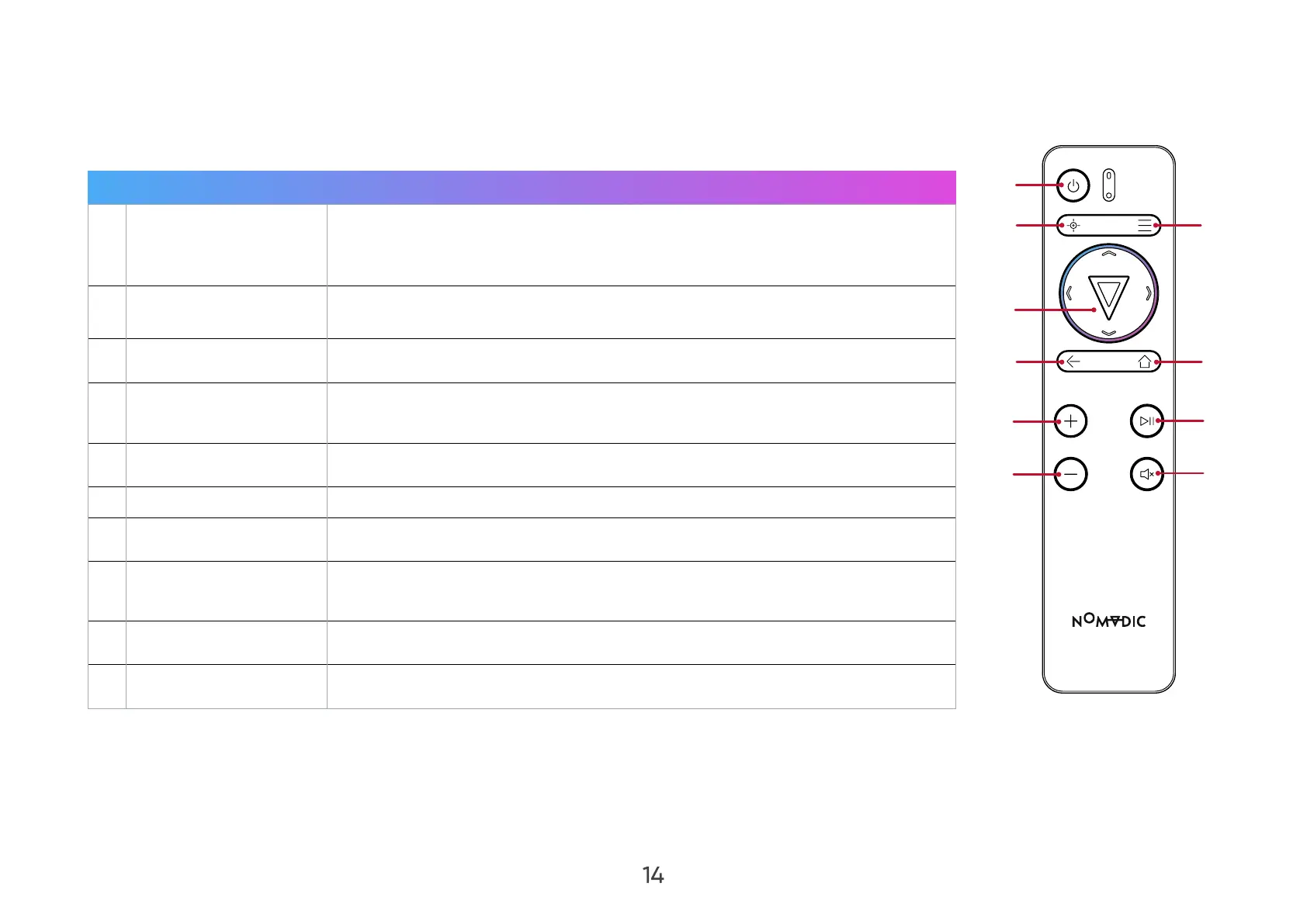
Remote Control
Button Description
1 Power
Turn on Bluetooth Speaker Mode, turn the Light Source O, or Restart
the Projector.
NOTE: To turn o the device, use the Power Toggle.
2 Focus
To manually adjust, press the Focus button on the remote control and
use the Left and Right arrows.
3 Settings Display the Settings menu.
4
OK/Up/Down/Left/
Right
Confirm the selection.
Navigate and select the desired menu items and make adjustments.
5 Return Return to the previous screen.
6 Home Access the Home screen.
7 Increase Increase the volume.
8 Play/Pause
Play/Pause content.
NOTE: Only supports built-in media player.
9 Decrease Decrease the volume.
10 Mute Mute/Unmute.
NOTE: You can also control the X300 with the NOMVDIC Remote Control App. To learn more, see page 30.


 To Next Page