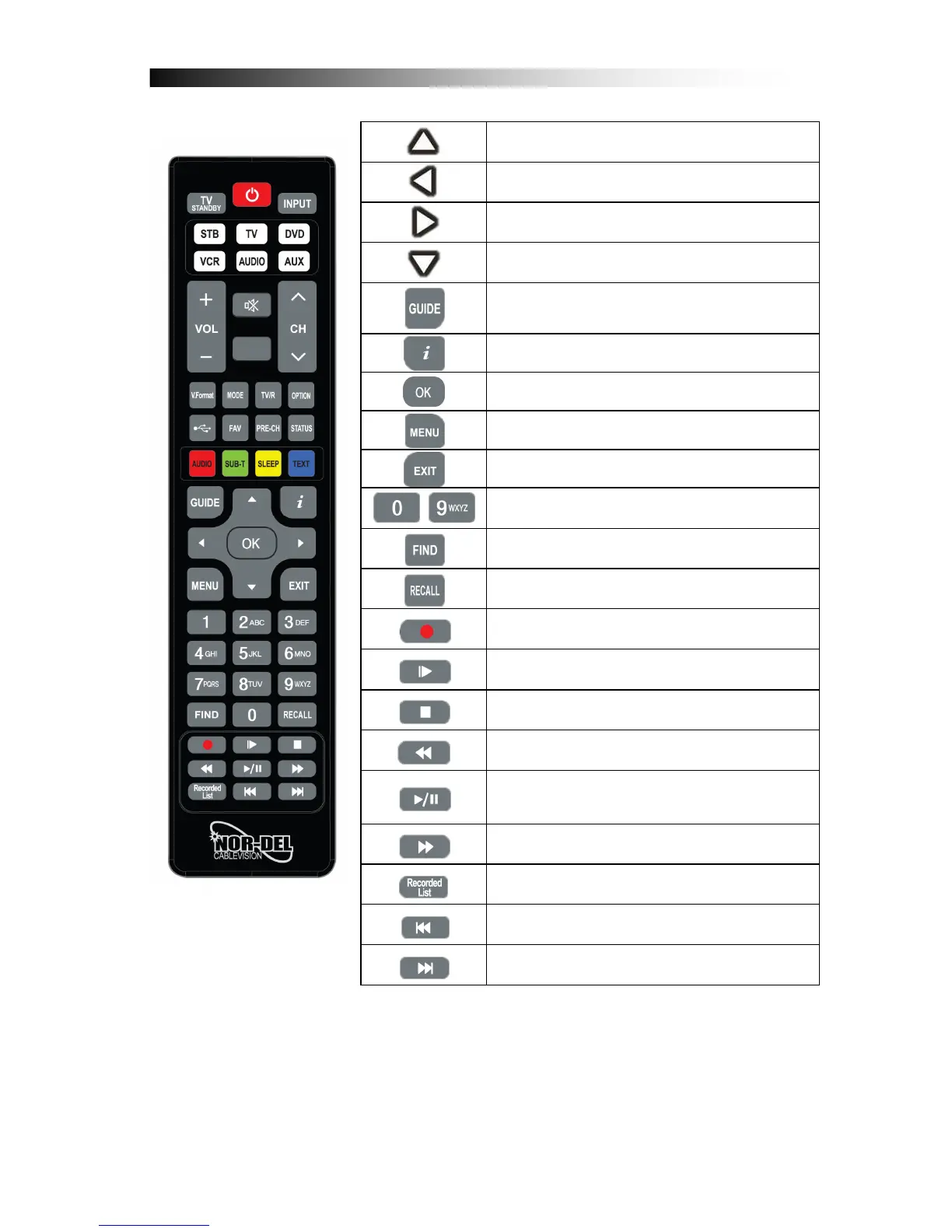
Cursor UP: By pressing this button, the user can jump to next
channel on the channel list. In menu structure, user can
move up one row.
Cursor LEFT: By pressing this button, the user can decrease
the audio volume level of the receiver. In menu structure,
user can change between selectable options.
Cursor RIGHT: By pressing this button, the user can increase
the audio volume level of the receiver. In menu structure,
user can change between selectable options.
Cursor DOWN: By pressing this button, the user can jump to
previous channel on the channel list. In menu structure, user
can move down one row.
ELECTRONIC PROGRAM GUIDE. By pressing this button,
the user can see current and forthcoming programming
information for each channel. 7-day program information
guide is also available by using this button.
INFORMATION. By pressing this button, the user can see
present and following information about the currently watched
channel.
OK: By pressing this button, the user can confirm a selection
or save settings in a menu.
MENU: By pressing this button, the user can activate the
main menu of the receiver.
EXIT: By pressing this button, the user can exit from the
menu without saving the made changes or go one step back
in the menu structure.
~
0-9 NUMBER. By pressing one of the number buttons (0 - 9),
the user can change channel or enter a number to menu.
FIND: Search for a Channel by entering the first letters of the
name.
RECALL: By pressing this button, you can return to
previously viewed channel list
RECORD: By pressing this button you can start a recording
(only if a USB HDD is connected and operational)*
SLOW MOTION: Slow motion playback*
STOP: By pressing this button Playback or Recording can be
stopped.*
REWIND: During Playback of recorded files this button can
be used to rewind.*
PLAY/PAUSE: By pressing this button the archive on the
connected USB HDD is displayed. During Rewind or Fast
Forward this button returns to regular playback. Press
PAUSE to halt Playback.*
FAST FORWARD: During Playback of recorded files this
button can be used to fast forward*
Recorded List: By pressing this button you can access the
recorded files and media files on a connected USB Hard-
Disk-Drive
JUMP Back: Jump forward by 10 Channels in the Channel-
List or jump forward during playback of a recorded or media
file*
JUMP Forward: Jump back by 10 Channels in the Channel-
List or jump back during playback of a recorded or media file*
* requires a USB HDD to be connected and opperational


 To Next Page
 Loading...