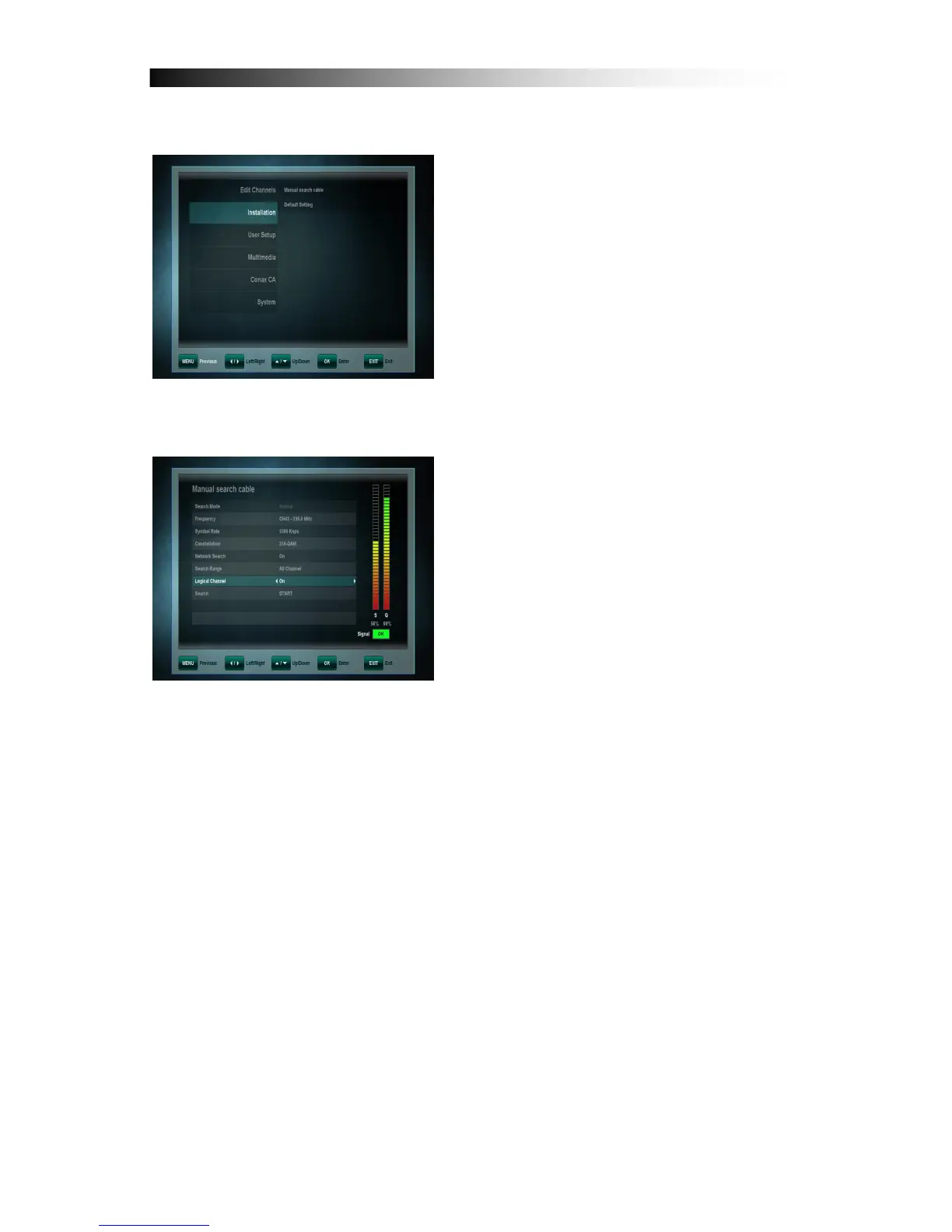
9. INSTALLATION
This menu contains following items:
• Manual search cable
• Default Setting
9.1 Manual Search
In Manual Mode the search begins with
the Start frequency.
Depending on the cable Network, choose
“Network Scan” on for a fast search for all
channels.
To start the channel scan please enter
the following parameters and move
cursor and select (search : START) in the
list
• Frequency: Select the Transponder frequency by using the NAVIGATION
keys LEFT and RIGHT or enter frequency by use number keys.
• Network Search: Choose „On“, if your Search is to include all Transponders,
that are connected to a certain Network. Use the NAVIGATION Keys LEFT
and RIGHT to toggle between „On“ and „Off“.
• Search Range: Use the NAVIGATION Keys LEFT and RIGHT to toggle
between All Channels, Free-To-Air or Scrambled Channels.
• Logical Channel: By setting the option to „On“ the sequence of channels in
your channel list changes according to what has been determined by your
operator. Should your network not provide this function, please switch this
option to „Off“.


 To Next Page