5
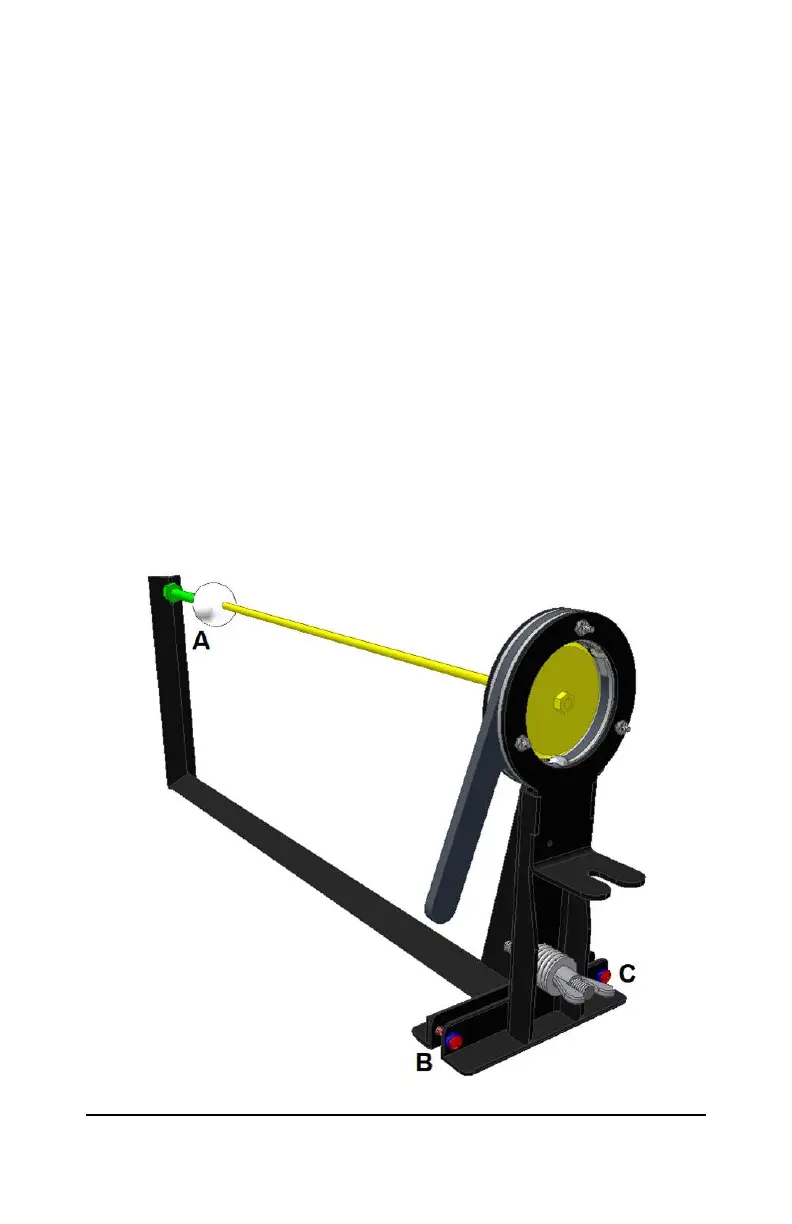
4.2 Insert the alignment tool (44968-2) into the test stand. (Figure 3)
4.3 Adjust the threaded mount (A) of the golf ball target so the surface of
the ball will touch the tip of the alignment tool (it may be necessary to
align the calibration stand first (Step 4.4) before this is possible.
4.4 Using the adjustment screws (B and C), align the tip of the alignment
tool to the center of the golf ball
To move the tip of the rod upwards, turn both adjustment screws
in an equal amount.
To move the tip of the rod downwards, turn both adjustment
screws out an equal amount.
To move the tip of the rod side to side, turn one screw in and one
screw out an equal amount.
4.5 Rotate the alignment tool 180 degrees and repeat the alignment
process (Step 4.4). If after rotating the alignment tool the tip of the
rod is not centered on the ball target, split the difference of the two
calibrations.
4.6 It may be necessary to adjust the threaded mount of the ball target (A)
after Step 4.5.
Figure 3: Test Stand Alignment



 To Next Page