Step 3. Add Multibeam System
Once the project geodesy and vessel shape have been specified, instruments/sensors can now be
added for data acquisition. The WBMS is the first instrument that is added.
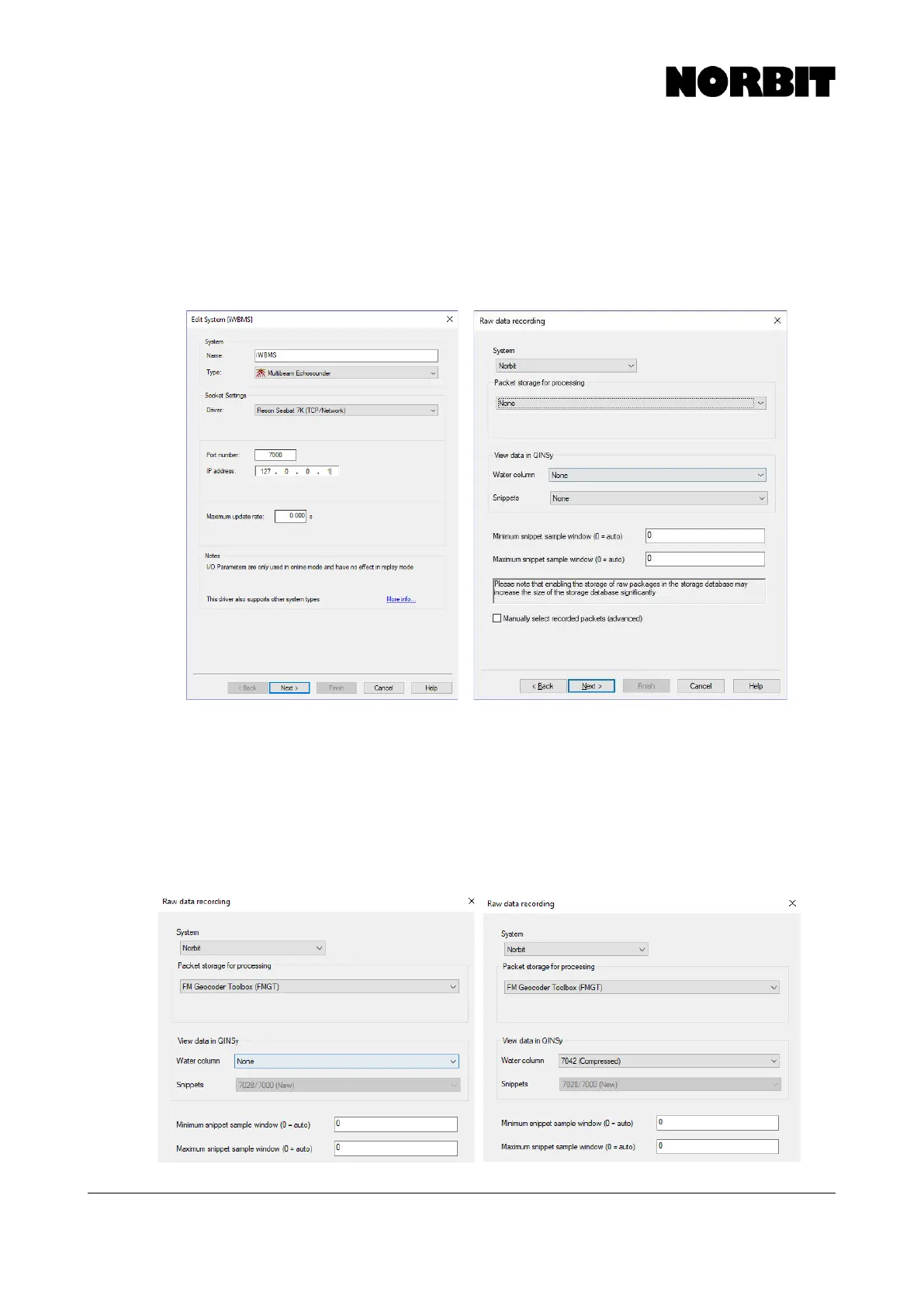
The system requires a name and type. The name can be user defined, e.g. NORBIT and the system
type, chosen from the drop-down menu is Multibeam Echosounder. Under socket settings select
the Reson SeaBat 7k (TCP/Network) driver. The port number is 7000 and the IP address is
127.0.0.1. Then click Next.
In the next window, Raw Data Recording, for standard bathymetric data collection select NORBIT
under System, None under Packet Storage, Water Column and Snippets. Note that the bathymetry
data automatically includes beam intensity values at the bottom detection point, which provides
coarse backscatter, separate from side scan and snippets.
Step 4. Configure Snippets and/or Water Column Recording (Optional)
To collect water column, users must select the 7042 (Compressed) option. To collect snippets but
no water column, configure the system as shown below on the left; for snippets and water column
see image on the right. Once configured, click Next.



 To Next Page