Installing and connecting a Series 2332 Access Point 39
Nortel WLAN Series 2332 Access Point Installation Guide
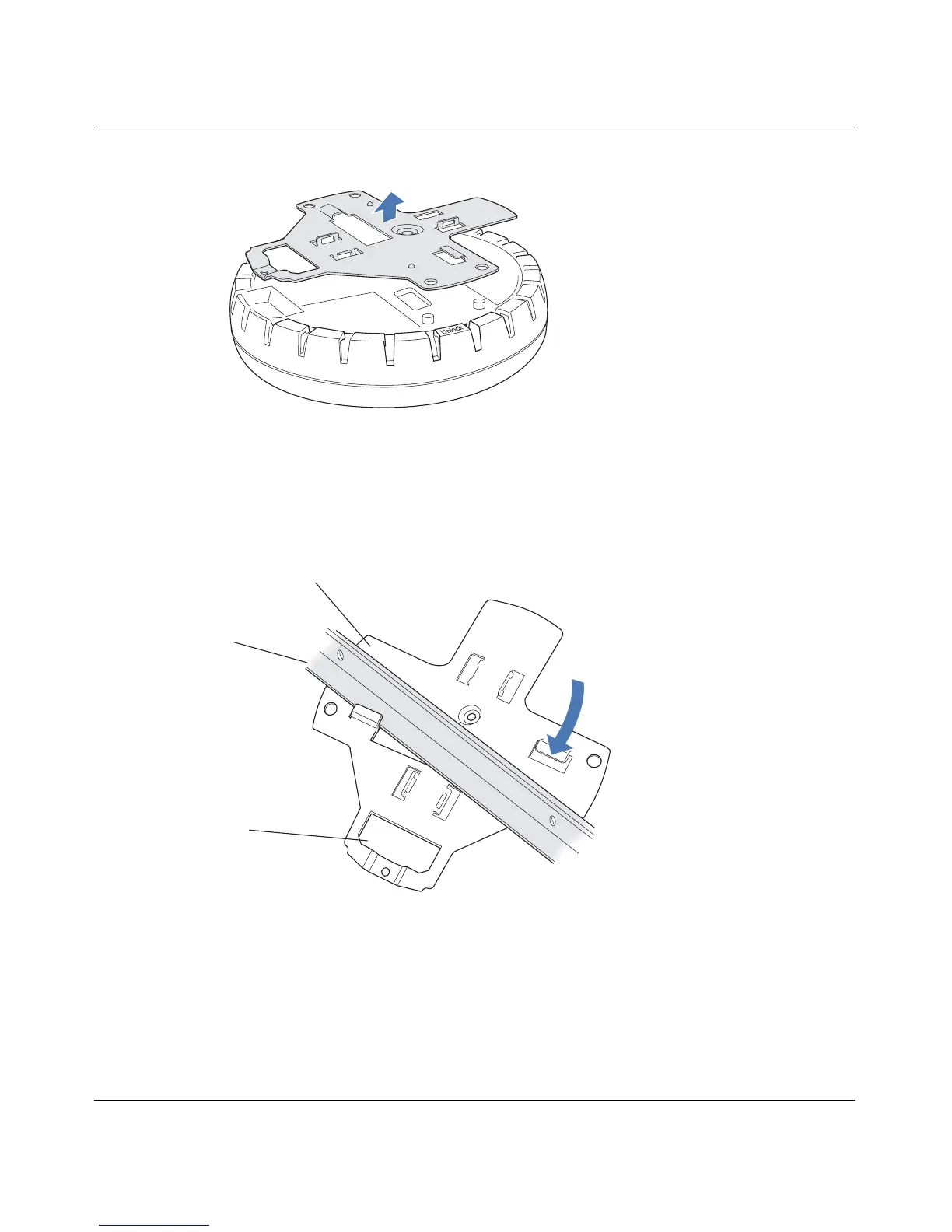
Figure 8. Step 6—Removing the Bracket
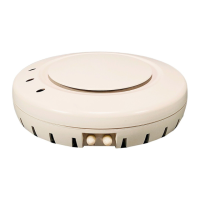
7 Install the universal mounting bracket as follows onto the T-bar or T-bar clamp:
a As shown in Figure 9, place the universal mounting bracket against the T-bar or clamp so that the
two screw holes face downward and the two T-bar flanges face upward and are adjacent to the T-bar
edges.
Figure 9. Step 7—Top View
b Properly align the bracket for mounting by placing the bracket so that its port connector opening is
to the left of the hole you cut for the cables.
c Rotate the universal mounting bracket clockwise until the flanges snap into place on the T-bar or
clamp as shown in Figure 10 on page 40.
840-9502-0008
T-bar
(Viewed from above ceiling tiles, looking down.)
840-9502-0005
Universal mounting
bracket
Port connector
opening


 To Next Page