44 Installing and connecting a Series 2332 Access Point
NN47250-302 (324136-A Version 01.03)
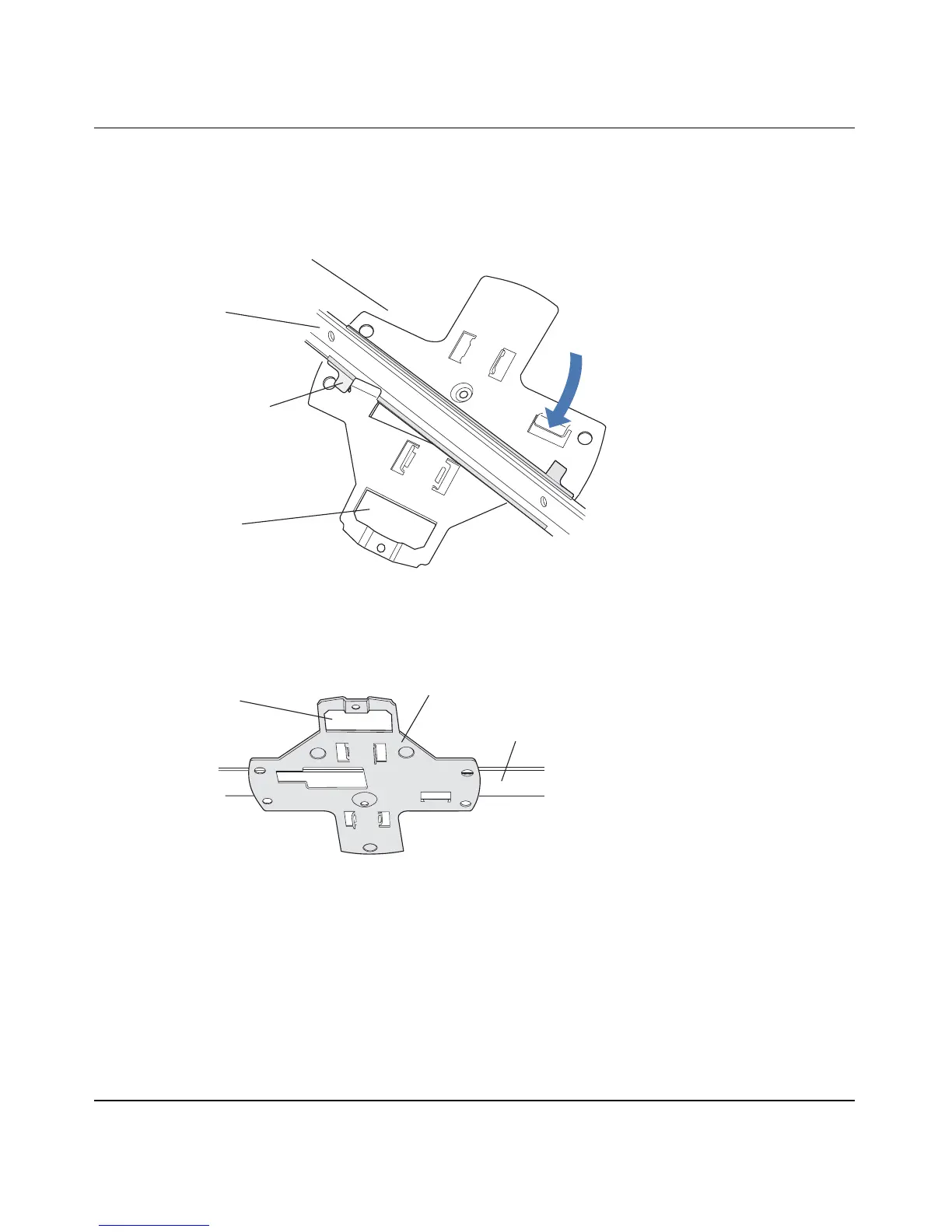
c Rotate the universal mounting bracket clockwise until the flanges snap into place on the T-bar clamp
as shown in Figure 18 on page 44.
Figure 17. Step 6—Top View
Figure 18. Step 6—Bottom View
7 Pull the Cat-5 cable about 15 cm (about 6 inches) out of the hole in the ceiling tile and through the port
connector opening to create enough slack to insert the cable.
8 Insert the Cat-5 cable into the connector.
9 Install the Kensington lock (optional).
a Loop the Kensington lock’s cable around an object that cannot be moved or damaged by a person
pulling on the cable.
b Insert the key into the Kensington lock.
c Insert the Kensington lock into the security slot on the AP.
d Rotate the key right or left to secure the lock to the AP.
T- bar
T-bar clamps
(attached
to T-bar)
Universal mounting
bracket
840-9502-0012
(Viewed from above ceiling tiles, looking down.)
Port connector
opening
T- b a r
Universal mounting bracket
840-9502-0004
Port connector
opening


 To Next Page