Installing and connecting a Series 2332 Access Point 43
Nortel WLAN Series 2332 Access Point Installation Guide
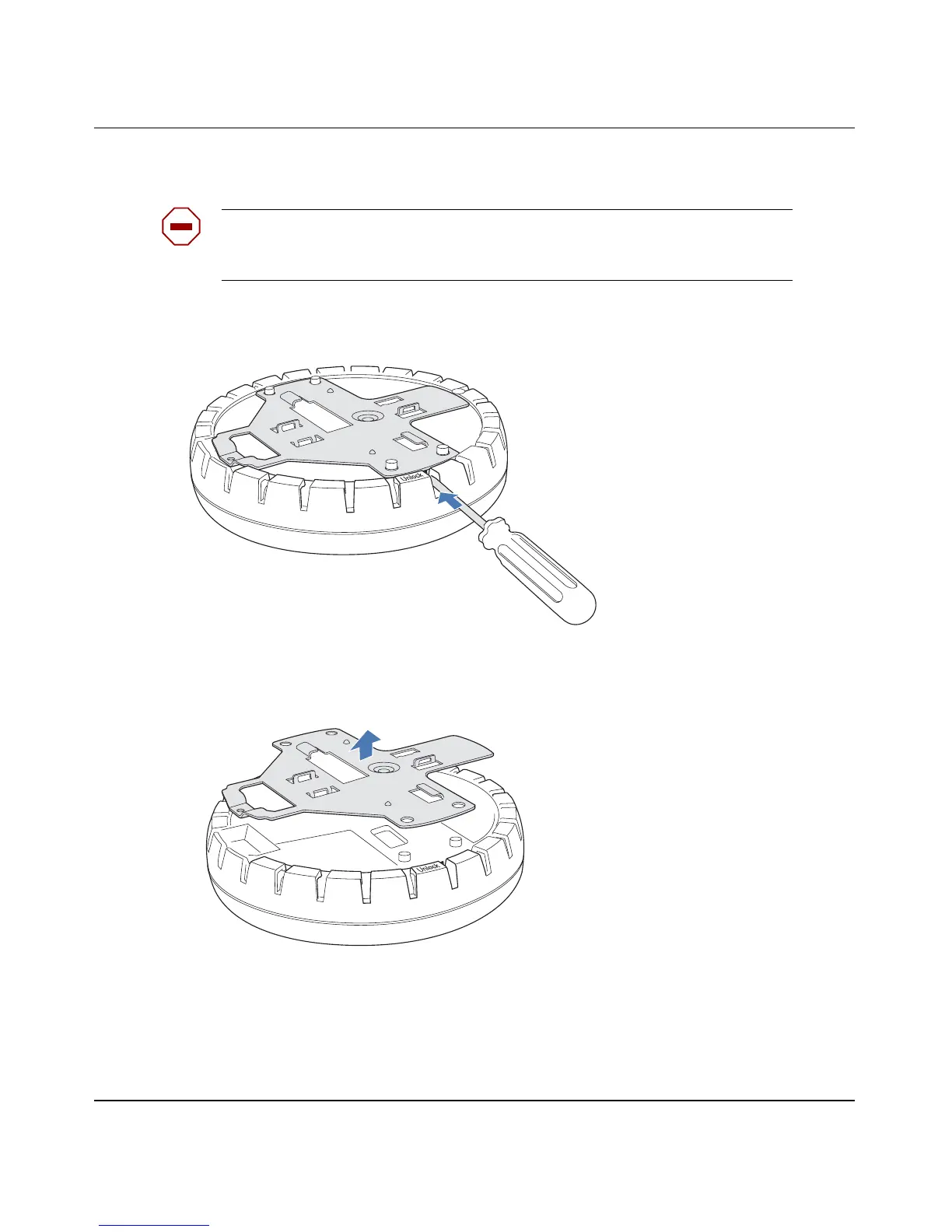
4 Unlock the universal mounting bracket from the AP by inserting the 3-mm or 1/8-inch screwdriver into
the Unlock hole on the AP as shown in Figure 15.
Figure 15. Step 4—Unlocking the Bracket
5 Remove the bracket as shown in Figure 16 on page 43.
Figure 16. Step 5—Removing the Bracket
6 Install the universal mounting bracket as follows onto the T-bar clamp:
a As shown in Figure 17, place the universal mounting bracket against the T-bar clamp so that the two
screw holes face downward and the two T-bar flanges face upward and are adjacent to the T-bar
edges.
b Properly align the bracket for mounting by placing the bracket so that its port connector opening is
to the left of the hole you cut for the cables.
Caution! To avoid damage to the AP’s lock mechanism or electronic
components, do not use excessive force when inserting a tool into the Unlock or
Lock hole.
840-9502-0011
840-9502-0008


 To Next Page
 Loading...