Defining trunk module types and settings 143
Programming Operations Guide
Configuring the trunk module to line type
Follow these steps to define the modules to the system:
1 Click on the keys beside Resources, Media Bay Modules, Bus <number>, and Modules on
Bus.
2 Click on the Module <number> you want to program.
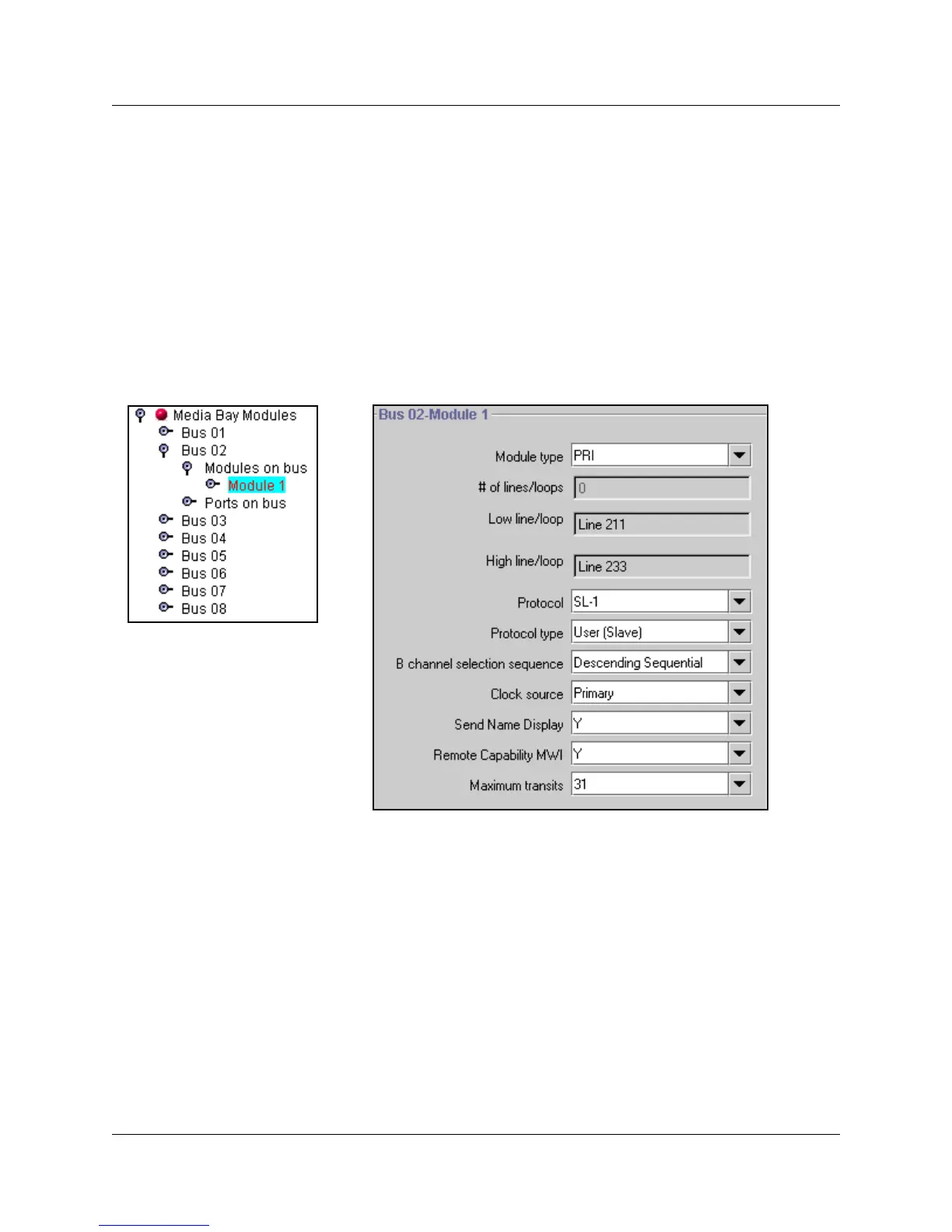
The Bus <number>-Module: <number> screen appears. The following figure shows an
example of the fields that display for a PRI module type.
Figure 37 Example of PRI module settings
3 Click on the arrow beside the Module type field and choose the correct setting that defines the
type of lines for the module.
The module installed in the system and Module Type must match the defined type of loop or
trunk and associated services provided by the central office line that you intend to be
connected to the module.
Note: When you configure a media bay module for PRI or BRI, the system may download
new software to the module. This takes a couple of minutes to complete. Allow the download
to finish before continuing to program the module.
4 Press <TAB> on your keyboard to update the record.
Tips: To refresh the record, you may need to click on another navigation tree heading and then
re-enter the module record you were working on.



 To Next Page