– 61 –
4 USING THE DEVICE
4.1 User modes
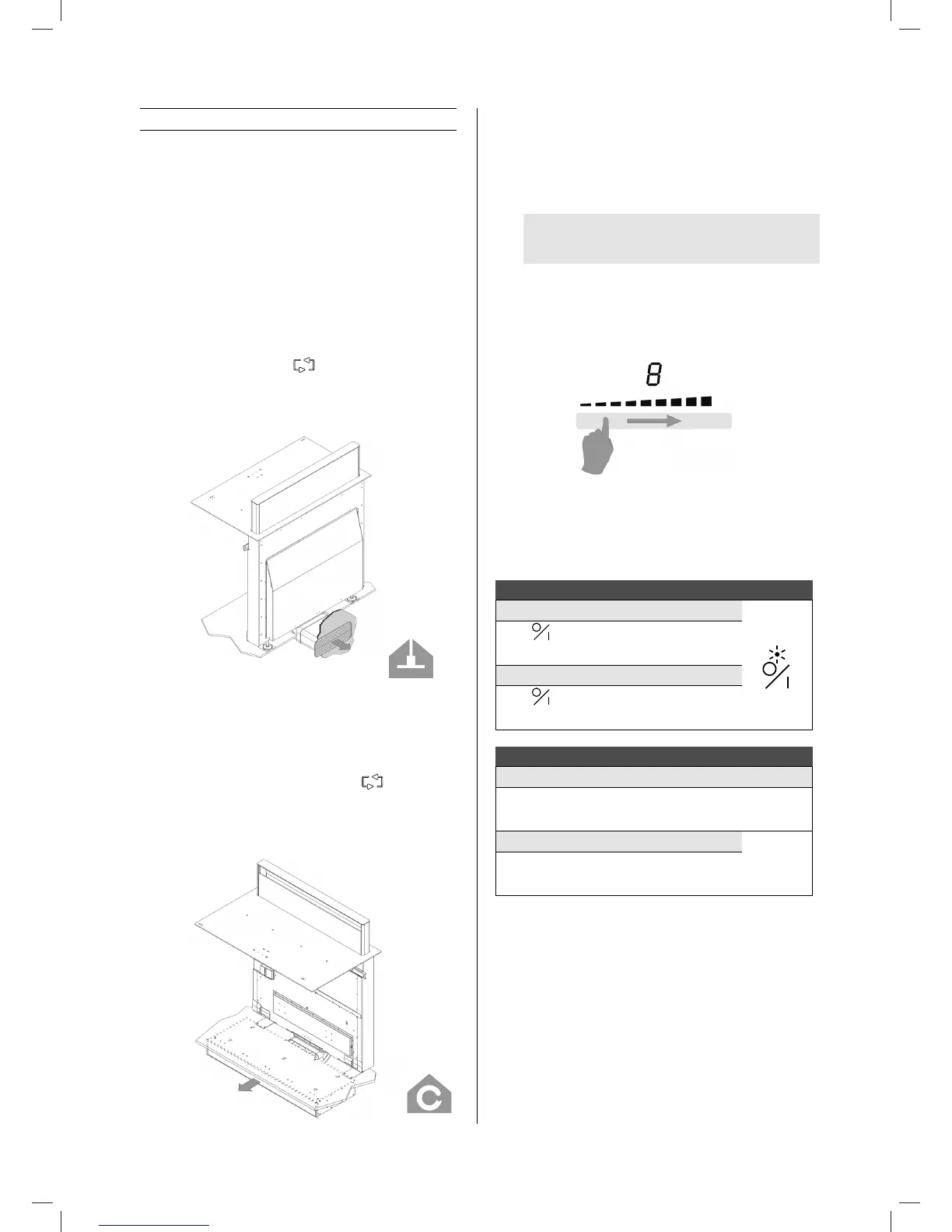
This device can be used in the exhaust or recirculation mode
(standard setting upon delivery)
4.1.1 Exhaust mode
The air sucked in is rst cleaned by the grease lters before
being removed to the outside. This can be achieved by making
use of a series of channels connected between the device and
a wall exhaust cover.
To set the device in exhaust mode, press and hold the key
combination
+
and
‐
and for 3 seconds when the
extraction tower is closed.
The led next to the Cleaning indication for recirculation lter will
blink 3x.
4.1.2 Recirculation mode
The air sucked in is rst cleaned by the grease lters. The
scents are then removed in the Monoblock recirculation lter
before re-entering the kitchen.
To set the device in recirculation mode (default setting), press
and hold the key combination
+
and
‐
and for 3 seconds
when the extraction tower is closed.
The led next to the Cleaning indication for recirculation lter will
be on for 3 seconds.
4.2 Control keys and slide operation
The device is equipped with touch control keys with which you
can set the various functions. Touching the control key operates
the function. Activating a function will cause a light, reading
and/or sound signal to be displayed.
WARNING: Do not push multiple control keys
simultaneously during normal use.
In order to select power, simply glide your nger over the slider,
just below the LED indication.
You can also access a certain level directly by using your nger
to select the desired level.
Zone for slider control
4.3 Controlling the hob
4.3.1 Switch on and off
Switching the hob on and o:
Switch on
Press and continue to hold for 2 sec
The LED will light up
Switch o
Press
LED goes out
Switching a cooking zone on and o:
Set up Display
Slide from left to right on the slider
(Power control)
0‐9
Switch o
0
H
Slide from right to left on the SLIDER until the
display shows
0
or
H
= "Hot".
If there is no control input within 20 seconds, the electronics will
return to the wait position.
4.3.2 Pan detection
This hob is equipped with an interactive control system that
makes use of the hob even easier.
When you place a pan on the hob, it is automatically detected.
You will also see a
0
to show you which slider to use for the
zone in question. The pan detection ensures optimum safety.
1821_110119_GA2.indd 61 19/02/18 23:14


 To Next Page