– 64 –
The recall procedure is as follows:
– Push the control key
– Push
II
before the ashing stops.
The previous settings are now active again.
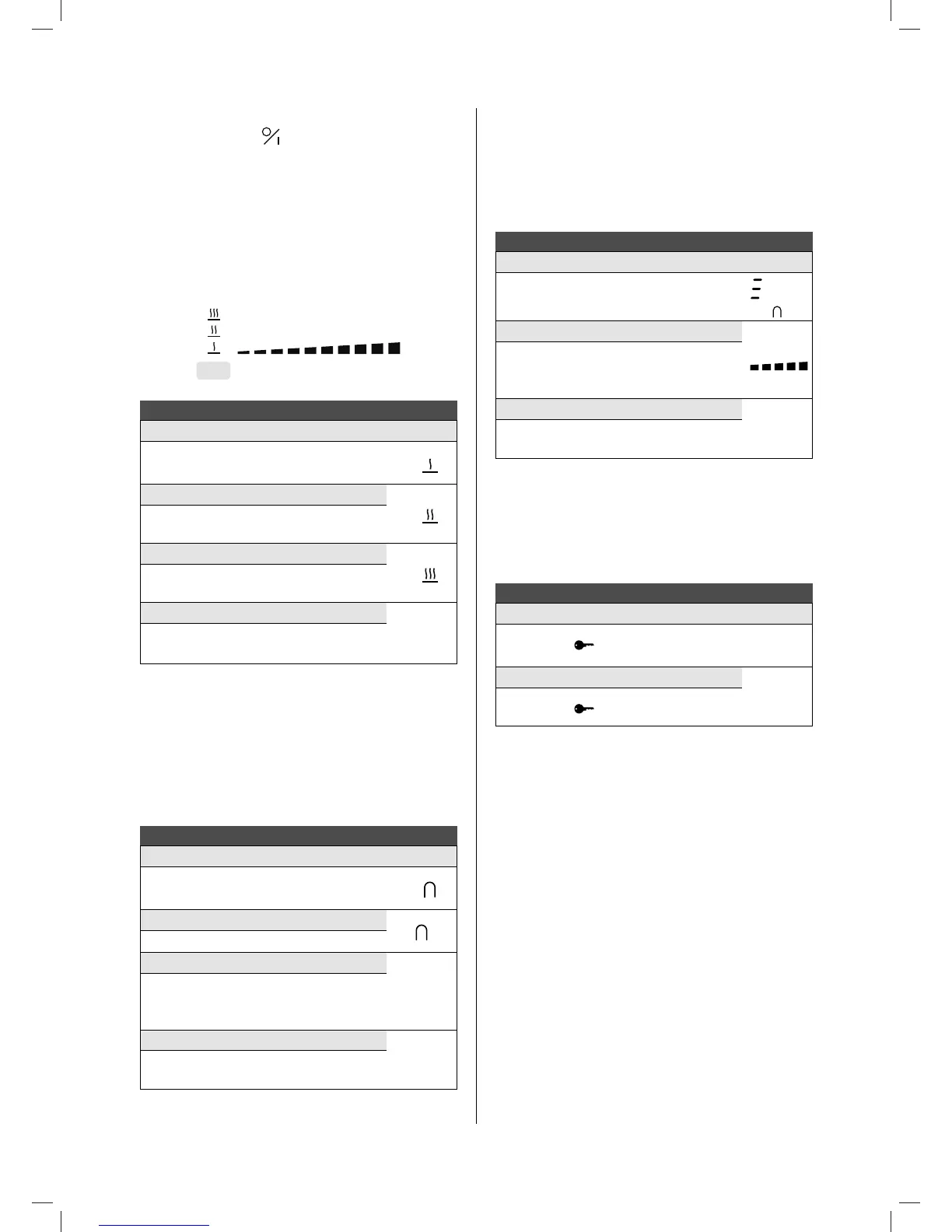
4.3.9 Keep warm function
This function makes it possible to automatically reach and
maintain a temperature of 42°C, 70°C or 94°C.
This prevents pans overowing or your food sticking to the
bottom of the pans.
8
Switching the keep warm function on and o:
Keep warm 42° Display
Press [Keep warm control key] once
U
Keep warm 70°
U
Press [Keep warm control key] twice
Keep warm 94°
U
Press [Keep warm control key] 3 times
Switching the keep warm function o
0
Glide your nger over the slider
0
to
9
or press [ Keep warm control key ] until [ 0 ]
The maximum duration of the keep warm function is 2 hours.
4.3.10 Bridge function
This function allows you to link the 2 left and 2 right zones so
they operate as 2 large zones. This function can be activated
manually, or automatically should a large pot/pan be placed on
the cooking surface.
Bridge function:
Manual activation Display
Simultaneously press [Keep warm control key]
of the 2 zones A1, A2 or B1, B2 to be linked.
0
Automatic activation
Place a pot on the zones A1, A2 or B1, B2.
Increase the power
0‐9
Glide your nger over the left slider until you
reach the desired power, both zones display the
chosen power.
Switch bridge function o
0
Simultaneously press [Keep warm control key]
of the 2 zones to be linked.
4.3.11 Grill function
This special cooking function optimises heating and warming
in a cast iron pot/grill plate. This will ensure improved results
of the food you are cooking. The zones A1 and A2 or B1 and
B2 will be automatically linked to one another using the bridge
function.
Grill function:
Activate Display
Simultaneously press the slider of the two
cooking zones A1, A2 or B1, B2.
ashes
Increase the power
Glide your nger over the left slider until you
reach the desired power; both zones display
the chosen power.
Switch grill o
Simultaneously press the slider of the two
cooking zones.
4.3.12 Locking the controller
To avoid a hob selection being changed, during cleaning for
example, the controller must be locked (except the on/o
button).
Locking:
Lock Display
Hold nger on
for 6 seconds
LED
lights:
Unlock
LED
goes out
Hold nger on
for 6 seconds
1821_110119_GA2.indd 64 19/02/18 23:14


 To Next Page