NOTICE
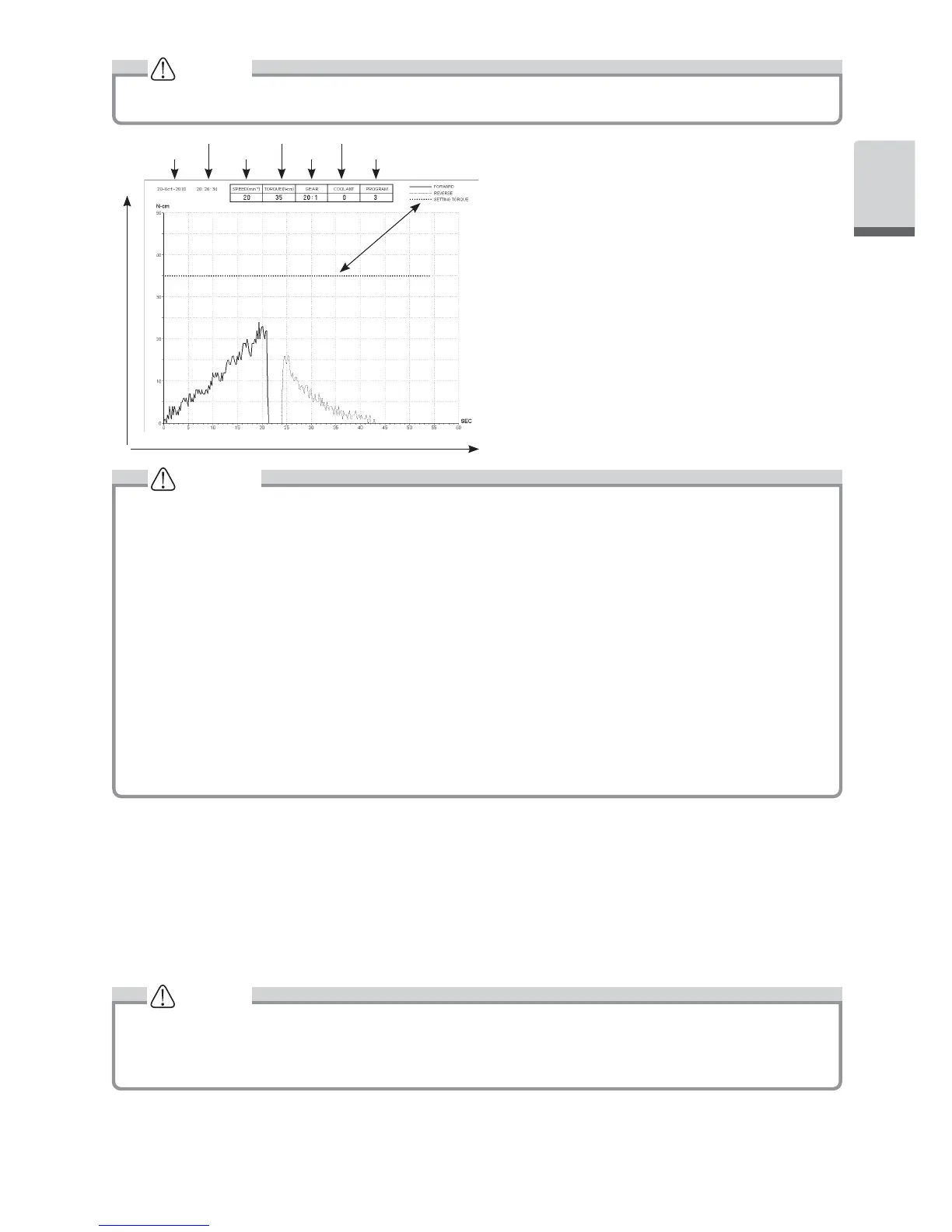
A BMP file can only be created only when Gear Ratio is 20
:
1 and the number of rotations is 50min
-1
or less.
Torque
Time
Time
Date
Torque
Rotation Speed
Gear Ratio
Irrigation Volume
Program Number
• Total recording time is about 100 minutes.
•
Do not insert a USB flash drive during operation. Only insert after operations are completed in order to store data.
• Do not use data stored in USB flash drive for diagnostic purposes.
• Do not use a USB flash drive other than USB 2.0. (To 32GB verification being complated)
• Do not remove USB flash drive while the LED lamp is on or blinking. (During the blinking, USB flash drive is
communication with the system)
•
This device is not guaranteed to work with all USB flash drive. It may not work with USB flash drive with security
functions or those which use a great deal of electricity.
• Do not turn the device on or off with the USB flash drive inserted.
• Be careful to insert the USB flash drive in the correct direction.
• When a USB flash drive is not connected, close the cover of the connector.
• The LED displays and their meanings are given below:
lamp on = internal memory is copying data, blinking = USB flash drive is storing data.
• If power is turned off, the internal memory will be erased. Turn off power after storing data on USB flash drive.
CAUTION
6-5-1 Internal memory
After power is turned on and the motor begins to rotate, memorizing will begin automatically (A USB flash drive need
not be connected).
6-5-2 Transmitting stored data
Insert a USB flash drive. (When correctly recognized, the USB flash drive mark will appear on the LCD).
Push the USB REC key to copy stored data onto the USB flash drive (The USB REC light will be on while it is
copying data).
1)
2)
• Distinguish rotating direction and torque that has been set using line types.
•
While in operation (memorizing), the USB REC LED will light up. About 10 seconds after operation stops, the LED
light will turn off and memorizing will stop temporarily (The time counter will also stop temporarily).
6-5-3 Resetting
Press the USB REC key for at least 2 seconds. The amount of remaining recording time will be reset after the
beep goes off (Initialized time: 100 min).
NOTICE
*BMP File
Set torque index
15
English


 To Next Page