generator charges the battery while running through the power
converter.
Check that the battery liquid level is correct (weekly in warm
climate, monthly in cold climate). Using protective gloves,
take the caps off the battery. Look for a ‘fill line’ inside the
battery wall. If the fluid is below the line, add distilled water
as required. Remember to also check the condition of your
truck battery.
Clean battery terminals and cable periodically using a wire
brush and baking soda. Be sure the caps are securely in place
when cleaning. Be sure the wing nuts on top of the battery are
tight. Loose wing nuts can cause arching and intermittent, or
loss of, 12-volt power. Use caution not to touch battery
terminals to metal door frame when removing or installing the
battery. Always disconnect the negative (-) cable first and
reconnect it last.
Remove rings, metal watchbands, and other metal jewelry
before working around a battery. Use caution when using
metal tools. If the tool contacts the battery terminals or metal
connected to them, a short circuit could occur which could
cause personal injury or fire.
DO NOT allow battery electrolyte to contact skin, eyes,
fabrics, or painted surfaces. The electrolyte is a sulfuric acid
solution that could cause serious personal injury or property
damage. Wear eye protection when working with batteries.
Battery Storage Precautions
When you store your camper for a week or more be sure to
disconnect the battery(s). Electronic tuning radios, the propane
detector, and the CO detector all draw a small amount of
current when the battery is connected. Even disconnected
batteries will naturally “self-discharge” about 1 % of capacity
per day. If you intend to store your camper for any length of
time, remove the battery(s). Store it in a cool, dry place and
recharge every month. Batteries will discharge on their own.
Recharging will also help prevent problems with battery
sulfating which leads to premature battery failure.
Battery Charging
Normally the battery(s) will be kept charged by either the
truck charging system while on the road, solar panel, or by the
AC/DC power converter when plugged into AC service. On
those occasions when the battery needs to be charged from a
different charging source, please follow these safety
guidelines:
Disconnect both cables to prevent damage to the
camper’s electrical system
DO NOT smoke near batteries that are being charged
or which have recently been charged. Please note that
batteries are being charged while you drive, and
while you are connected to 120-volt AC power
through the power converter/charging circuit.
Use care when connecting or disconnecting booster
leads or cables while charging. Poor connections are
a common cause of electrical arcs that can cause
explosions.
Check and adjust the electrolyte level before
charging. Fill each cell to the indicator level with
distilled water. Always remove the vent caps (if
equipped) before charging the battery.
Never expose the battery to open flame or electric
spark. Chemical action in the battery generates
hydrogen gas that is flammable and explosive.
To avoid sparks, turn off all electrical components
before connecting the battery cables. Connect the
black or red to the positive (+) post on the battery.
Connect the white cable to the negative (-) post.
NOTE: This is different than the automotive industry which
uses red and black. There are fuses on the front of the power
converter that will protect the camper’s electrical system if
you accidentally connect the battery in reverse.
The 40-amp main circuit fuse will not allow power into the
camper or the battery(s) to be charged when an overload or
short circuit occurs. To reset replace the 40-amp fuse, If the
fuse continues to burn out, a short circuit or overload
condition is indicated. Have the system checked by qualified
personnel.
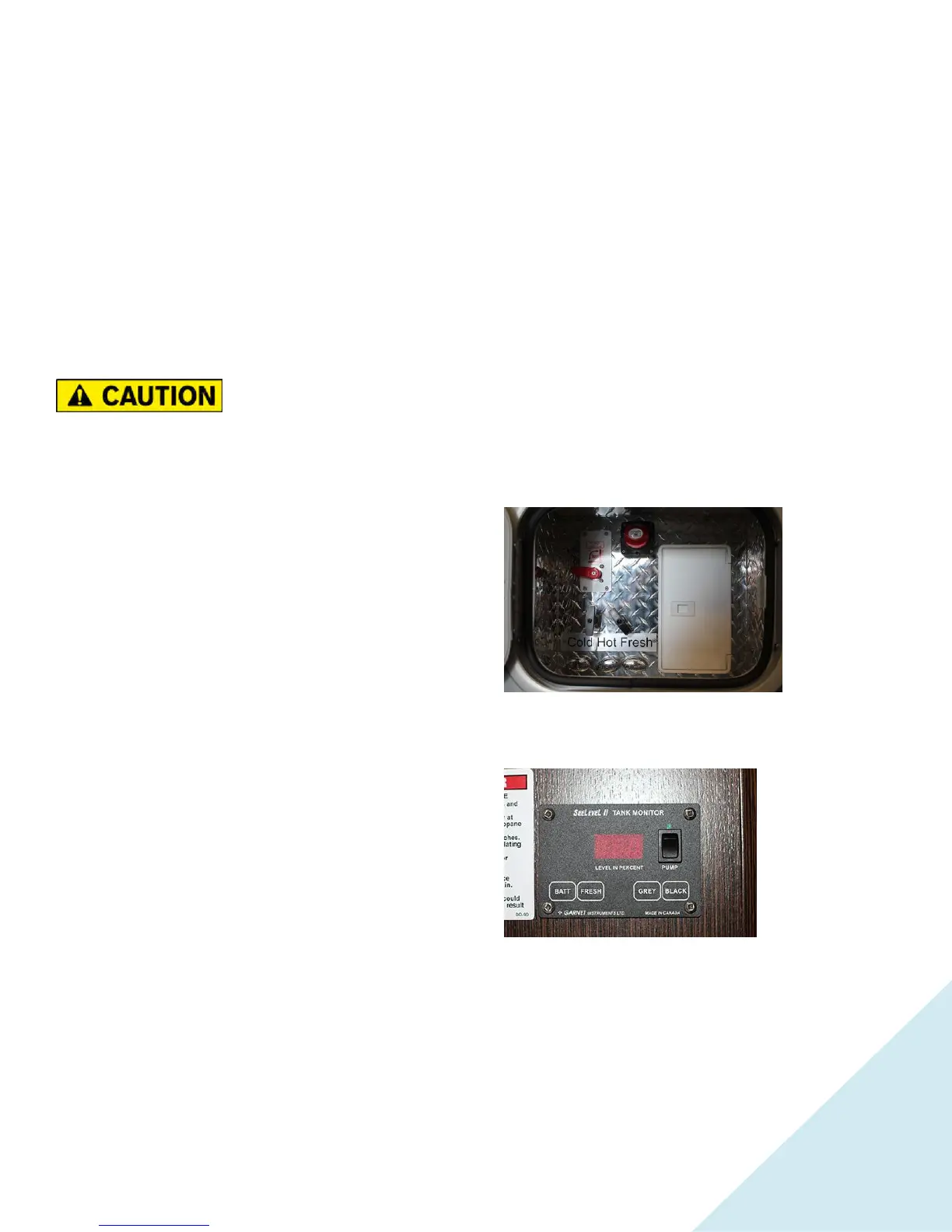
Battery Disconnect Switch
While in storage
use, the battery disconnect switch to help with slowing down
the discharging of the battery.
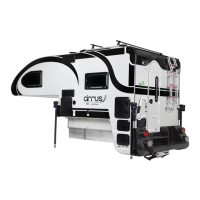
System Monitor Panel
The systems
monitor panel may
incorporate controls
and instrumentation
for the water and
holding tank levels,
battery voltage
level, water pump
switch.
Monitor Panel –
Level Indicator Switch
When depressing the monitor switch, indicator lights for the
black (waste), grey (sink and shower), and fresh water, (for
drinking and cooking) tank will illuminate, indicating the
existing condition of each component. The battery level is a
digital display that reflects the battery voltage when the switch
is depressed.


 To Next Page