EasyManua.ls Logo

Nuga N6 - Controller Interface Overview; Controller Key Functions; Controller Display Layout; Display Configuration

Default Icon
24 pages
Print Icon
To Next Page IconTo Next Page
To Previous Page IconTo Previous Page
Loading...
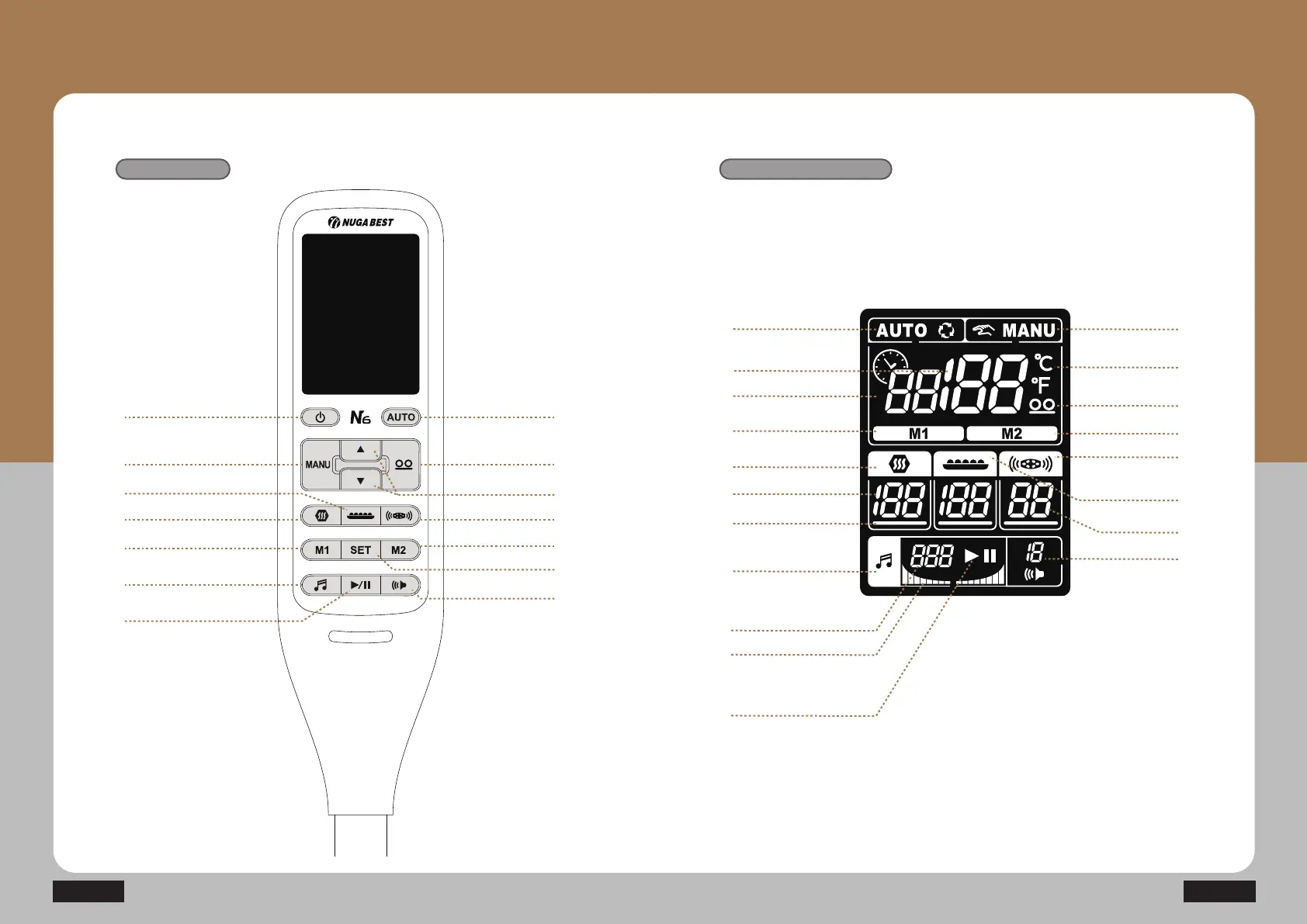
Descriptions for Controller Buttons
Controller keys
Power on / off
Controller display setup
20
N6
21How to Use the Product
Auto Mode
Manual Mode
Internal Projector
Mode 2
Low frequency
Volume
Low-frequency
intensity
External Projector
(abdomen heating pad)
Temperature display
Remaining time
Set temperature for
the internal projector
Mode 1
Auxiliary heating part
Sleep music
Selection cursor
Set temperature
Current track
Equalizer
Play / Pause
Manual Mode
Auxiliary heating part
External Projector
(abdomen heating pad)
Mode 1
Sleep music
Play / Pause
AUTO Mode
Internal Projector
Low frequency Pad
Up / Down
Mode 2
Volume control
Preheating SET
Display setup

Related product manuals