Caution
Ensure checking out the following before applying for A/S if any abnormality
occurs from the product.
The product might fail to operate normally even without any failure if you use
it with no right understanding on how to use it.
Self-check Items Before any A/S Request
38
N6
39Product Storage and Care
Caution
There might be risk of injuries or fire if you fail to check out the
following. Make sure that you check out the following.
Check before use
1. Is the power cord connected to an outlet?
2. Is the controller operating well?
3. Is the temperature indication displayed on the
temperature indicator window on the controller?
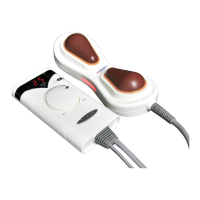
4. Is the temperature of the projector not too high?
5. Is the temperature of the auxiliary heating part
not too high?
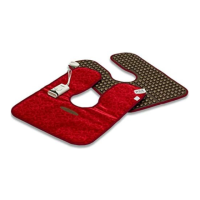
6. Is the power supply for both the internal and external
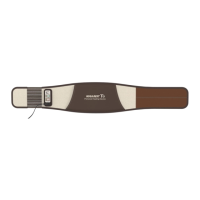
projectors(abdomen heating pad) turned on?
7. Did you check out conditions for any damage to the
power cord or cable conditions?
Check after use
1. Is the controller power turned off?
2. Is the power lamp on the projector turned off?
3. Is the power switch turned off to the point?
4. Is the power cord separated from the outlet?
Yes No
Yes No
Yes No
Yes No
Yes No
Yes No
Yes No
Yes No
Yes No
Yes No
Yes No
Checklist for any abnormality on the controller
① Turn on the main power switch.
② Check out if the power cord is accurately connected.
③ Check out if the fuse inside the main power switch
is disconnected.
④ Please check the error code on the controller.
① Check out if the power cord is accurately connected.
② Check the error code on the controller display.
Do not disassemble the product but contact your nearest
supplier or A/S center.
Check out if the low frequency connector is connected
accurately.
This warning message is shown when the heater bar of
internal heating element is not functioning properly.
In this case, replace the heater bar to fix the problem.
Do not disassemble the product but contact your nearest
supplier or A/S center.
It is a safety message due to failure in the heating lamp for
the external projector(Abdomen heating pad).
The product will operate if you replace the heating lamp.
Do not disassemble the product but contact your nearest
supplier or A/S center.
Checklist for operations of the low frequency pad
Checklist for any abnormality on the internal projector
If various indicator lamps
on the controller are
not operating;
If the internal projector
is not operating;
If the low frequency pad
is not operating;
In case of a warning message
with error codes, E1, E3 or E5,
for the internal projector,
is displayed
In case of a warning message
with the error code, E1,
for the external projector
(Abdomen heating pad),
is displayed



 To Next Page