6002 addressable control and indicating equipment
User Manual
6
31-0019-r04_2018-08
© 2017, 2018 Ambest Electronics (Ningbo) Co Ltd. All rights reserved.
All specifications and other information were current at the date of publication and subject to change without notice.
3. CONDITIONS
3.1. Quiescent Condition
The Quiescent Condition is the normal condition for the control and indicating equipment. In the Quiescent
Condition, only the SYSTEM LED is on.
3.2. Alarm Condition
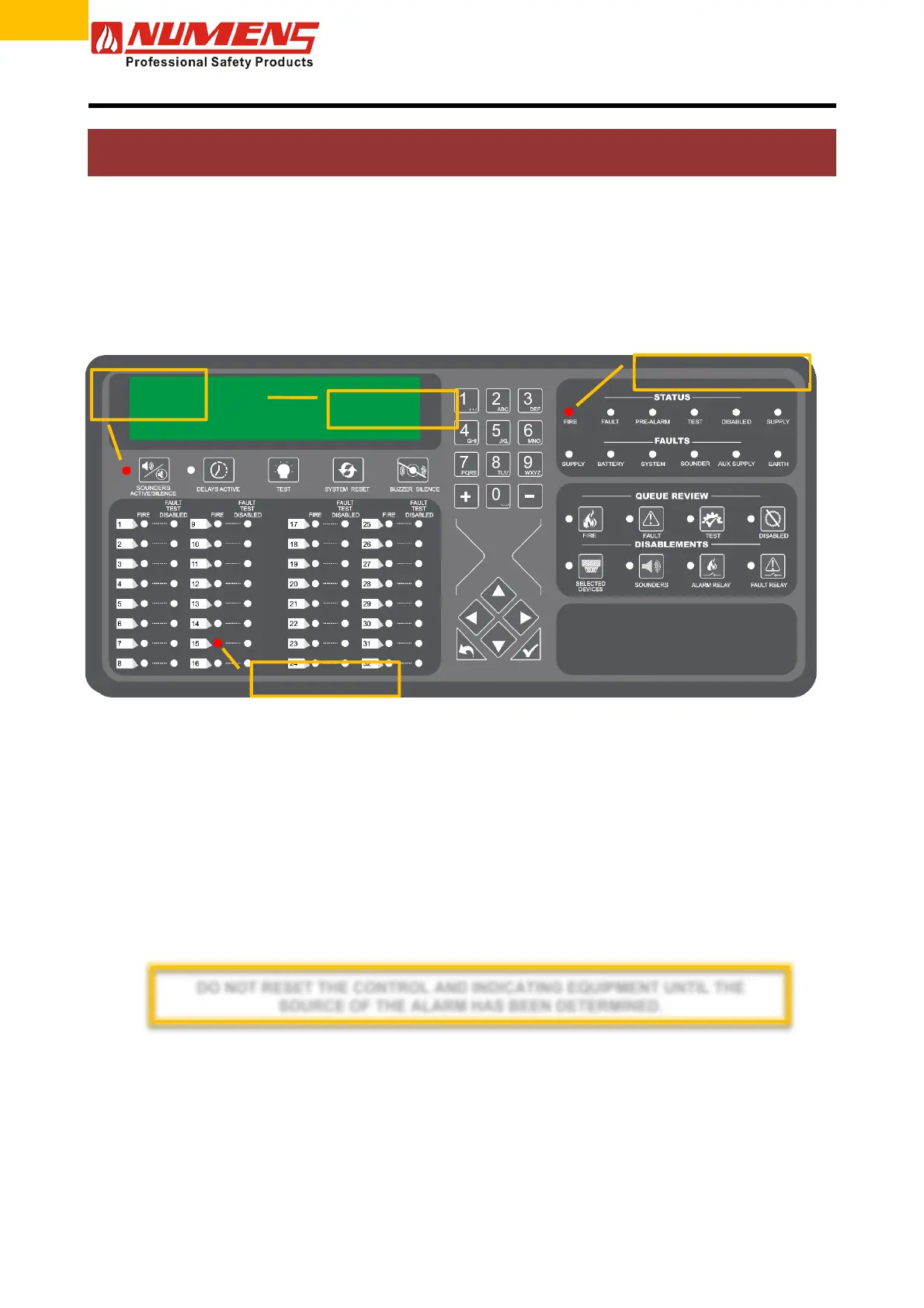
When the control and indicating equipment enters the Alarm Condition, the audio/visual alarm devices and
output modules will operate according to their configuration programming.
Figure 2 – Alarm condition indications
3.3. Actions During the Alarm Condition
3.3.1. Fire Investigation
After the control and indicating equipment enters the Alarm Condition, take the following actions.
1) Insert the key and enable the controls. The CONTROLS ACTIVE LED will be on steady.
2) Enter Access Level 2.
3) Press the
button to acknowledge the Alarm. The FIRE LED will be on steady.
4) Press the BUZZER SILENCE button to mute the internal sounder.
5) Read the details of the alarm event on the LCD and investigate the source of the Alarm Condition.
6) If the building or area needs to be evacuated, once the area(s) is cleared, silence the alarm devices by
pressing the SOUNDER ACTIVATE/SILENCE button. The SOUNDER ACTIVATE/SILENCE LED will turn
off. Alarm devices can be re-started by pressing the button a second time.
7) If the cause of the Alarm Condition was not a fire, enter Access Level 2 and press the SYSTEM RESET
button to reset the fire detection and alarm system.
8) If the cause of the fire alarm has not cleared, the control and indicating equipment will re-enter the Alarm
Condition. If this occurrence repeats, disable the zone and contact the service company.
The relevant alarm zone
FIRE LED will flash.
The ALARMS
ACTIVATE/SILENCE
LED will illuminate.
The FIRE LED will flash.
The internal sounder will o
erate.
The device in alarm
will display in the LCD.
DO NOT RESET THE CONTROL AND INDICATING EQUIPMENT UNTIL THE
SOURCE OF THE ALARM HAS BEEN DETERMINED.


 To Next Page