6002 addressable control and indicating equipment
User Manual
7
33-0019-r04_2018-08
© 2017, 2018 Ambest Electronics (Ningbo) Co Ltd. All rights reserved.
All specifications and other information were current at the date of publication and subject to change without notice.
3.3.2. Multiple Devices in Alarm
If more than one device is signaling a fire alarm, the QUEUE REVIEW FIRE LED will flash. Press the FIRE
button to scroll through the list of devices.
Once all devices in alarm have been viewed, the QUEUE REVIEW FIRE LED will be on steady. After 20 s, the
LCD will revert to the first fire alarm event.
3.3.3. Audio/Visual Alarm Device Silence/Activation
The audio/visual alarm devices will activate during the Alarm Condition. If all occupants have evacuated the
building, or the cause of the Alarm Condition was not a fire, then the alarm devices (both audible and visual)
can be silenced. To silence/active alarm devices, take the following actions:
1) Enter Access Level 2.
2) Press SOUNDER ACTIVATE/SILENCE button. The SOUNDER ACTIVATE/SILENCE button will toggle the
audio/visual alarm devices between off and on.
3) To exit to Access Level 2, press button twice.
3.3.4. Delays Active Override
If Alarm Condition delays have been configured, audio/visual alarm devices and output module activations will
be delayed until the pre-set time has expired. When delays have been configured and an alarm is received
from an initiating device, the DELAYS ACTIVE LED will be on.
To override pre-programmed delays to the Alarm Condition, take the following actions:
1) Insert the key and enable the controls to enter Access Level 1. The CONTROLS ACTIVE LED will be on
steady.
2) Press the DELAYS ACTIVE button. The audio/visual alarm devices configured for operation will activate.
3.4. Fault Condition
When a fault occurs with a device or within the control and indicating equipment, the control and indicating
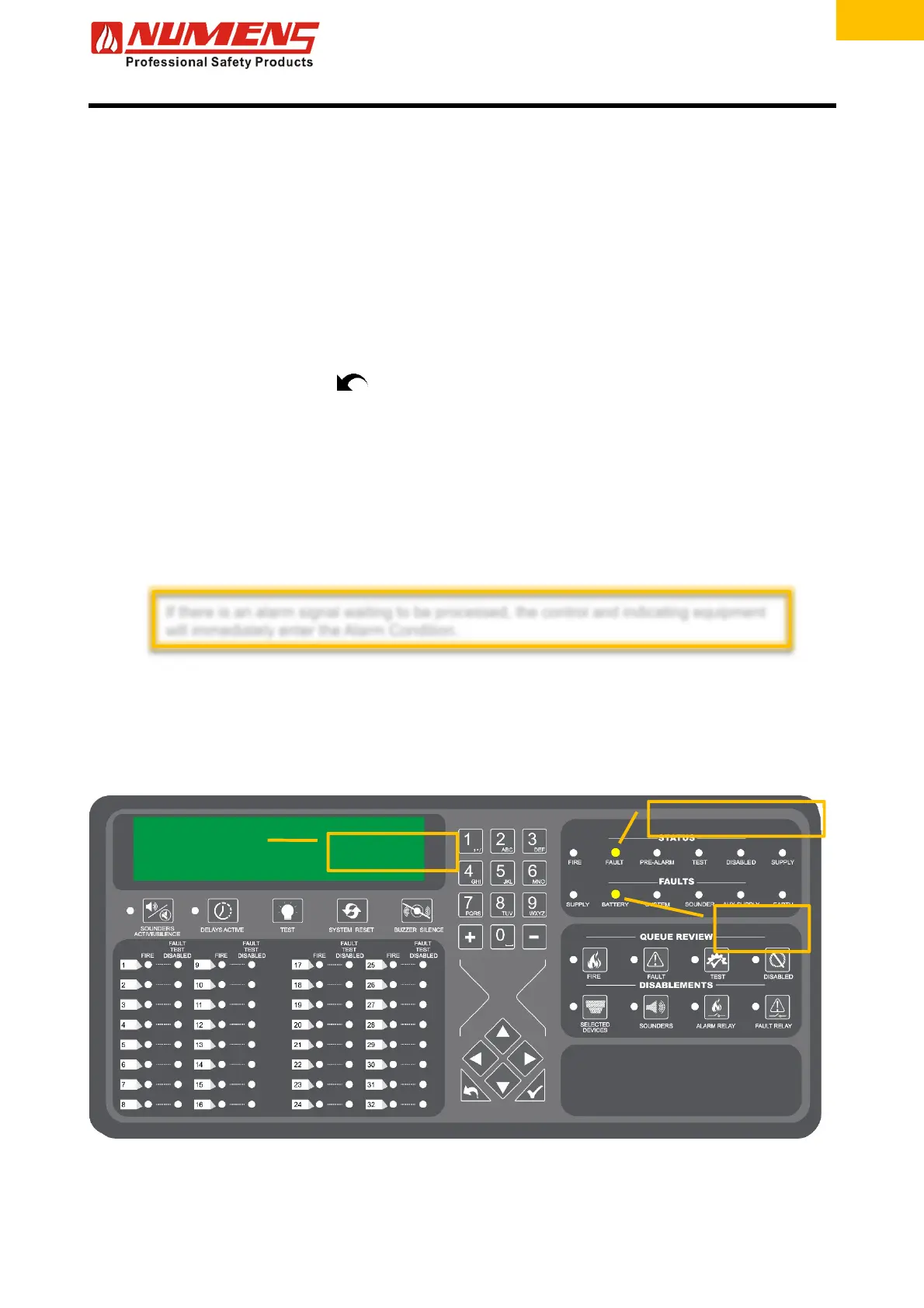
equipment will enter the Fault Condition. In the Fault Condition, the internal sounder will operate.
Figure 3 – Fault condition indications
The general FAULT LED will flash.
The internal sounder will o
erate.
The device in FAULT
will display in the LCD.
The fault type
will display as
a flashin
LED.
If there is an alarm signal waiting to be processed, the control and indicating equipment
will immediately enter the Alarm Condition.


 To Next Page