EasyManua.ls Logo

Nureva SPAN - Mount Boom and Projector; Attach Boom to Wall Plate; Attach Projector to Boom

Default Icon
28 pages
Print Icon
To Next Page IconTo Next Page
To Previous Page IconTo Previous Page
Loading...
12
February 2017
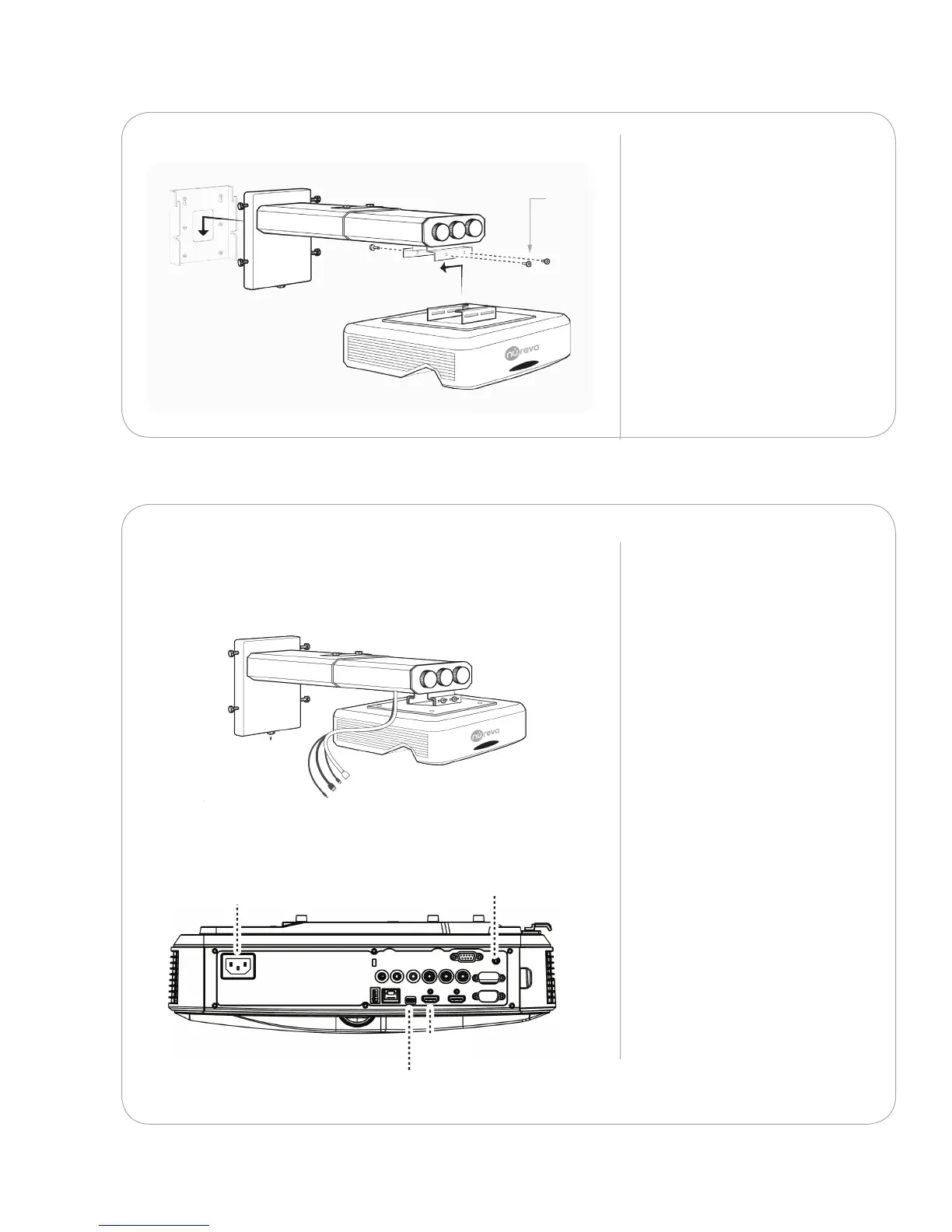
Attach the wall mount boom
to the wall mount plate.
Attach the projector to the
boom with four of the screws
provided.
Repeat with any remaining
booms and projectors.
p X4p X4p X4p X4
Q
3.1.4
Attach the cables from the
mount to the back of the
projector.
3.1.5
UP/DOWNUP/DOWNUP/DOWNUP/DOWN
PROJECTOR
POWER CORD
HDMI
MINI USB
TOUCH MODULE
POWER CORD
PROJECTOR
POWER CORD
PROJECTOR
POWER CORD
PROJECTOR
POWER CORD
HDMIHDMIHDMI
MINI USBMINI USBMINI USB
TOUCH MODULE
POWER CORD
TOUCH MODULE
POWER CORD
TOUCH MODULE
POWER CORD
X 4
Projector power
HDMI
Mini USB
Touch module power