Operating Instruction and Documentation
Sprinter NT
- 17 -
The vehicle must be positioned on the elastomer supports in a safe way, otherwise
there’s a danger that the vehicle might fall down.
• Check the dangerous places of the lift and be sure that there are no objects or
people in the immediate area of the lift or on the lift
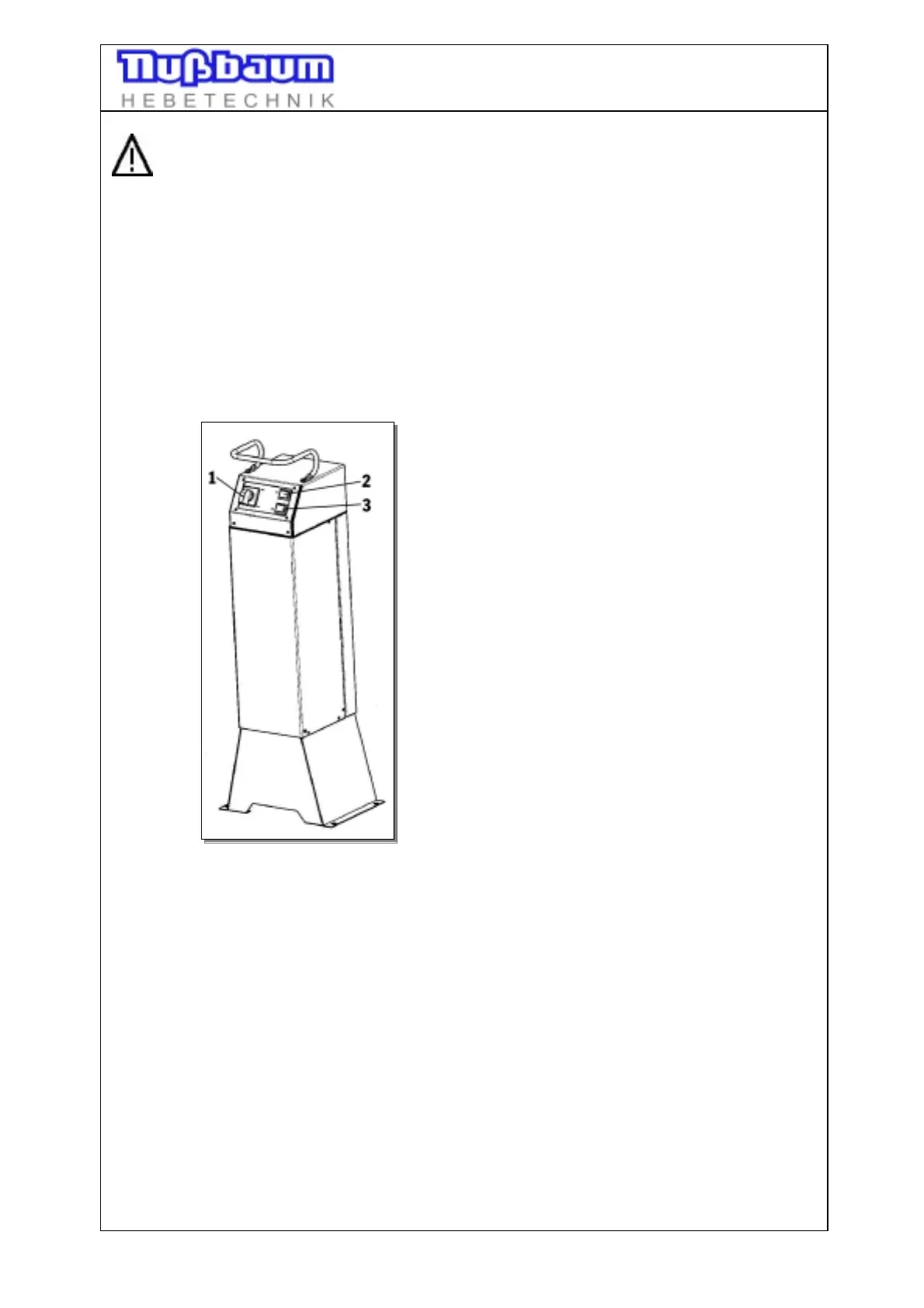
• Switch on the control system; main switch on position ”1” (see pic.1)
• Lift vehicle until the wheels are free. Press button ”lifting”. Check that the vehicle
is safety positioned.
• Lift the vehicle on the working height. Press the button „lifting“ .
• Observe the complete process.
Pic 1: Operating unit
1 main switch
2 button „lifting“
3 button „lowering“
5.2 Lowering the vehicle
• Control the dangerous places of the lift and be sure that there are no objects or
people in the immediate area of the lift or on the lift
• Lower the vehicle to the working height or until the platform reaches the lowest
point; press the button “lowering“
• Observe the complete process.
• If the lift is in the lowest position, remove the polymer-supports.
• Drive the vehicle out of the lift.




 To Next Page