30
How to use.
Selecting a Function
Press any of the Smart Cooking
Programs according to your
recipe.
Setting the Pessure level
Cooking Mode and Time
PRESSURE LEVEL:
Your Smart Pot has two pressure
levels – High Pressure and Low
Pressure. All pressure cooking
programs which include Soup/
Broth, Meat/Stew, Bean/
Lentil, Chicken, Egg, Canning,
Biryani, Porridge, Steam, and
Pressure Cook default to High
Pressure while Rice and Cake
defaults to Low Pressure. The
Low pressure level is used to
avoid overcooking tender food
materials such as vegetables
and for certain recipes that
may require using low pressure
setting.
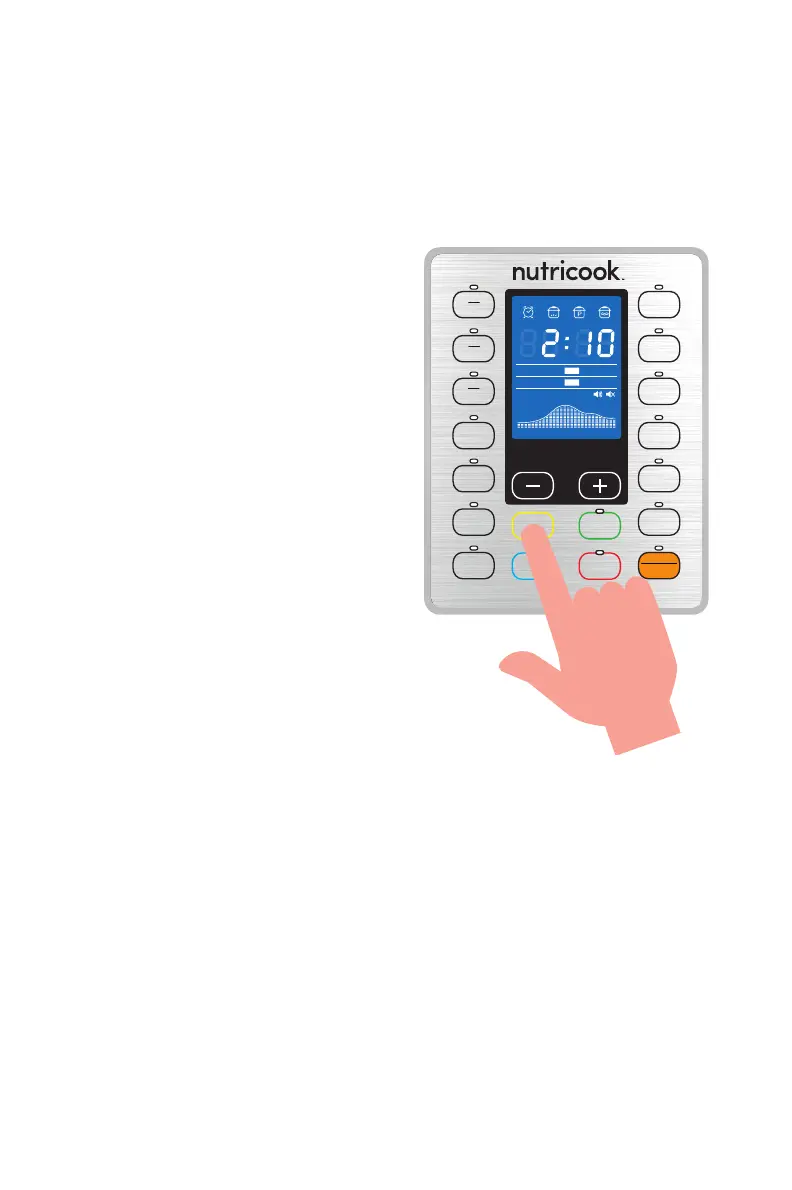
To set the desired pressure level
according to your recipe after
each program selection, press
Pressure button repeatedly to
switch between High and Low
Pressure.
NOTE: The pressure level has no effect on Slow Cook, Sauté and Yogurt functions.
SOUP
BROTH
ءﺎﺴﺣ/ﺔﻗﺮﻣ
Pressure
Mode
Less Normal More
Low
High
Pre-heating
Cooking Keep Warm
EGG
CANNING
ﺐﻴﻠﻌﺘﻟا
CAKE
MEAT
STEW
ﺔﻨﺨﻳ/ﻢﺤﻟ
BEAN
LENTIL
سﺪﻋ/ءﺎﻴﻟﻮﺻﺎﻓ
CHICKEN
جﺎﺟد
SLOW
COOK
ءﻲﻄﺑ ﻲﻬﻃ
SAUTÉ
ﺐﻴﻠﻘﺗ
DELAY
ﺮﻴﺧﺄﺗ
PRESSURE
ﻂﻐﺿ
KEEP WARM
CANCEL
ءﺎﻐﻟإ | ﺔﺌﻓﺪﺗ
PRESSURE
COOK
ﻂﻐﻀﻟا ﻲﻬﻃ
YOGURT
ﻦﺒﻟ
STEAM
رﺎﺨﺑ
PORRIDGE
ةﺪﻴﺼﻋ
BIRYANI
ﻲﻧﺎﻳﺮﺑ
RICE
زرأ
ﻚﻴﻛ
ﺾﻴﺑ


 To Next Page