NUVO
®
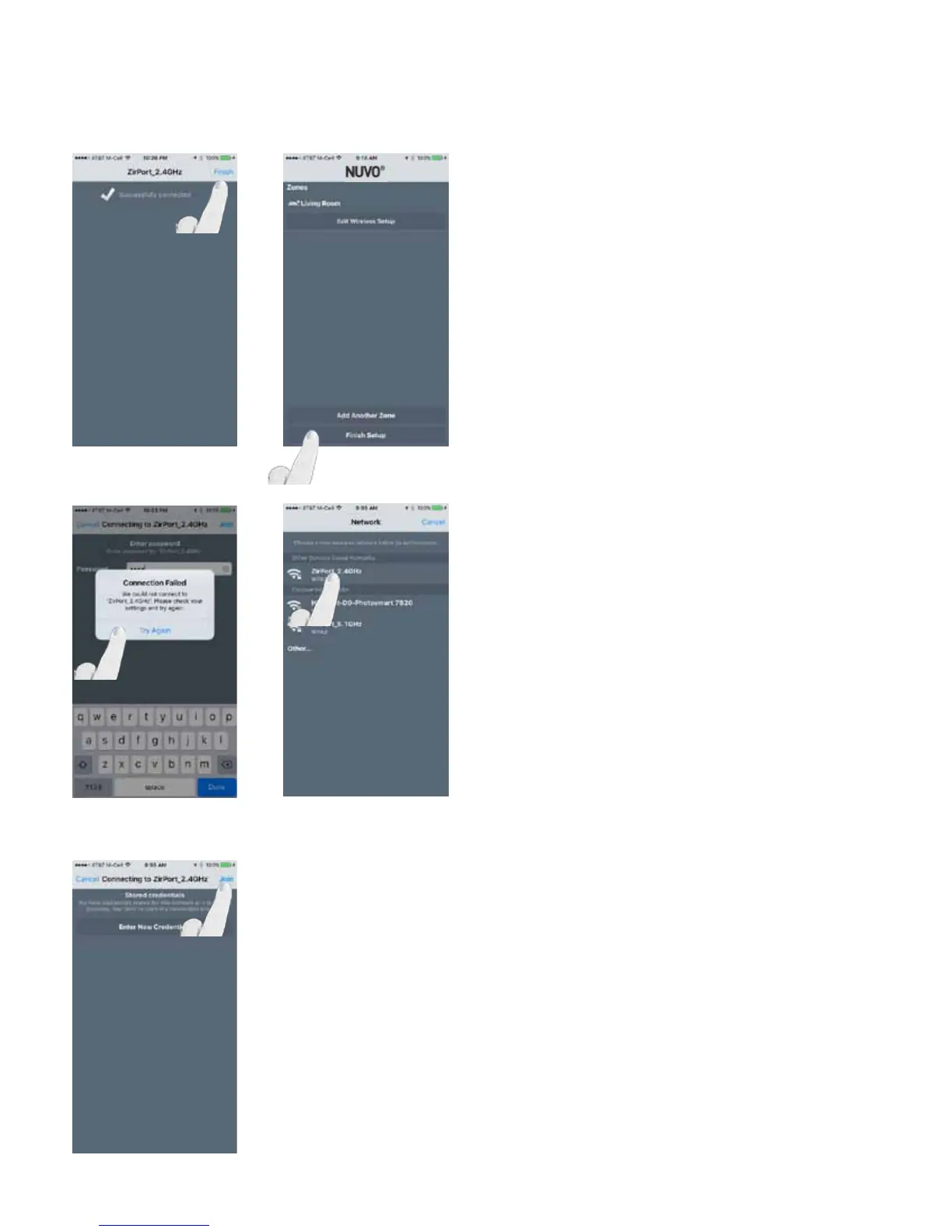
If the correct password is entered the app will display “Join-
ing.” Once successfully connected, select “Finish.” The
Player app will return to the setup screen where additional
zones can be added, or the existing zone can be edited. (Fig.
22, Fig. 23)
NOTE: If the incorrect password is entered, the app will
show “Connection Failed” and allow you to try again. (Fig. 24)
IMPORTANT: Do not select “Finish Setup” until all units
have gone through the wireless setup.
Fig. 22 Fig. 23
Fig. 24
Fig. 25
If adding another zone, select “Add Another Zone” and follow
the steps. The wireless network used for the previous zone’s
setup will be listed under “Other Devices Saved Networks.”
Select the saved network and press “Join” to use the stored
credentials. (Fig. 26, Fig. 27)
NOTE: If the credentials have changed, select “Enter New
Credentials.”
IMPORTANT: Do not select “Finish Setup” until all units
have gone through the wireless setup.
Fig. 26
18


 To Next Page