Nuvoton Nu-Link Debug Adapter User Manual
Oct 28, 2014 - 19 - Revision V1.01
4.2.2 Keil RVMDK
Step 1: Install Keil RVMDK. Before setting the Nu-Link Adapter, make sure the Nu-Link Adapter
Driver for Keil RVMDK has been downloaded and installed such that the Keil RVMDK can
recognize the Nu-Link Adapter.
Step 2: Open the Keil RVMDK and open the project to be set.
Debugger Settings:
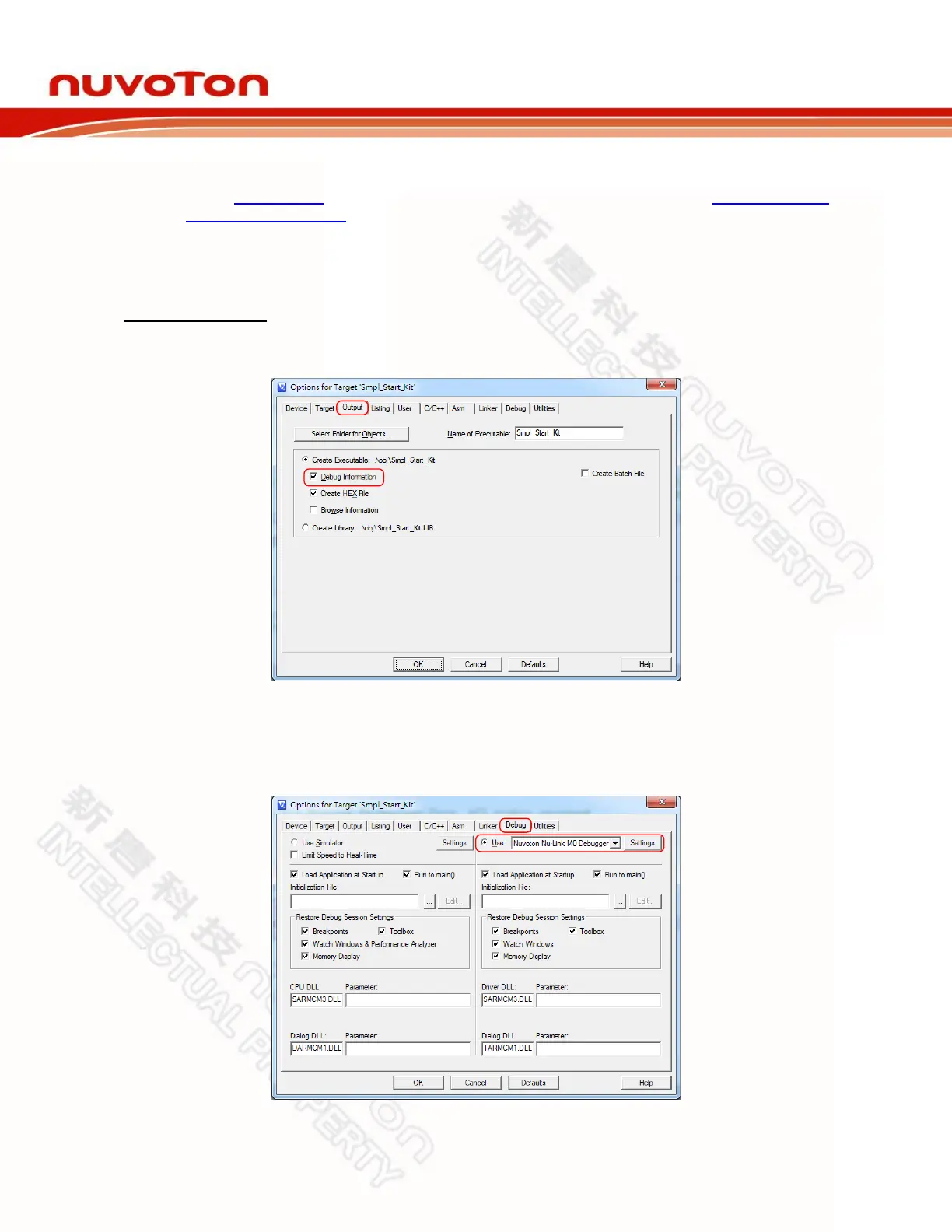
Step 3: Invoke Project → Options for Target → Output, and enable the Debug Information
option, as shown in Figure 4-9.
Figure 4-9 Enable Debug Information for Keil RVMDK
Step 4: Invoke Project → Options for Target → Debug, and make sure the Use:「Nuvoton Nu-
Link M0 Debugger option is checked, as shown in Figure 4-10.
Figure 4-10 Keil RVMDK Debugger Selection



 To Next Page