Nuvoton Nu-Link Debug Adapter User Manual
Oct 28, 2014 - 5 - Revision V1.01
2.2 Nu-Link
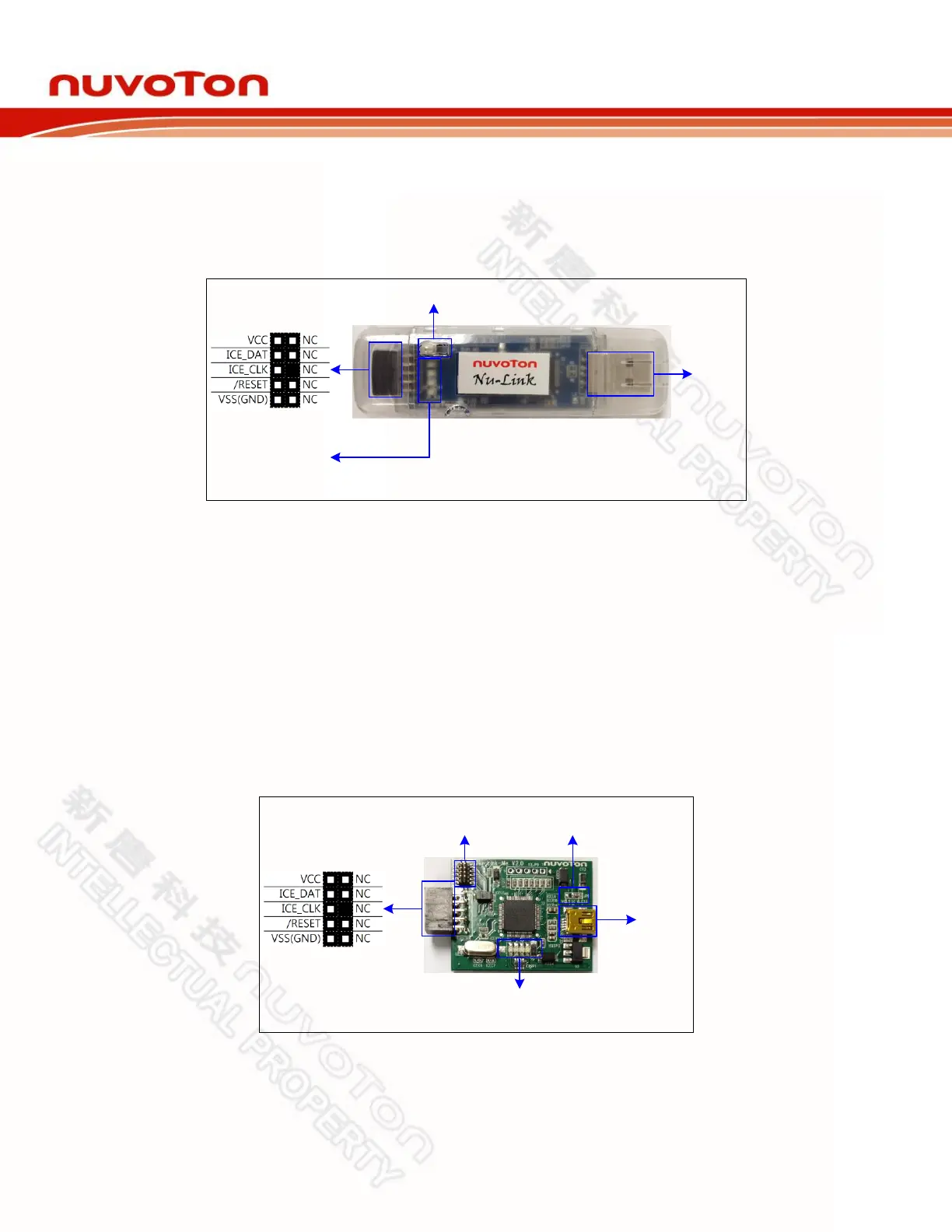
The Nu-Link is a basic debugger and programmer with debugging and online/offline programming
functions. As shown in Figure 2-2, the Nu-Link includes an USB port that can be connected to a
computer host, a set of Status LEDs, an offline programming button, and a SWD port that can be
connected to a target chip for debugging and programming (the default voltage of the SWD port as
5.0V).
SWD
USB
Offline Programming Button
Green
Red
ICP
ICE
Status LED
Figure 2-2 Nu-Link Configuration
2.3 Nu-Link-Me
The Nu-Link-Me is a simple debugger and programmer with debugging and online programming
functions, which is only shipped with the NuTiny-SDK kits and can be used stand-alone for developing
the customized NuMicro™ Family system. As shown in Figure 2-3, the Nu-Link-Me includes an USB
port that can be connected to a computer host, a set of Status LEDs, a Power Switch to switch the
voltage of Nu-Link-Me between 3.3V and 5.0V (the default as 3.3V), a SWD port that can be
connected to a target chip for debugging and programming (whose voltage is adjustable with the Nu-
Link-Me). A Cortex Debug port is provided in parts of the version only for connecting to Keil’s
MCBNUC1XX board. The pins of the Cortex Debug port conform to those of the SWD port, except the
pin order.
SWD
USB
Cortex Debug
Status LED
(ICE / ICP / Red / Green)
Power Switch
(5.0V / 3.3V)
Figure 2-3 Nu-Link-Me Configuration



 To Next Page