Nuvoton Nu-Link Debug Adapter User Manual
Oct 28, 2014 - 22 - Revision V1.01
4.2.3 IAR EWARM
Step 1: Install IAR EWARM. Make sure that Nu-Link Adapter Driver for IAR EWARM has been
downloaded and installed before setting the Nu-Link Adapter such that the IAR EWARM can
recognize the Nu-Link Adapter.
Step 2: Open IAR EWARM, and open the project to be set.
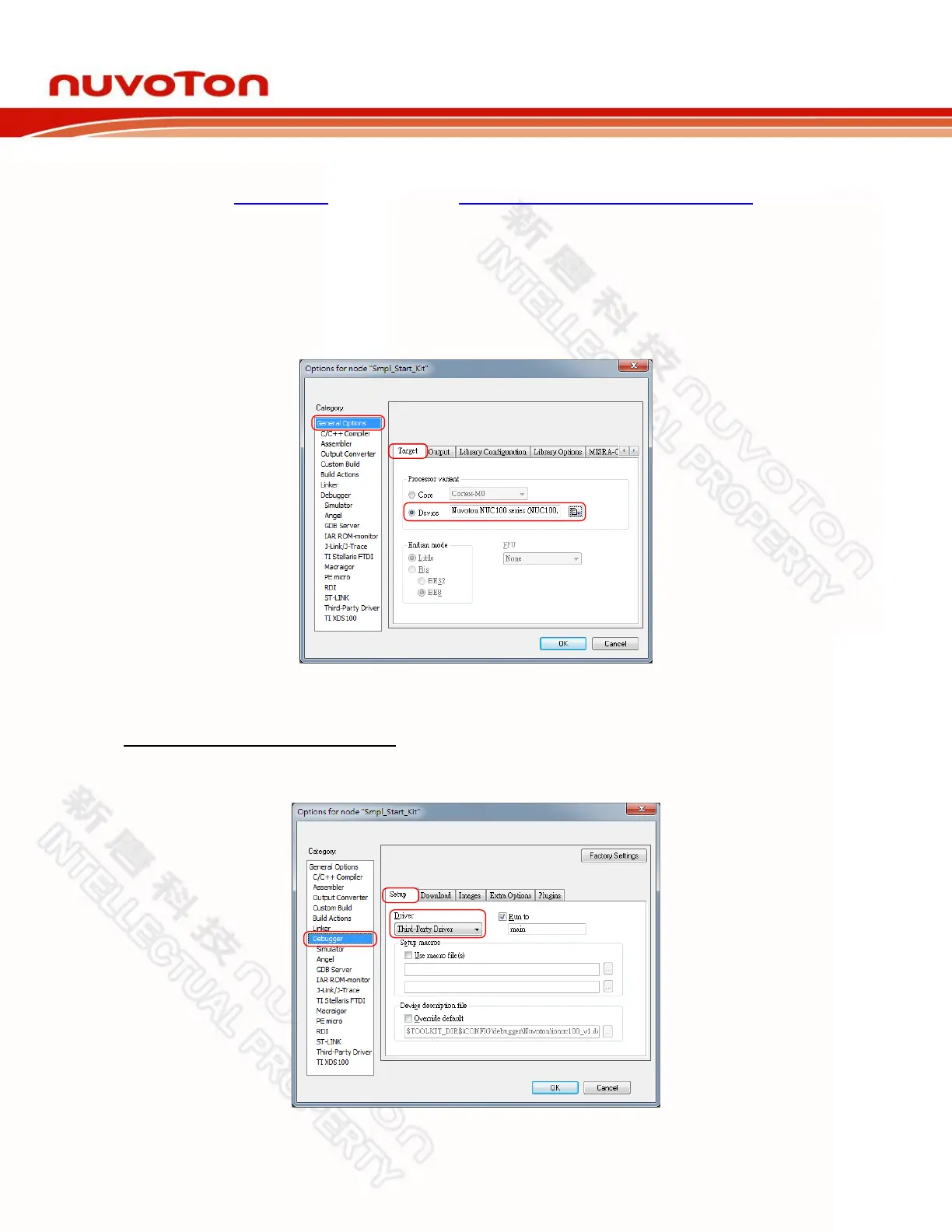
Step 3: In the Target tab of the General Options page (through invoking Project → Options), click
the button in the right of the Device option (make sure the Device option is enabled), and
select “Nuvoton → Nuvoton NUC100 series” as the target chip (NUC100 series is this
case), as shown in Figure 4-14.
Figure 4-14 IAR EWARM Target Chip Selection
Debugger and Programmer Settings:
Step 4: In the Setup tab of the Debugger page, select Third-Party Driver as the driver, as shown in
Figure 4-15.
Figure 4-15 Set IAR EWARM as Third-Party Driver for Debugger & Programmer



 To Next Page