ENGLISH
Preheat
Preheat the Brio to set the cooking temperature before cooking your food for crispier
results. The Brio will automatically preheat before all
functions. The default cooking temperature is 350F
and the range is 50F-425F.
1. Press START/PAUSE to begin preheating.
• The cooking temperature can be adjusted
before or during the Preheat cycle.
• The Preheat cycle can be canceled anytime by
pressing Preheat.
2. While the Brio is preheating, the LED display will
ash the preheat temperature.
3. Once preheated, the Brio will beep twice, display
“Ready”, countdown to 10 seconds and then
beep once more.
4. During the countdown, place your food in the Brio.
5. The Brio will begin cooking with the set
temperature and time.
6. When the Brio is nished cooking, it will beep 3 times and the LED display will show
“End”.
Auto Preheat
The Brio, by default, will automatically preheat for all cooking functions and certain
programmed presets. If at any time you want to turn off the automatic preheat function,
press Menu + Preheat. This will deactivate automatic preheating before any cooking.
Press Menu + Preheat again to activate it.
If at any time you want to temporarily turn off Preheat for an indvidual cooking cycle,
press Preheat.
Probe
Use the Digital Temperature Probe to accurately cook your food to your preferred
internal temperature.
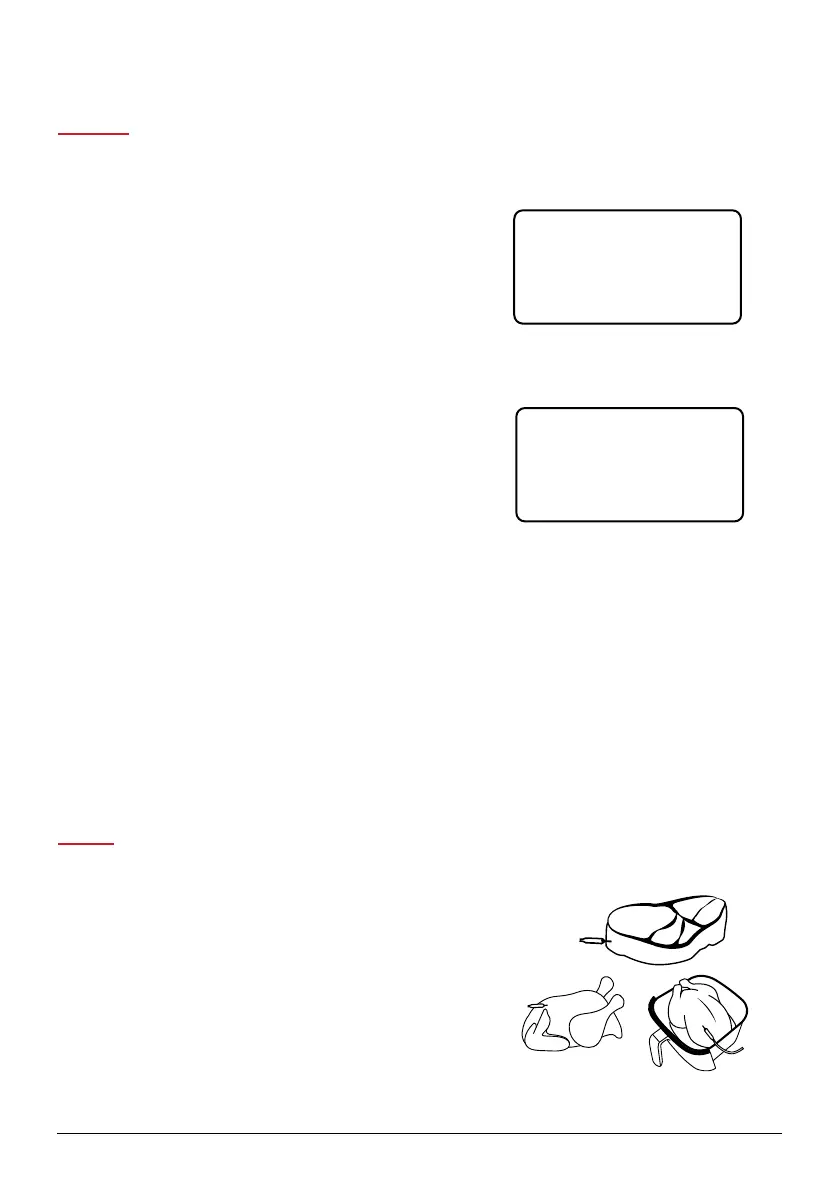
1. Insert the Probe into your food.
• Insert the Probe from the side into the thickest part of
the meat, parallel to the cooking surface, and not
touching any bone.
1800
35 0F
1800
35 0F
1800
35 0F
GENERAL USE
nuwavenow.com | 15



 To Next Page