HeatWater.com | WaterService@nyle.com | (800) 777-6953 | Rev. IM-E360-060523 HeatWater.com | WaterService@nyle.com | (800) 777-6953 | Rev. IM-E360-060523
Installation: Configuration
44
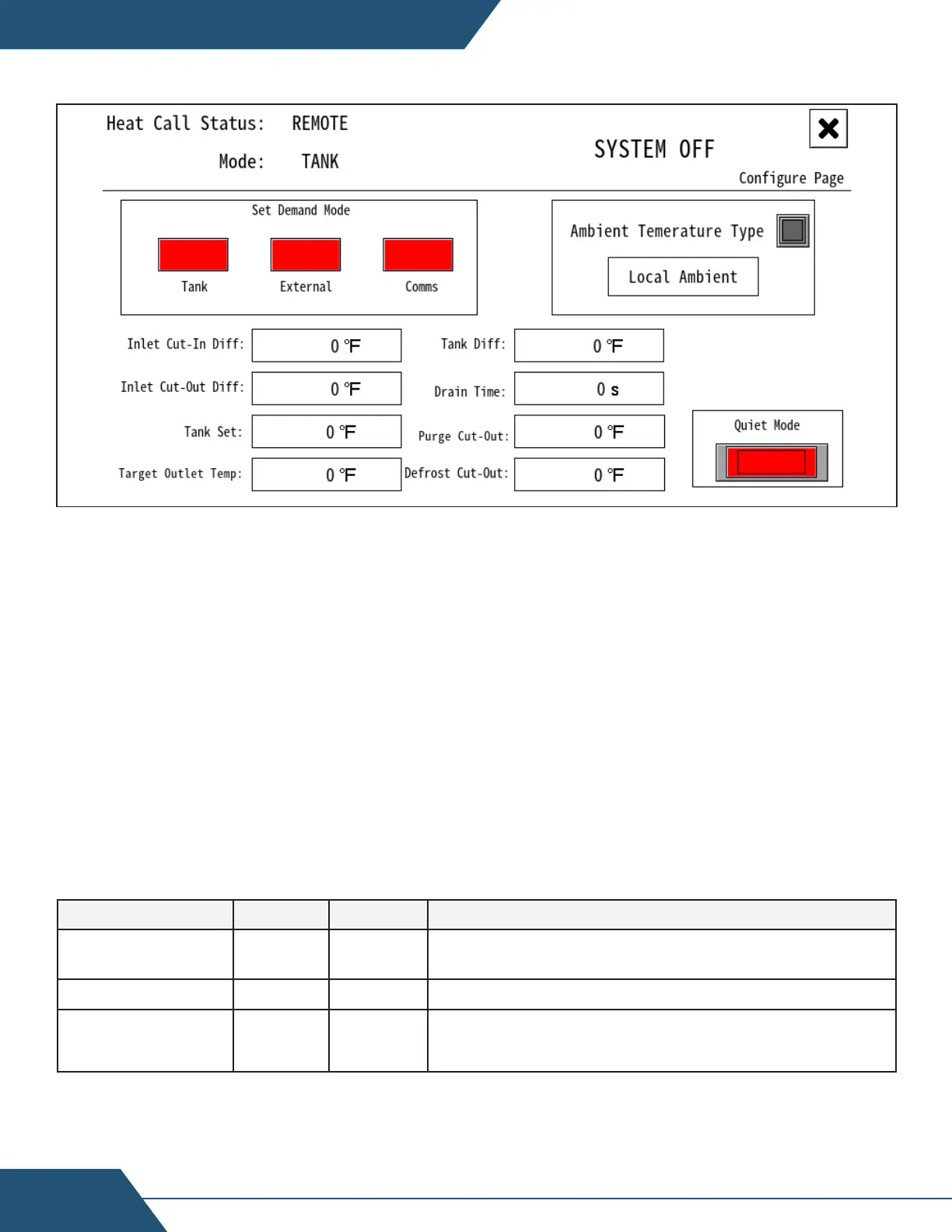
D13 - Configuration Screen
Tank Sensor Mode Configuration:
Use this mode when the heat pump is controlling itself, with a wired sensor directly
installed in the primary storage tank. In single-pass operation, tank storage temp
will actually be dictated by the heat pump Outlet Temp. Target Tank Temp and
Target Outlet Temp can be modified independently, to aect on/o temperatures
separately from storage temperatures, if desired.
On the “Configure” screen:
1. Set “Demand Mode” to “Tank”.
2. Set the following parameters as necessary:
Table 8: Tank Sensor Mode Key Parameters
All parameters on the “configure“ screen. Service jumper required.
Parameter Default Range Description
Tank Dierential 15 15-100
When Tank temp drops to (Target Tank Temp - Tank
Dierential), begin heat demand
Target Tank Temp 120 100-160 Set to desired primary storage tank temperature.
Target Outlet
Temp
120 120-160 Target outlet water temp from the heat pump*
*In Single-Pass applications, Target outlet temp cannot be set lower than Target Tank Temp. Typically,
these will be set to equal values.


 To Next Page