Settings under "Security"
2
2-220 VL6522c/VL5522c/VL4522c
2.58
2.58.2 Limiting accessible destinations for each user
Register and edit reference allowed groups.
When you register a user with this machine, add the user to a reference allowed group. In addition, when you
add a destination to the address book, grant reference access permission only to the reference allowed group
you add the user to. This limits access to the destination to the users in this reference allowed group.
You can also specify the access allowed level of each reference allowed group. Even a user who does not
belong to a group permitted to reference a destination can still reference the destination if the access allowed
level of the user is higher than or equal to that of the group permitted to reference the destination.
d Reference
For details on the registration of users, refer to page 2-141.
For details on the registration of destinations with the address book, refer to page 2-242.
Registering reference allowed groups
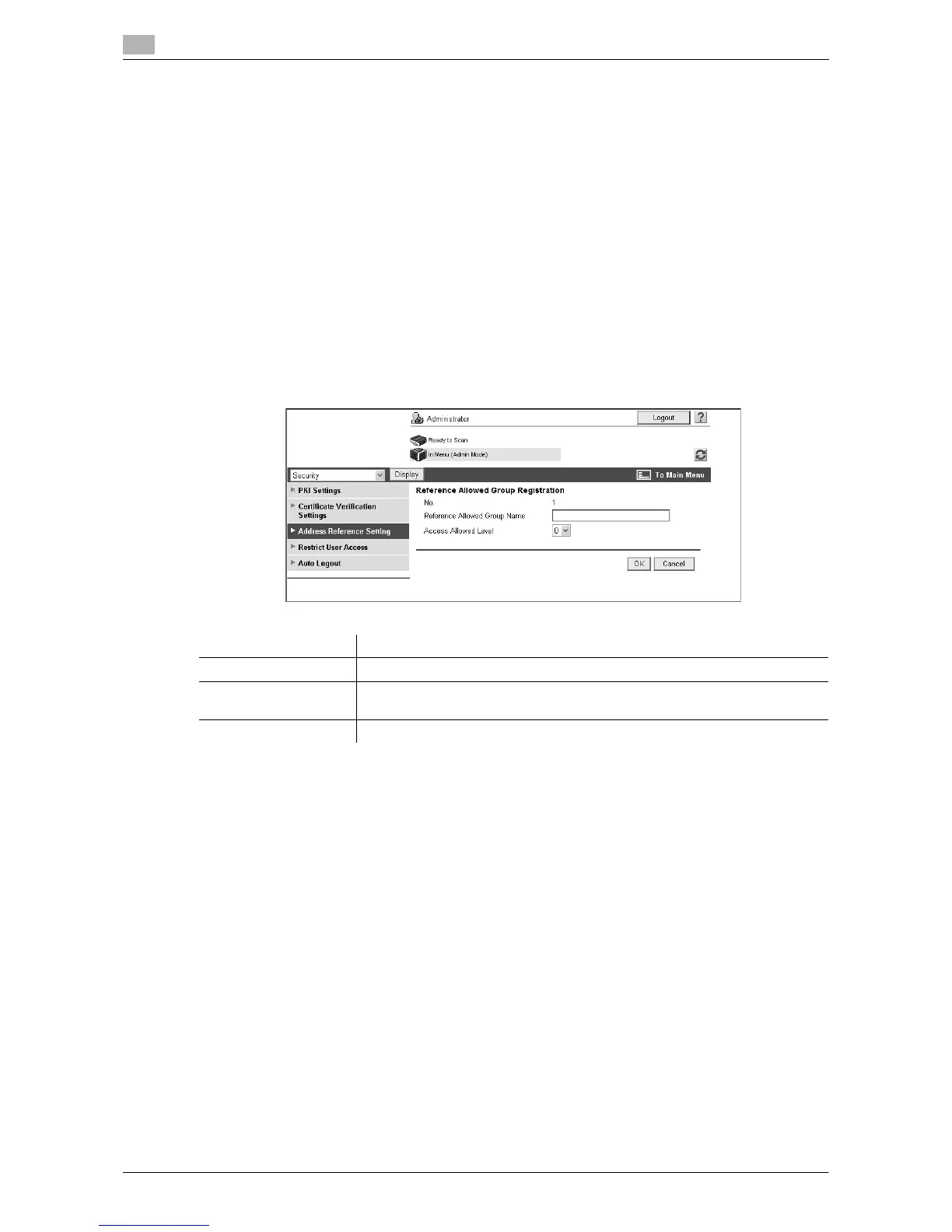
In the administrator mode of Web Connection, select "Security" ö "Address Reference Setting" ö [Edit].
Item Description
No. Displays the registration number.
Reference Allowed
Group Name
Enter the name of the reference allowed group (up to 24 characters).
Access Allowed Level Specify the access allowed level of the reference allowed group.


 To Next Page