Sending scanned data by E-mail
2
2-52 VL6522c/VL5522c/VL4522c
2.15
E-Mail RX (POP)
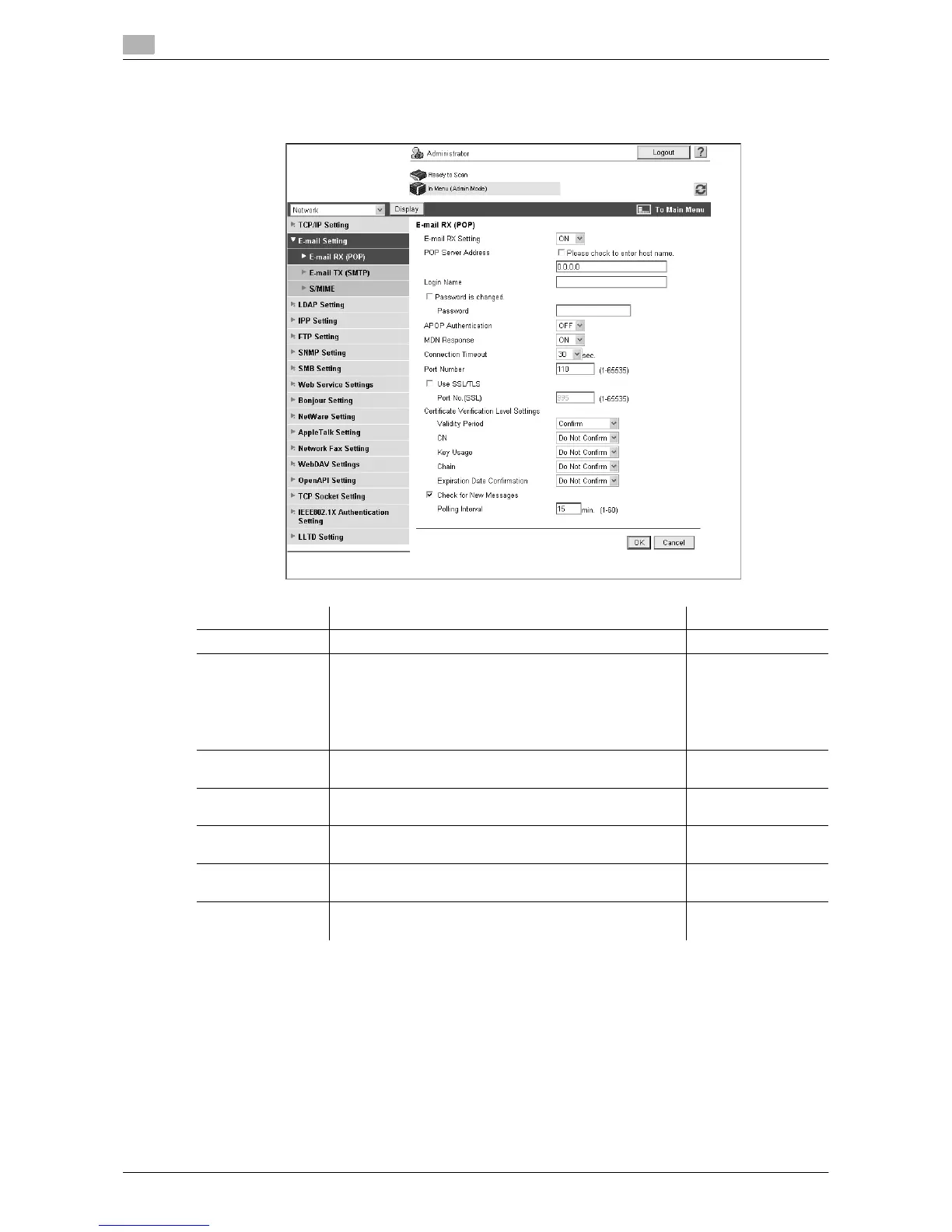
In the administrator mode of Web Connection, select "Network" ö "E-mail Setting" ö "E-mail RX (POP)".
Item Description Prior check
E-mail RX Setting Select "ON" to perform POP before SMTP authentication.
POP Server Ad-
dress
Enter the POP server address.
Format: *.*.*.* (Asterisk * can be 0 to 255)
If the DNS server has already been configured, you can
enter the host name instead.
If "IPv6" is set to "ON", you can also specify the IPv6 ad-
dress.
Server address
Login Name Enter the login name of the POP server (up to 63 charac-
ters).
Password is
changed.
Select this check box to change the password.
Password Enter the password to log in to the POP server (up to 15
characters).
Connection Time-
out
Specify the timeout period for a communication with a
server.
Port Number Enter the port number.
Default setting: 110
Server port number



 To Next Page