Settings under "Store Address"
2
2-242 VL6522c/VL5522c/VL4522c
2.62
2.62 Settings under "Store Address"
Register or change the destination addresses for the transmission functions and storage locations for the
User Box functions.
d Reference
When you permit users to register addresses, the users can register or change addresses in the user mode
as well. For details on settings that determine whether to permit address registration, refer to page 2-221.
2.62.1 Registering Address Book
Add new addresses to the address book, change settings of addresses, and register the icon for each
address.
When you have added addresses to the address book in advance, you can select the addresses from the
address book when sending data. You can also register an icon for a registered address.
Address Registration
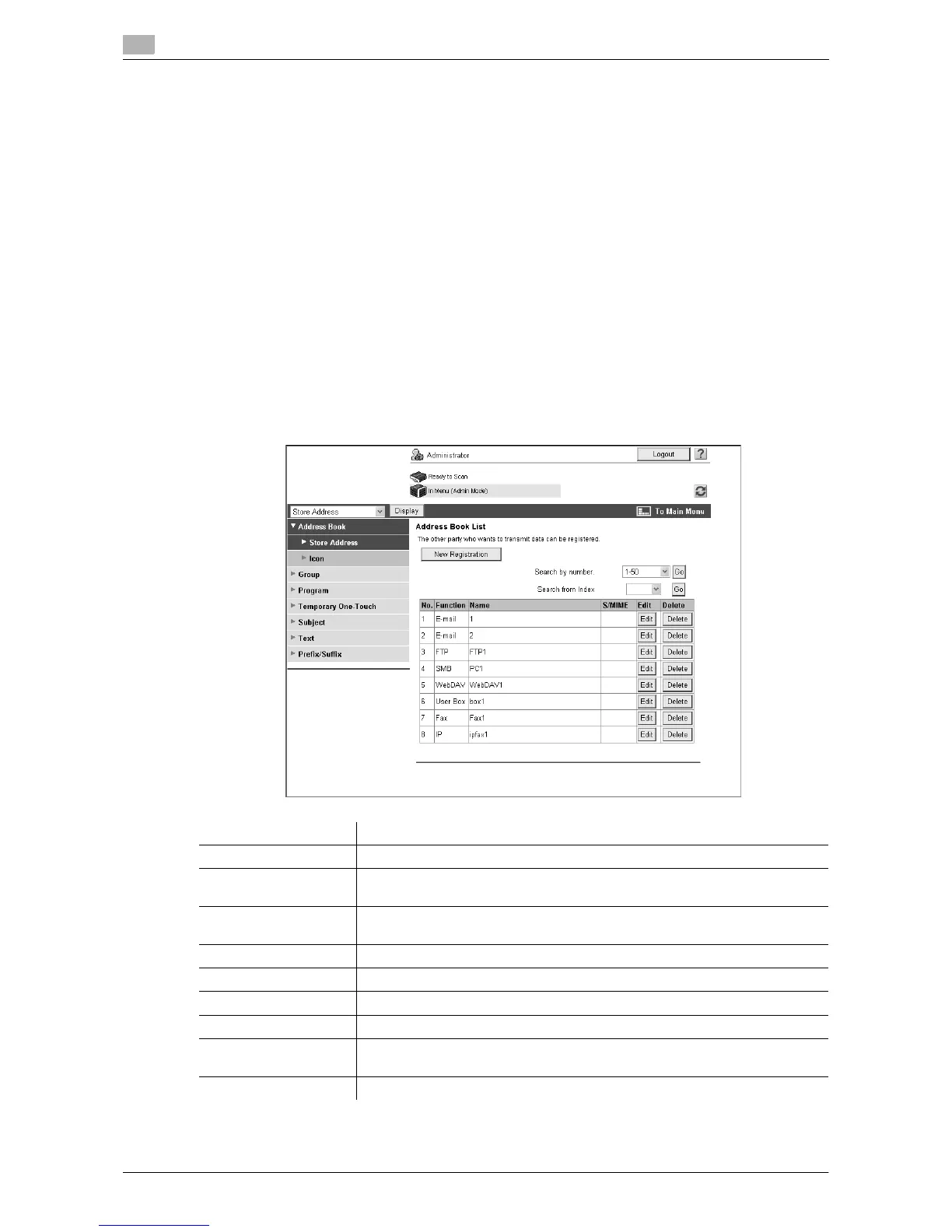
In the administrator mode of Web Connection, select "Store Address" ö "Address Book" ö "Store
Address".
Item Description
[New Registration] Add new destinations to the address book.
Search by number Select a range of registration numbers, and then click [Go] to display the list of
destinations in the selected range.
Search from Index Select an index, and then click [Go] to display the list of addresses with the
selected index.
No. Displays the registration number.
Function Displays the registered functions.
Name Displays the registered name.
S/MIME Displays whether a certificate is registered with the E-mail address.
Edit Click this button to edit the registered address. The available items are the
same as those for registration.
Delete Delete an address from the address book.



 To Next Page