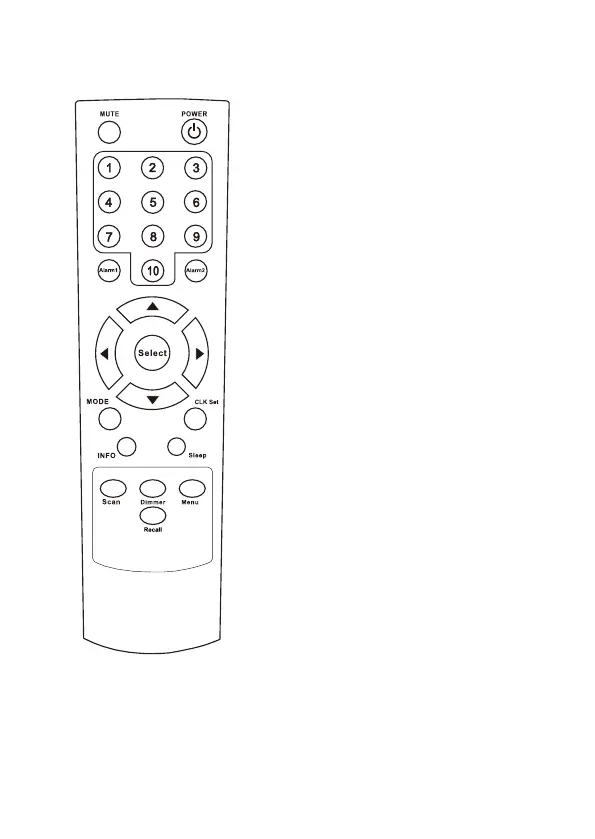
Remote control
1. Power: Power on/off standby.
2. Mute: Silent on/off.
3. Numeric button 1-10:
Preset and recall the radio station by
pressing a specific number.
Press and hold the button to store the
station.
Press briefly to recall the station.
4. Alarm1/2: Press to set the Alarm on
the radio.
5. ▲ / ▼: Up/Down button, press to
scroll up and down on the menu;
During playback of the radio channel:
DAB mode: press ▲ / ▼ return to the
station list.
FM mode: press ▲ / ▼ to fine tune
the frequency; long pressing the
button to skip to the next /previous
available radio channel.
6. Select: Press it to confirm the
operation.
7. Mode: Press the button to enter into
the mode menu. Press the button
repeatedly to switch between the
mode of DAB, FM and Bluetooth.
8. CLK Set: Press to set the clock.
9. Info: To view the detailed
information of the current playing
radio station; return to the playing
screen after operating in other menu.
10. Sleep: Set the sleep timer.
11. Scan: To initiate full scan of DAB and
auto scan the next available station
in FM.
12. Dimmer: 3 levels of brightness
control for the display.
13. Menu: Enter the main menu of the
radio mode it is playing.
14. Recall: To recall the list of preset
stations.
‒ 2 –













 To Next Page