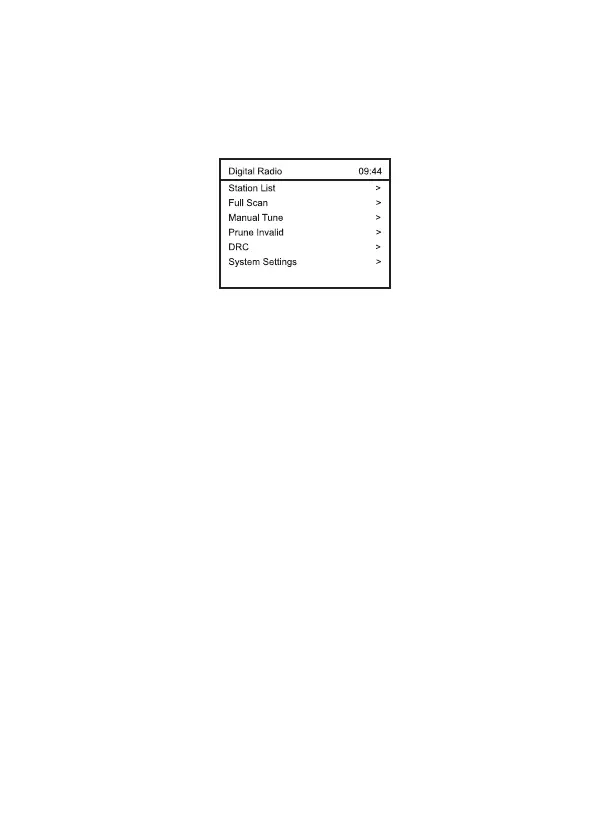
Main Menu
There are other options available under DAB mode.
Press the <Menu> button, it will enter into the menu as follow.
Press <▲> and <▼> to select different option, you can press
<►> key or <Select> to enter the sub-menu when there is >
sign displayed.
Station List
Select it to see the full list of the received DAB
stations.
If you want to exit the station list, press the <Menu>
again.
Full scan
It will pick up the DAB stations available in your area.
Alternatively press the <Scan> button on the remote
control.
Manual tune
This function allows you to check whether a specific
frequency can be received in your area and the
corresponding signal strength.
When this option is selected, it will show a list of DAB
frequencies.
Choose a frequency and it will display a bar of signal
strength. If the bar of strength is grayed out, it means
the frequency cannot be received in your area.
Prune Invalid
Some DAB services may stop broadcasting or you may
not be able to receive a station. Prune stations will
delete the DAB stations from your station list that are
no longer received.
DRC
Dynamic Range Control (also known as DRC) can
make quieter sounds easier to hear when your radio is
‒ 5 –













 To Next Page