3: Using NeoFox with NeoFox Viewer Software
013-20000-009-02-201510 27
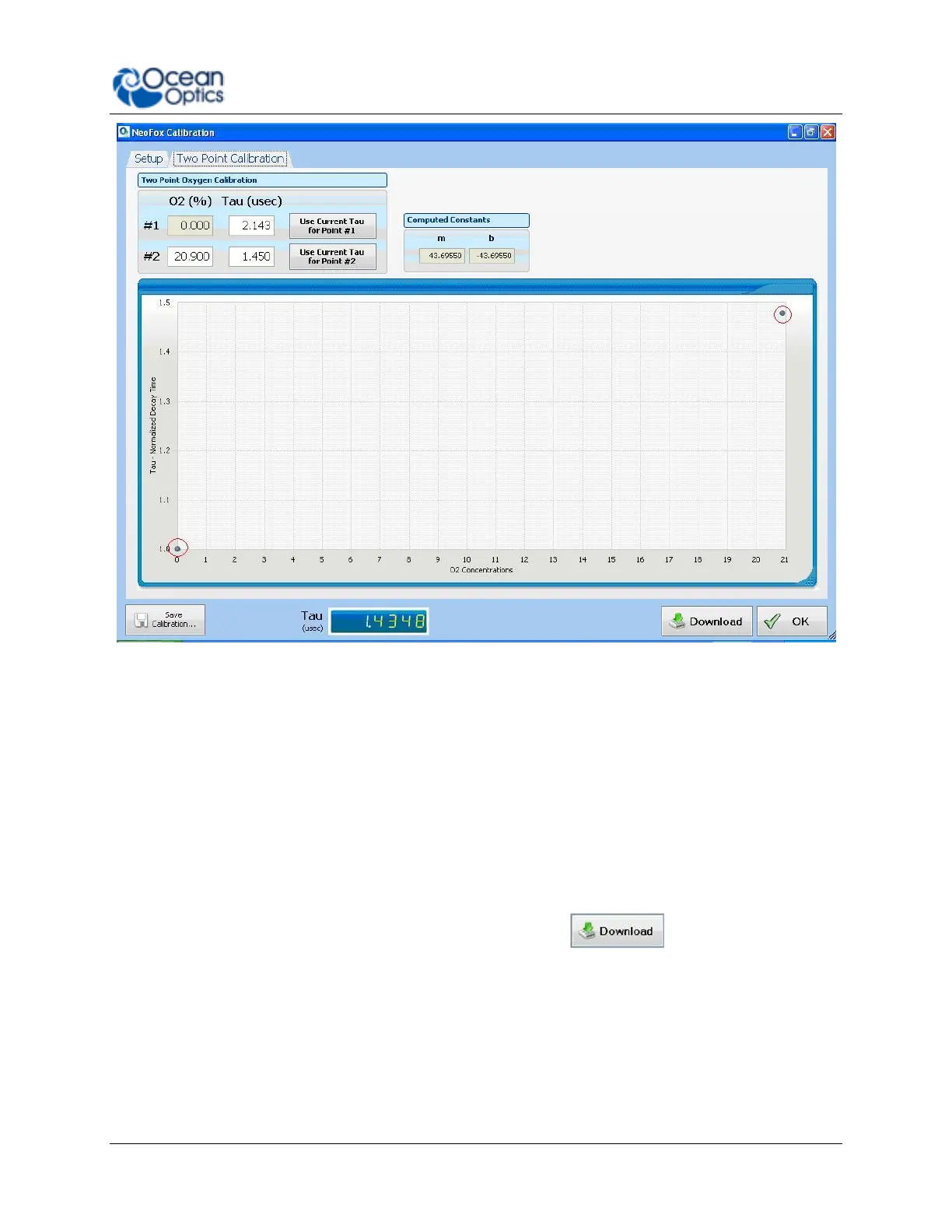
7. Expose your oxygen sensor to 0% oxygen and let the Tau value stabilize. You can observe the
Tau value on the bottom of the screen to determine when it stabilizes.
8. Click on the Use Current Tau for Point #1 box once the tau value is stable.
9. Expose your oxygen sensor to the second known concentration of oxygen. You can expose the
probe to ambient conditions in air, which is 20.9% oxygen.
10. Enter the known oxygen value in the O2% box for point #2.
11. Once the Tau value is stable, click on the Use Current Tau for Point #2 box.
12. Now that you have the two points of calibration, click anywhere in the graph chart displayed on
this screen. The two points will appear on the graph (circled in red on the figure above), which
will Compute Constants m and b.
13. To use this calibration for oxygen measurement, click the button. A Download
Confirmation screen appears.
14. Click Yes to confirm the download and continue. The main NeoFox Viewer window will now
display oxygen measurements.



 To Next Page