13
PRO PLUS 3 OPERATING MANUAL
© 2002 Design, 2012 Doc. No. 12-5332-r01 (11/19/12)
SET GAS (NORM FO2 & PO2 ALARMS)
Sequence >> Gas 1 >> Gas 2 >> Gas 3 >> FO2 50% Default.
With the FO2 50% Default selection set Off, the Pro Plus 3 will remain set at the last FO2 set point for that period of activation.
When the FO2 50% Default is set On and FO2 is set for a numerical value, 10 minutes on the surface after that dive the FO2 will
be displayed as 50 and further dives will be calculated based on 50% O2 for oxygen calculations and 21% O2 for Nitrogen
calculations (79% Nitrogen), unless FO2 is set before the dive.
FO2 will continue to reset to the FO2 50% Default after subsequent repetitive dives until 24 hours elapse after the last dive, or the
FO2 50% Default is set Off.
FO2 set to Air
The default FO2 settings for Gas 1, 2, and 3 each new activation period will be Air with Gas 2 and 3 also set Off.
When FO2 is set for Air -
> calculations are the same as when FO2 is set for 21%.
> it will remain set for Air until set for a numerical FO2 value (21 to 50%).
> O2 data (such as PO2, O2%) will not be displayed at any time during the dive, on the surface, or during the PDPS.
> MODs (Max Operating Depths) affected by the PO2 limit will not be displayed on the FO2 set screen.
> internally, it will keep track of O2 data in case FO2 is subsequently set for Nitrox for repetitive dives.
FO2 set for Nitrox
When FO2 is set for a numerical value (21 to 100%), the dive is considered Nitrox and the NX icon will be displayed.
> The Air option will not be displayed as a FO2 set selection until 24 hours elapse after the last dive.
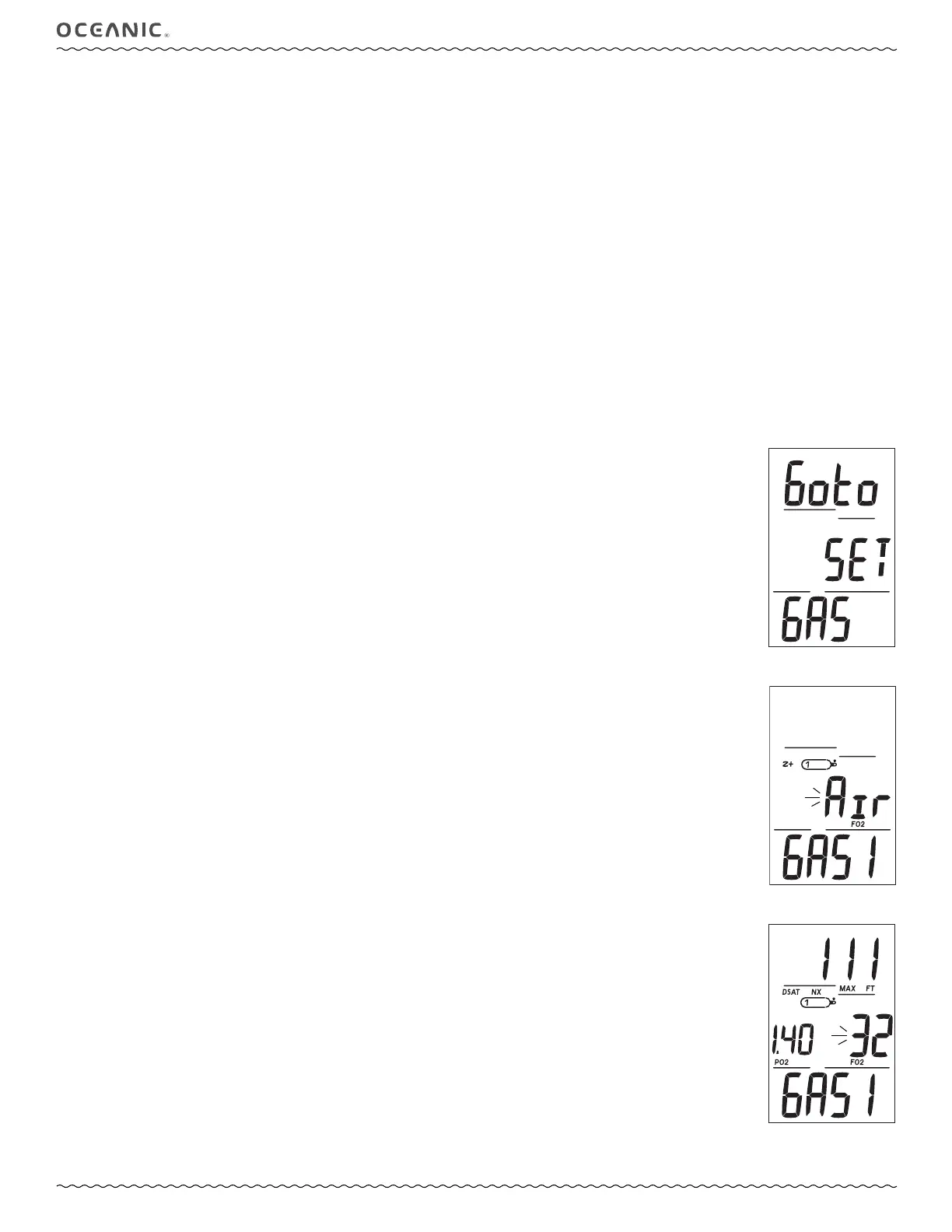
Set FO2 GAS LEAD-IN, information includes (Fig. 15):
> Graphics Goto Set GAS.
• A (< 2 sec) to step forward to Set Alarms Lead-in.
• S (< 2 sec) to access Set Gas 1.
Set Gas 1, information includes (Fig. 16, 17):
> Max Depth allowed for the PO2 alarm set with MAX and FT (or M) icons, blank if Air.
> NX, Z+ (or DSAT), CF icons - those that apply.
> Gas 1 icon.
> PO2 alarm value set (ATA) for Gas 1 with icon, blank if Air.
> Graphic Air or FO2 Nitrox value, flashing, with icon.
> Graphic GAS 1.
• A (hold) to scroll upward through FO2 set points at a rate of 8 per second from Air (default) to 21 through 100 (%) in
increments of 1%.
> The scroll will stop when A is released, or at 32, then 50, then 80%, (even if A is held depressed). Press/hold A again will
resume the scroll through 100, then stop at Air (or 21%).
• A (< 2 sec) to step upward through FO2 set points one at a time.
• S (< 2 sec) to save the FO2 setting and flash the PO2 digits if Nitrox, or access Set Gas 2 if Air.
• S (2 sec) to revert to Set Gas Lead-in.
• A (< 2 sec) to step upward through PO2 Alarm set points one at a time from 1.00 to 1.60 in increments of .05.
• S (< 2 sec) to save the PO2 Alarm setting and access Set Gas 2.
• S (2 sec) to revert to Set Gas Lead-in.
Set Gas 2 (3 similar), information includes (similar to Fig. 16, 17):
> Max Depth allowed for the PO2 alarm set with MAX and FT (or M) icons, blank if OFF or Air.
> NX, Z+ (or DSAT), CF icons - those that apply.
> Gas 2 icon.
> PO2 alarm value set (ATA) for Gas 2 with icon, blank if OFF or Air.
> Graphic OFF* or Air or FO2 Nitrox value, flashing, with icon.
> Graphic GAS 2.
*OFF prevents the Gas from being displayed as a switch option during dives. If Gas 2 is set Off, Gas 3 is automatically set
Off. An OFF setting does not affect the FO2 or PO2 Alarm values set.
• A (hold) to scroll upward through FO2 set points at a rate of 8 per second from OFF to Air to 21 through 100 (%) in
increments of 1%.
> The scroll will stop when A is released, or at 32, then 50, then 80%, (even if A is held depressed). Press/hold A again will
resume the scroll through 100, then stop at OFF or Air (or 21%).
• A (< 2 sec) to step upward through FO2 set points one at a time.
Fig. 16 - Set FO2 (Air)
Fig. 17 - Set FO2 (Nitrox)
Fig. 15 - Set F LEAD-IN



 To Next Page