15
PRO PLUS 3 OPERATING MANUAL
© 2002 Design, 2012 Doc. No. 12-5332-r01 (11/19/12)
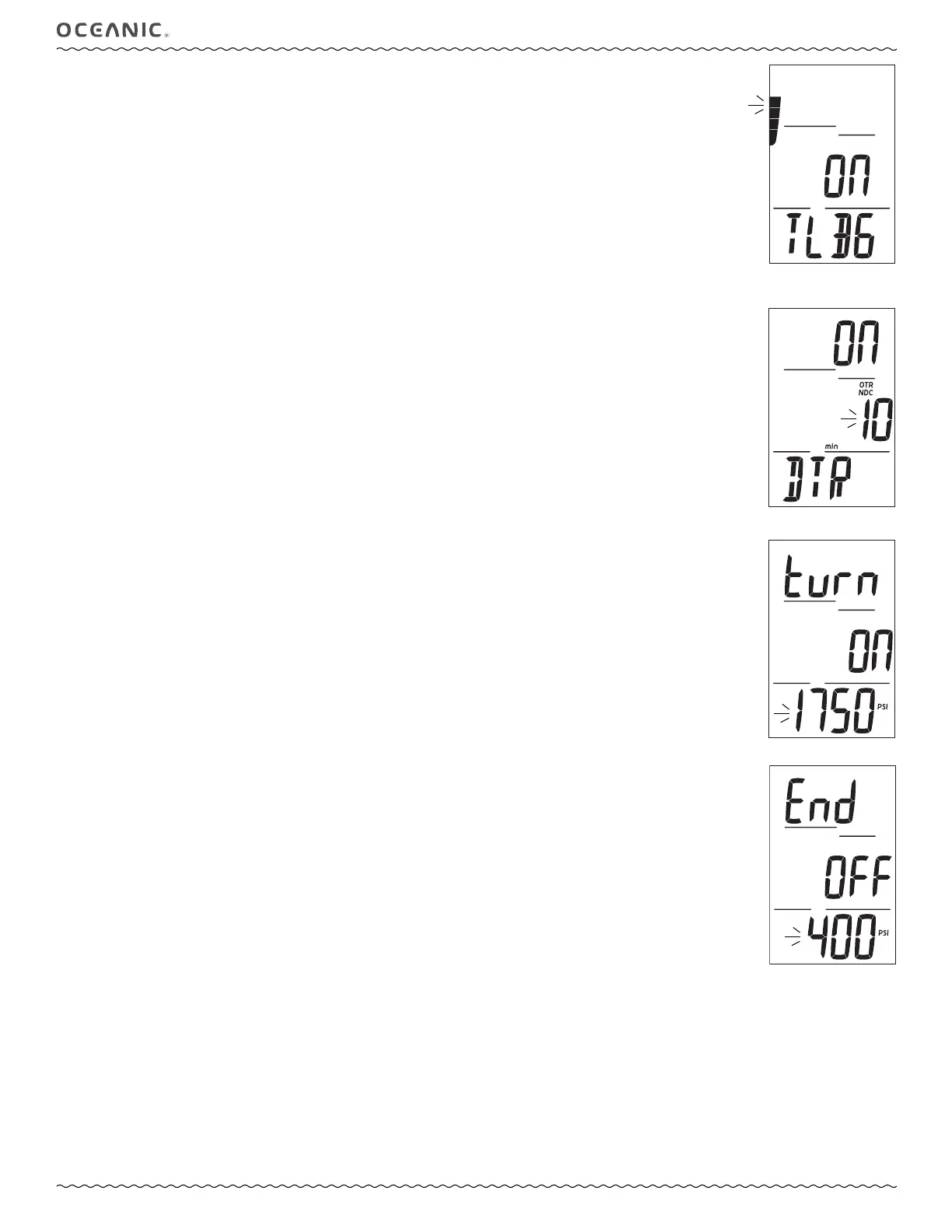
Set TLBG Alarm, information includes (Fig. 23):
> Graphic OFF (or ON) flashing.
> TLBG, last value saved (number of segments).
> Graphic TLBG.
• A (< 2 sec) to step through selections OFF, ON, and Set, one at a time.
• S (< 2 sec) to save the selection and flash the TLBG segments, if Set is saved; or access Set DTR Alarm, if OFF or ON is
saved.
• S (2 sec) to step back to Set EDT Alarm.
• A (< 2 sec) to step through TLBG set points one segment at a time.
• S (< 2 sec) to save the setting and flash Set, allowing ON or OFF to be selected/saved.
• S (2 sec) to step back to Set EDT Alarm.
Set DTR Alarm, information includes (Fig. 24):
> Graphic OFF (or ON) flashing.
> Time with NDC, OTR, and min icons, last time value saved.
> Graphic DTR.
• A (< 2 sec) to step through selections OFF, ON, and Set, one at a time.
• S (< 2 sec) to save the selection and flash the Time digits, if Set is saved; or access Set Turn Alarm, if OFF or ON is saved.
• S (2 sec) to step back to Set TLBG Alarm.
• A (hold) to scroll upward through Time set points at a rate of 8 per second from 5 through 20 (min) in increments of 1 min.
• A (< 2 sec) to step through Time set points one at a time.
• S (< 2 sec) to save the setting and flash Set, allowing ON or OFF to be selected/saved.
• S (2 sec) to step back to Set TLBG Alarm.
Set Turn Pressure Alarm, information includes (Fig. 25):
> Graphic turn.
> Graphic OFF (or ON) flashing.
> Tank Pressure with PSI (or BAR) icon, last value saved.
• A (< 2 sec) to step through selections OFF, ON, and Set, one at a time.
• S (< 2 sec) to save the selection and flash the Pressure digits, if Set is saved; or access Set End Alarm, if OFF or ON is
saved.
• S (2 sec) to step back to Set DTR Alarm.
• A (hold) to scroll upward through Pressure set points at a rate of 8 per second from 1000 through 3000 PSI (70 to 205
BAR) in increments of 250 PSI (5 BAR).
• A (< 2 sec) to step through set points one at a time.
• S (< 2 sec) to save the setting and flash Set, allowing ON or OFF to be selected/saved.
• S (2 sec) to step back to Set DTR Alarm.
Set End Pressure Alarm, information includes (Fig. 26):
> Graphic turn.
> Graphic OFF (or ON) flashing.
> Tank Pressure with PSI (or BAR) icon, last value saved.
• A (< 2 sec) to step through selections OFF, ON, and Set, one at a time.
• S (< 2 sec) to save the selection and flash the Pressure digits, if Set is saved; or revert to Set Alarms Lead-in, if OFF or ON is
saved.
• S (2 sec) to step back to Set Turn Alarm.
• A (hold) to scroll upward through Pressure set points at a rate of 8 per second from 500 through 1500 PSI (20 to 105 BAR)
in increments of 100 PSI (5 BAR).
• A (< 2 sec) to step through set points one at a time.
• S (< 2 sec) to save the setting and flash Set, allowing ON or OFF to be selected/saved.
• S (2 sec) to step back to Set Turn Alarm.
------------------------------------------------------------------------------------------------------------------------------------------------------
Fig. 25 - Set TURN AL
Fig. 26 - Set END AL
Fig. 24 - Set DTR AL
Fig. 23 - Set TLBG AL



 To Next Page