16
PRO PLUS 3 OPERATING MANUAL
© 2002 Design, 2012 Doc. No. 12-5332-r01 (11/19/12)
SET UTILITIES (NORM/GAUG)
Sequence >> Lead-in >> Water Type >> Units >> DS* >> SS* >> Algo* >> CF* >> Glo >> SR.
*Items apply to NORM only.
Set points remain as set until changed.
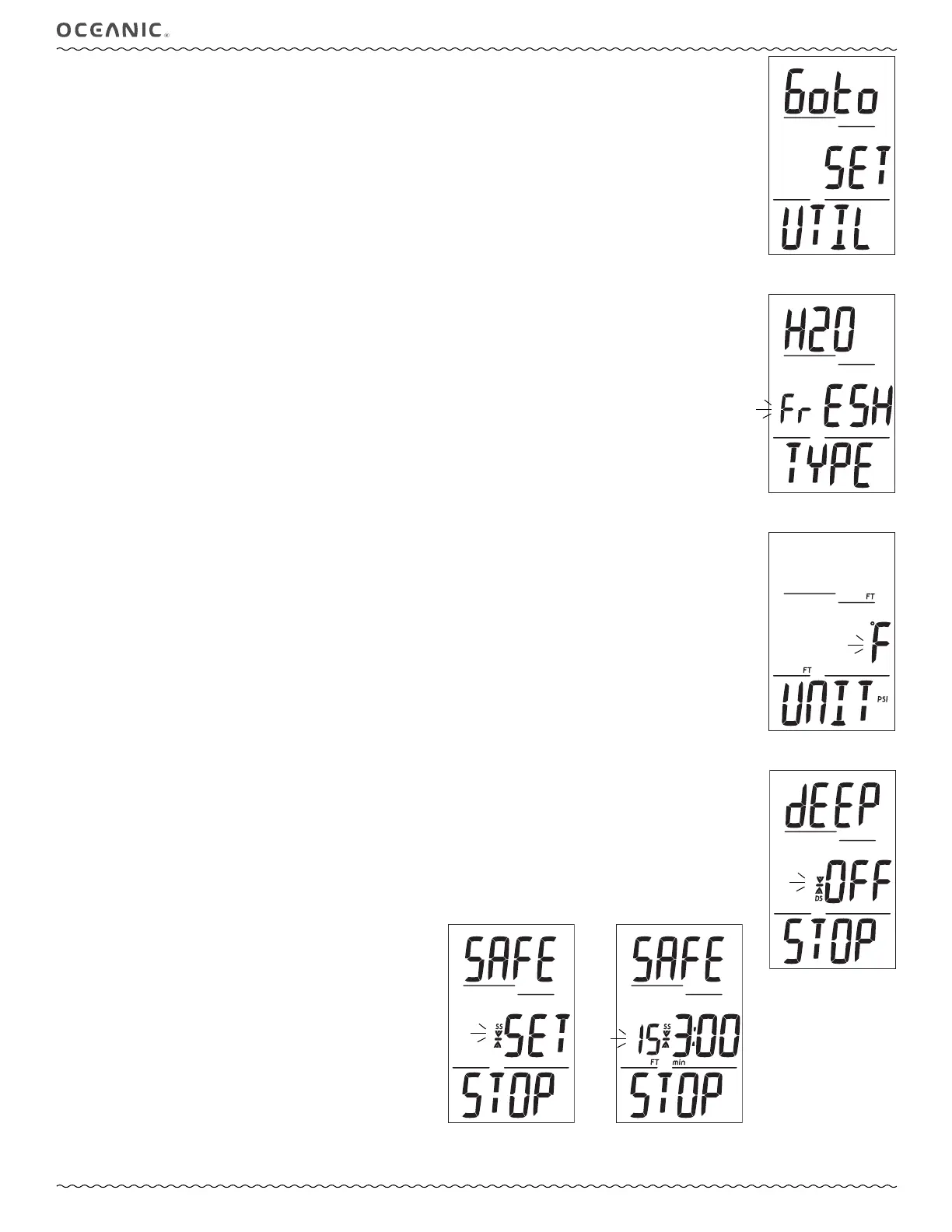
Set Utilities Lead-in, information includes (Fig. 27):
> Graphics Goto Set UTIL.
• A (< 2 sec) to step forward to Set Time Lead-in.
• S (< 2 sec) to access Set Water Type.
Set Water Type, information includes (Fig. 28):
> Graphics H2O TYPE.
> Graphic FrESH (or SEA) flashing.
• A (< 2 sec) to toggle between Fresh and Sea.
• S (< 2 sec) to save the setting and access Set Units.
• S (2 sec) to step back to Set Utilities Lead-in.
Set Units, information includes (Fig. 29):
> Graphic UNIT.
> Graphic °F (or °C) with FT and PSI (or M and BAR) icons, flashing.
• A (< 2 sec) to toggle between Imperial and Metric units..
• S (< 2 sec) to save the setting and access Set DS.
• S (2 sec) to step back to Set Water Type.
Set Deep Stop (DS), information includes (Fig. 30):
> Graphics dEEP STOP with Stop arrow/bar and DS icons.
> Graphic OFF (or ON) flashing.
• A (< 2 sec) to toggle between OFF and ON.
• S (< 2 sec) to save the setting and access Set SS.
• S (2 sec) to step back to Set Units.
Set Safety Stop (SS), information includes (Fig. 31A/B):
> Graphics SAFE STOP with Stop arrow/bar and SS icons.
> Graphic OFF (or ON) flashing, or graphic TMR with ON flashing
• A (< 2 sec) to step through the selections OFF, ON, Set.
• S (< 2 sec) to save the setting.
• S (2 sec) to step back to Set DS.
>> If OFF or ON is selected, operation will access Set Algorithm.
>> If Set is selected, Stop Depth with FT (or M) icon and Time (min:sec) with min icon are displayed with the Time digits
flashing.
• A (< 2 sec) to toggle Stop Time between 3:00 and 5:00 (min:sec).
• S (< 2 sec) to save the Stop Time setting and flash the Stop Depth digits.
• A (< 2 sec) to step through Depth settings of 10, 15, and 20 FT (or 3, 4, 5, and 6 M) one at a time
• S (< 2 sec) to save the setting and flash Set, allowing ON or OFF to be selected/saved.
Fig. 31A - Set SS Fig. 31B - Set SS
TIME/DEPTH
Fig. 27 - Set UTILITIES
LEAD-IN
Fig. 28 - Set WATER TYPE
Fig. 29 - Set UNITS
Fig. 30 - Set DS



 To Next Page