21 of 30
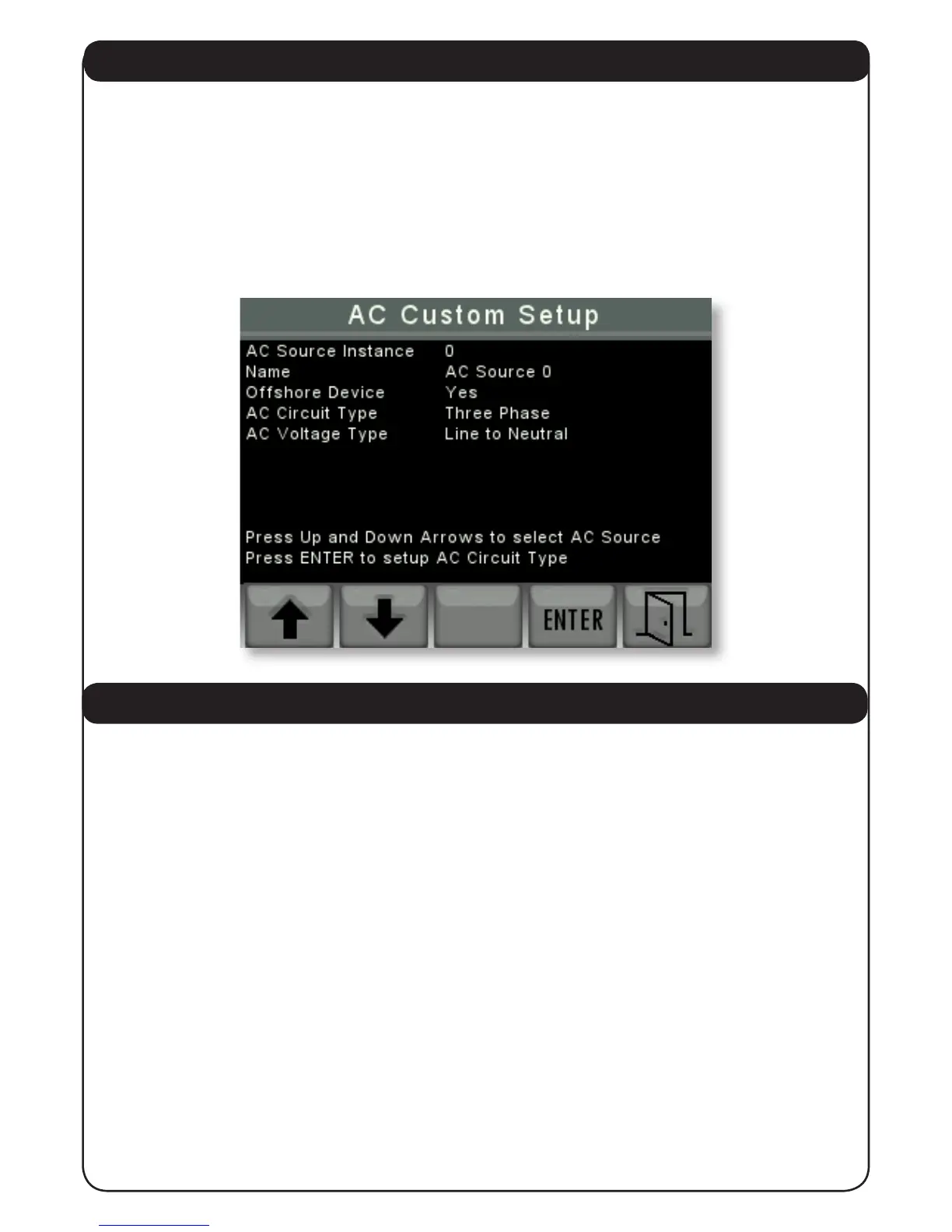
4.2.5.2 AC CUSTOM SETUP
This screen allows you to select an Offshore Systems AC monitor by instance and change its
properties. First select the instance using the “UP” “DOWN” arrows on the left (if the battery
instances have been given names this will also show up) then press “ENTER” button to select.
A new right arrow button will appear once the instance has been selected. Once you have
selected the instance you use the “UP” “DOWN” arrows to change the value and the ‘ENTER’
button to proceed into the next eld. Once all the elds have been selected the last press of
the ‘ENTER’ will save the conguration. You can press the exit button on the far right to cancel
the setup of the device at any time.
4.2.6 SYS & DEV INSTANCES
This screen is to set the NMEA2000® System and Device Instances as required by the standard.
The System Instance is normally set on 0 but if the NMEA2000® network is linked to other
networks then the System Instance of each 3345 should be set to match the network instance
that it is set to. Unless the networks are linked the System Instance should be set = 0;
The Device Instance of each 3345 on a given NMEA2000® network should be set to a different
number to differentiate between each 3345. The rst 3345 should be set to Device Instance = 0
and then each subsequent 3345 should have a different unique device instance.
Please see next page.


 To Next Page