Patent No. 6,766,028 - OFI Testing Equipment, Inc.
OFITE, 11302 Steeplecrest Dr., Houston, TX 77065 USA / Tel: 832-320-7300 / Fax: 713-880-9886 / www.ote.com 52
10. Attach the rotor sleeve to the rotor. Fill the thermocup with calibration
uid and raise it to submerge the bob.
For an F1B1 conguration, use 200 cP uid. For an F2B2 conguration,
use 1000 cP uid.
11. Open the TransCal software supplied by OFITE.
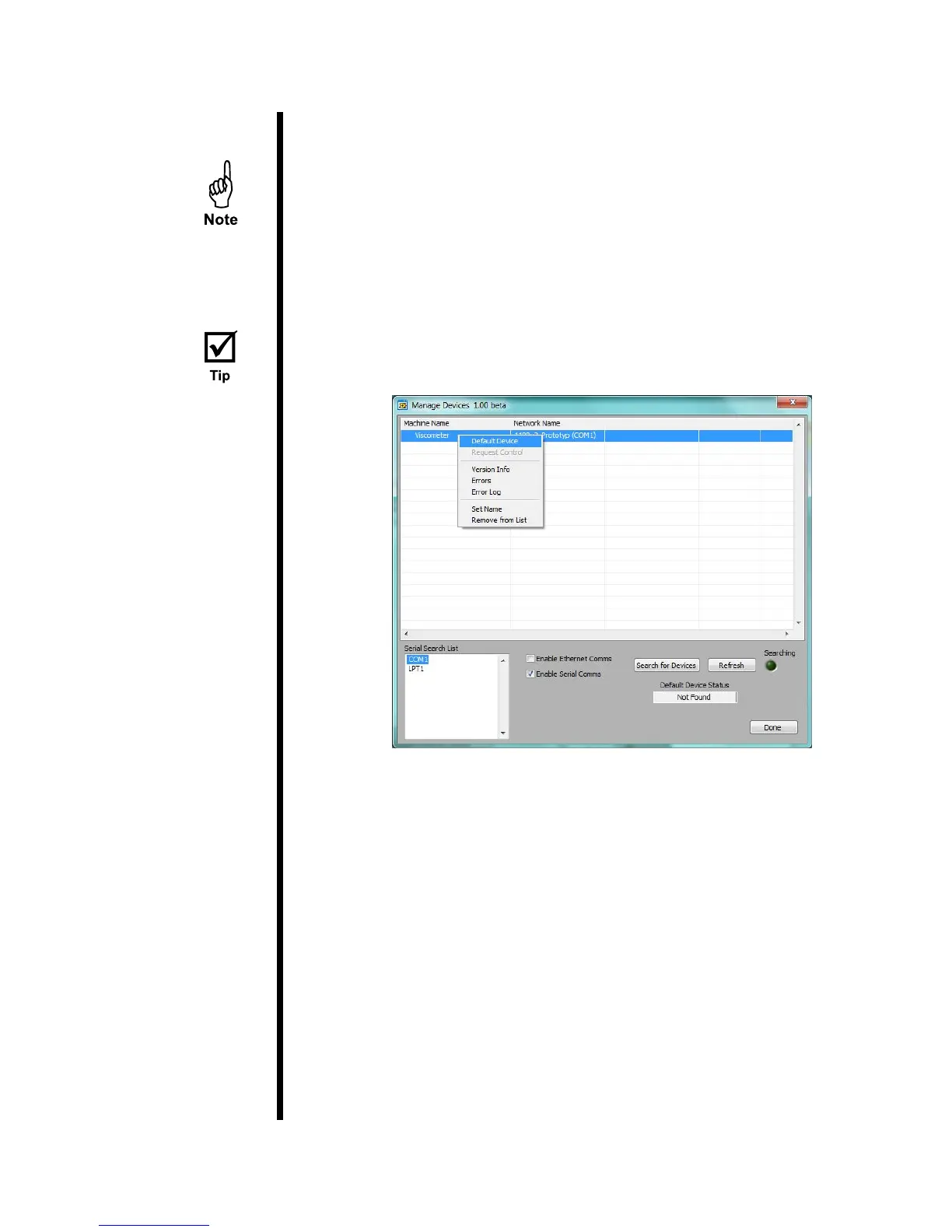
12. On the “Manage Devices” screen, right-click the Viscometer in the list and
select “Default Device”. Then click “Done”.
If the Viscometer does not appear in the list, select the correct COM port
from the list and click the “Search for Devices” box.
13. Click the “Start Transducer Calibration” button. The transducer calibration
will run automatically for about 20 minutes. At the end of the procedure,
the status screen will disappear. Close the TransCal software and open
the ORCADA
®
software.
14. Calibrate the viscometer through the ORCADA
®
software before running
any other tests.



 To Next Page