EN-12 BW SERIES COMPACT BENCH SCALE
7.2 Troubleshooting
The following table lists common problems, possible causes and remedies. If the
problem persists, contact Ohaus or your authorized Ohaus dealer.
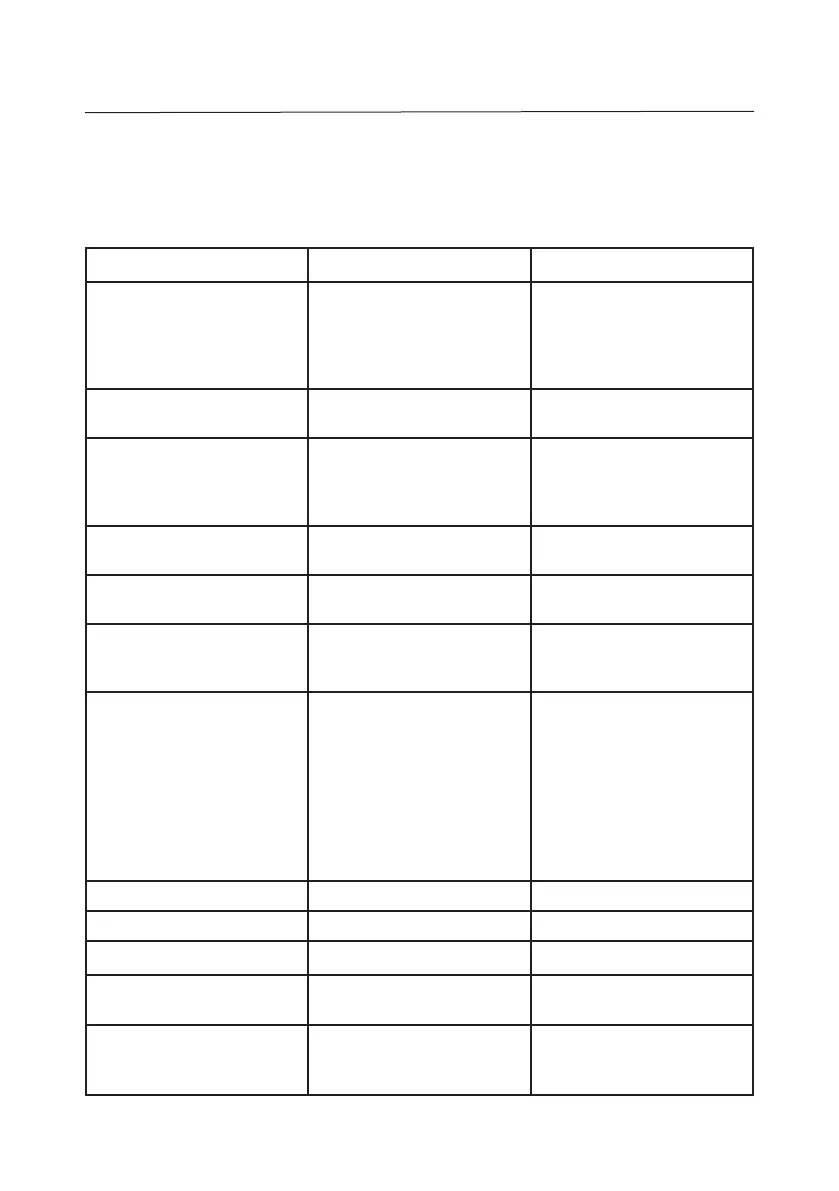
Symptom Possible Causes Remedy
Scale will not turn on AC power not connected to scale
or to outlet.
No power in outlet.
Battery discharged.
Connect scale to power.
Connect scale to power and
charge battery.
Connect to different power outlet.
Replace battery.
Battery fails to charge fully. Battery is defective or past its
useful life.
Have the battery replaced by an
authorized Ohaus service dealer.
Weight reading does not
stabilize.
Unstable environment.
Interference under pan or sub-
platform.
Ensure a stable environment.
Ensure that the weighing
pan and sub-platform are
unobstructed.
Scale does not display
accurately.
Improper calibration Calibrate the scale using proper
calibration weights.
“nnnnnn“ displayed Overload condition: Load on the
pan exceeds scale capacity +9d
Reduce the load on the pan.
Re-zero the scale.
“uuuuuu“ displayed Underload condition: No load on
the pan, exceeds scale zero -9d
Install the pan on the sub-
platform.
Re-zero the scale.
”- - - - - -” displayed Unstable condition.
Cannot establish zero.
Situate in a stable environment.
Relieve internal pressure from
the scale by loosening the
leveling feet.
Clear possible obstructions on
the vent holes under the rear feet.
Remove the weight on the pan
that may exceed the power-on
zero range.
”E 11“ displayed RAM error Turn the scale off and on again.
”E 16“ displayed ROM error Recalibrate the scale.
”E 18“ displayed EEPROM error Return scale for service
”E 48“ displayed Checkweigh target setting error Review setup and re-enter
correct Over-Under values
“Error” displayed Software running error Turn the scale off and on again.
Replace battery.





 To Next Page